Spread and Rest
Assigning an object to a new variable doesn't copy it, so this lesson shows how spread makes real copies and merges, and how rest gathers any number of values into one.
Apprentice · JavaScript · Updated
After this lesson you can
- Explain why assigning an object to a second variable doesn't copy it
- Copy and merge arrays and objects with spread, leaving the original unchanged
- Gather leftover values with rest, in a function's parameters or when destructuring
Key takeaways
const copy = pet;doesn't copy anything: both names point at the same object, so a change through one shows up through the other.- Spread,
..., unpacks an object's properties or an array's items into a new object or array.{ ...pet }is a real copy. - When properties are merged with spread, the one written later wins, so
{ ...pet, adopted: true }is a copy with one change. - A spread copy is shallow. An array inside the object is still shared, so copy it too, or use
structuredClone. - Rest uses the same three dots to gather.
...giftsin a function's parameters collects every extra argument into one array.
An edit form with a Cancel button. An Undo that brings back what was there a second ago. A "preview your changes" screen before you save. All three need the same thing: a changed version of some data while the original stays exactly as it was. In JavaScript that sounds like it should be const copy = pet;, and that line is one of the most common bugs in the language. This lesson shows why, and how to make real copies with spread. Its twin, rest, gathers any number of values into one, and you'll see both in almost every framework you might learn next, React most of all.
Two names, one pet
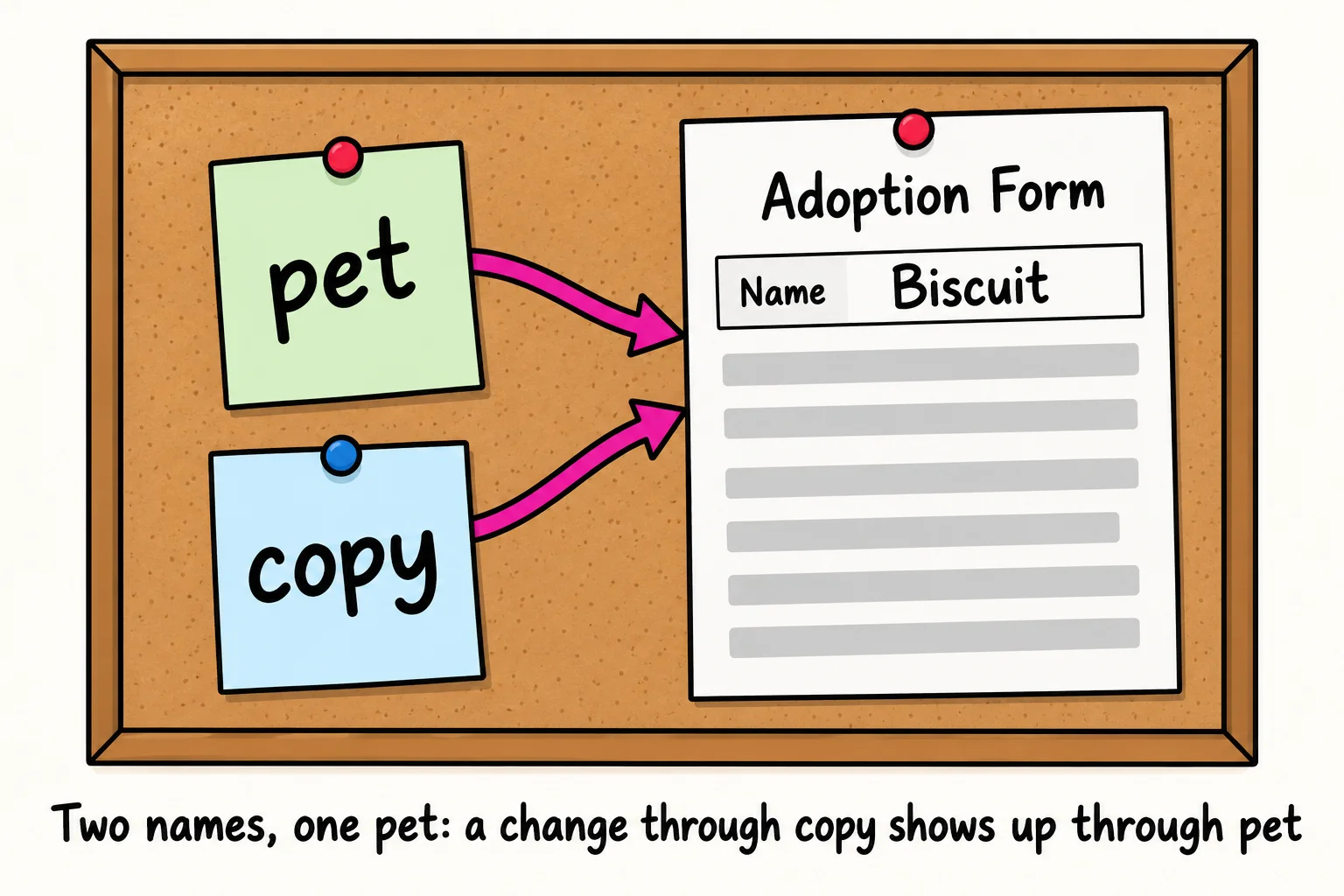
A pet at Happy Tails has one form, kept in one folder. If two volunteers each have a sticky note that says "Biscuit's form is in drawer 3", there are two notes but still only one form. Whatever one volunteer writes on the form, the other sees too.
A variable that holds an object works like that sticky note. It doesn't hold the object itself; it holds directions to it. So const copy = pet; makes a second note, not a second form:
const pet = { name: 'Biscuit', species: 'dog', adopted: false };

const copy = pet;
copy.adopted = true;

console.log(pet.adopted);
console.log(copy === pet);
true
true
Changing copy changed pet, because they are the same object. copy === pet (read "copy triple equals pet", or "strictly equals") is true: for objects, === asks "are these the very same object?", not "do they look alike?".
In your textbook this is called a reference: a variable holds a reference to the object. Numbers, strings and booleans don't behave this way; let b = a; with a number gives b its own copy of the value. Objects are shared like this, and so are arrays, which JavaScript counts as a kind of object.
A real copy with spread
To get a second form, you need to copy every box onto a new one. Spread syntax does that. Three dots ... (read "dot dot dot", or "spread") in front of an object, inside new curly braces, unpack all its properties into the new object:
const pet = { name: 'Biscuit', species: 'dog', adopted: false };

const copy = { ...pet };
copy.adopted = true;

console.log(pet.adopted);
console.log(copy.adopted);
console.log(copy === pet);
false
true
false
Now there are two objects. Read { ...pet } as "a new object, with everything from pet spread into it". The curly braces are what make it new; the spread fills it.
Copies with changes, and merges
The real power is copying and changing at the same time. Properties are written into the new object from left to right, and when a key appears twice, the later one wins. So a spread followed by a property is "a copy, with this one change", and two spreads in a row merge two objects:
const pet = { name: 'Biscuit', species: 'dog', ageYears: 3, adopted: false };

const adoptedPet = { ...pet, adopted: true };
const updates = { ageYears: 4, nickname: 'Bis' };
const updatedPet = { ...pet, ...updates };

console.log(pet);
console.log(adoptedPet);
console.log(updatedPet);
{ name: 'Biscuit', species: 'dog', ageYears: 3, adopted: false }
{ name: 'Biscuit', species: 'dog', ageYears: 3, adopted: true }
{
  name: 'Biscuit',
  species: 'dog',
  ageYears: 4,
  adopted: false,
  nickname: 'Bis'
}
pet is untouched. Order matters: { adopted: true, ...pet } would let pet's adopted: false win, because it comes later.
Spread works on arrays too, inside square brackets. It copies an array, joins arrays, or adds an item without changing the original:
const dogs = ['Biscuit', 'Juniper'];
const cats = ['Mochi'];

const everyone = [...dogs, ...cats];
const withNewcomer = [...everyone, 'Pepper'];

console.log(everyone);
console.log(withNewcomer);
console.log(dogs);
[ 'Biscuit', 'Juniper', 'Mochi' ]
[ 'Biscuit', 'Juniper', 'Mochi', 'Pepper' ]
[ 'Biscuit', 'Juniper' ]
Making a new value instead of changing the old one is called immutability (from immutable, "can't be changed"); changing an object in place is called mutating it. You'll meet both words in React's documentation, which asks you to update data this way.
Try it. In your objects-practice folder, make copies.js. Make a pet object, then a copy with spread that changes its ageYears. Print both, and check that the original's age didn't change.
A copy is only one level deep
Spread copies the boxes on the form. If a box holds an array, such as traits, the copy gets the same array, not a new one. That's called a shallow copy, and it can surprise you:
const pet = { name: 'Biscuit', traits: ['loves fetch'] };

const shallow = { ...pet };
shallow.traits.push('snores');
console.log(pet.traits);

const deep = structuredClone(pet);
deep.traits.push('steals socks');
console.log(pet.traits);
console.log(deep.traits);
[ 'loves fetch', 'snores' ]
[ 'loves fetch', 'snores' ]
[ 'loves fetch', 'snores', 'steals socks' ]
Pushing onto shallow.traits changed pet.traits, because they're one array. There are two fixes:
- Copy the inner array too, with its own spread:
{ ...pet, traits: [...pet.traits, 'snores'] }. This is the usual way when you're changing one inner list. - Make a deep copy with
structuredClone(pet), which copies the object and everything inside it, all the way down.
Rest: the same dots, gathering
Spread unpacks one thing into many. Its twin, rest, does the opposite: it gathers many things into one. Same three dots; the place they're written decides which one you get.
In a function's parameters, a rest parameter gathers every extra argument into an array. It has to be the last parameter, because it takes everything that's left:
function welcomePack(petName, ...gifts) {
  return `${petName} goes home with ${gifts.length} gifts: ${gifts.join(', ')}`;
}

console.log(welcomePack('Mochi', 'a collar', 'a feather wand'));
console.log(welcomePack('Biscuit', 'a leash', 'a squeaky toy', 'treats'));
Mochi goes home with 2 gifts: a collar, a feather wand
Biscuit goes home with 3 gifts: a leash, a squeaky toy, treats
Read ...gifts as "the rest of the arguments, as gifts". The first argument goes to petName; everything after it lands in the gifts array. (gifts.join(', ') is the same join you met in Arrays of Objects: it glues the items into one string with a comma and a space between them.)
Rest works in destructuring too, where it gathers whatever you didn't name. That's a tidy way to leave a private field out of what a page shows. And spread goes the other way in a function call, unpacking an array into separate arguments:
const ages = [3, 2, 1, 7];
console.log(Math.max(...ages));

const pet = { name: 'Pepper', species: 'rabbit', microchipId: '985-112-004' };
const { microchipId, ...publicProfile } = pet;

console.log(publicProfile);
7
{ name: 'Pepper', species: 'rabbit' }
Math.max wants separate numbers, not an array (Math.max(ages) gives NaN, "not a number"), so ...ages spreads them out. The rule of thumb: dots where values are being made (inside new [ ] or { }, or in a call) spread; dots where variables are being named (in parameters, or on the left of =) gather.
Check yourself
2 questions to try on the lesson page.
So what
Knowing that = shares an object and spread copies it saves you from one of the most confusing bugs in JavaScript. And copy-with-a-change, { ...pet, adopted: true }, is how modern apps update their data safely, from an Undo button to a whole React app.