Up Next: How JavaScript Really Works
See how much real data you can handle after Module 2, meet the My Music Wrapped project where you'll show it, and get a first look at the ideas Module 3 explains, starting with a function that remembers.
Apprentice · JavaScript · Updated
After this lesson you can
- Choose the Module 2 tool that fits a data task, from array methods to string methods, ?? and JSON
Key takeaways
- After Module 2 you can store lists and records, reshape them with map, filter, reduce and sort, tidy text, handle missing values, and save and load data as JSON.
- The My Music Wrapped project hands you a page and a year of listening history. You write the functions that turn it into stat cards.
- Each data job has a tool. Array methods reshape lists, string methods tidy text, ?. and ?? handle missing values, and JSON saves and sends.
- Module 3 explains how JavaScript works underneath, such as how a function can remember a value between calls, which is called a closure.
At the start of this module, every variable you made held one value. Now your programs read whole lists of real records, reshape them, clean up what people typed, cope with what's missing, and save the result as JSON. That's most of what JavaScript does at work: take data from somewhere and get it ready for a screen.
This lesson looks back at what you can do, shows you the project where you'll put it all together, and gives you a first look at Module 3, where you find out why JavaScript behaves the way it does.
What you can do now
After Module 2, you can:
- keep lists in arrays and records in objects, and lists of records, such as a playlist or a page of pets;
- add, remove and find items, and loop over them with
for...ofandforEach; - unpack and copy data with destructuring and spread (
...); - reshape a whole list with
map,filter,reduceandsort, chained together; - tidy text with
trim,slice,replaceAll,split,joinandpadStart; - compare safely with
===, and know which values are falsy; - handle missing values with
?.and??; - save and send data as JSON with
JSON.stringifyandJSON.parse.
Here's the Riverside 5K's podium, worked out from the timing company's JSON in one chain:
const resultsText = `[
  { "name": "  maria lopez", "minutes": 27.7, "team": "Turtle Power Crew" },
  { "name": "jamal REED", "minutes": 24.2, "team": null },
  { "name": "Priya Shah ", "minutes": 25.9 },
  { "name": "sam okafor", "minutes": 31.4, "team": "Turtle Power Crew" }
]`;

const podium = JSON.parse(resultsText)
  .toSorted((a, b) => a.minutes - b.minutes)
  .slice(0, 3)
  .map((runner) => {
    const name = runner.name.trim().toUpperCase().padEnd(12);
    return `${name} ${runner.minutes} min   ${runner.team ?? "no team"}`;
  });

console.log(podium.join("\n"));
JAMAL REED   24.2 min   no team
PRIYA SHAH   25.9 min   no team
MARIA LOPEZ  27.7 min   Turtle Power Crew
JSON in, sorted, the top three taken, each name tidied, each missing team filled in. A module ago, every line of that was new. Now you can read it from top to bottom.
Show what you can do: My Music Wrapped
Every December, music apps show their listeners a "year in music": your top songs, your top artists, how many minutes you listened. Module 2's project is your own version: My Music Wrapped.
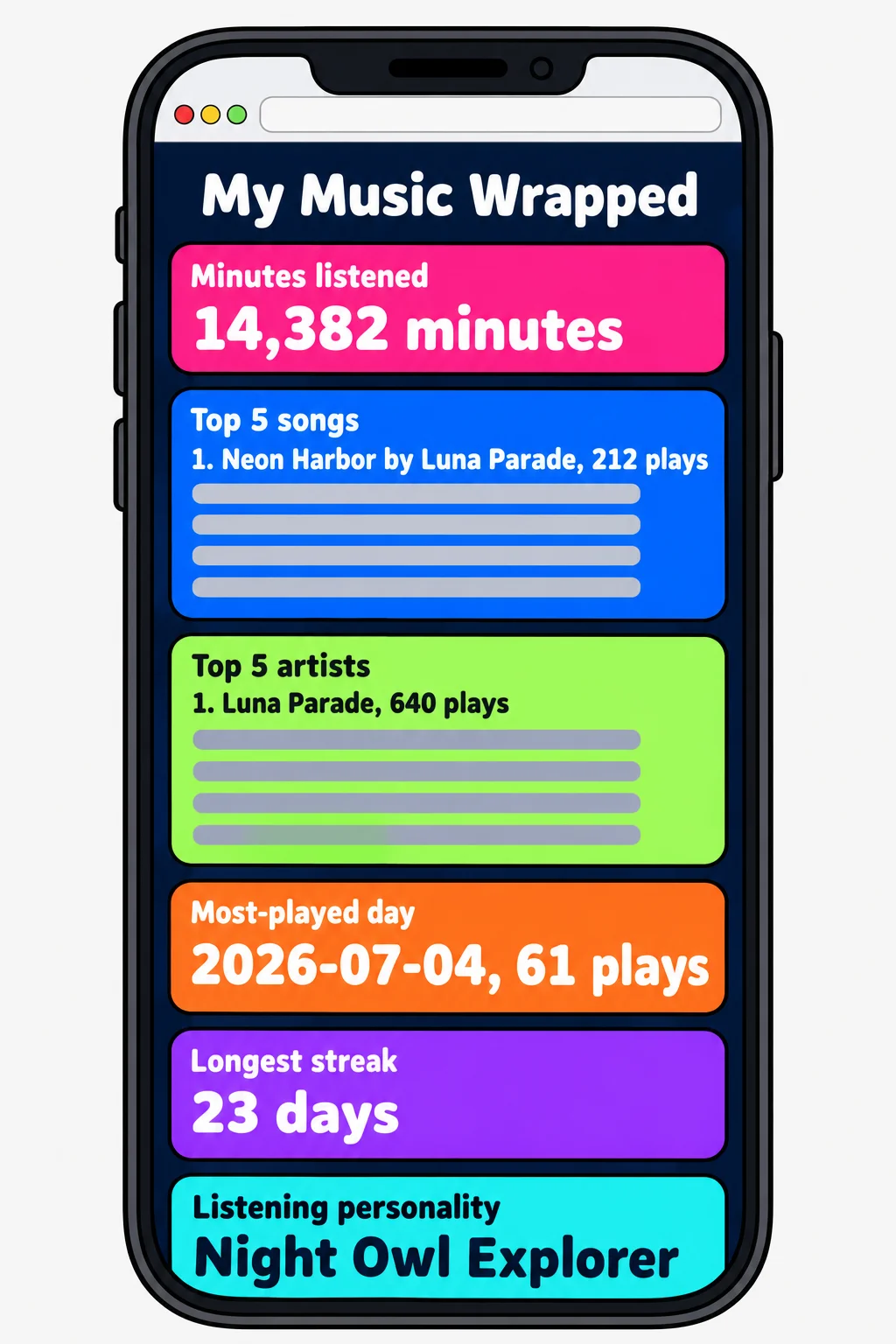
The project hands you the finished page and a JSON file of a year's listening history: every play of every song, with fictional songs and artists. You write wrapped.js, the functions that turn thousands of plays into stat cards:
- total minutes listened all year (
reduce); - your top 5 songs and top 5 artists (counting with
reduce, thentoSortedandslice); - the most-played day of the year;
- your longest streak of days in a row with music;
- a listening personality, a line such as Night Owl Explorer, chosen from your own numbers.
Tests check each function, and the page shows your results as cards you'd want to screenshot. Pick a stretch goal if you like: change the history file to your own favorite songs, and see your own Wrapped.
Which tool fits?
Most of the project, like most real work with data, comes down to one question for each step: which tool does this job?
| The job | The tool |
|---|---|
| Change every item in a list | map |
| Keep only some items | filter |
| Boil a list down to one number | reduce |
| Put items in order | sort or toSorted |
| Tidy a piece of text | string methods: trim, toLowerCase, slice, replaceAll, padStart |
| Break text into pieces, or glue pieces together | split and join |
| Give a missing value a default | ?? |
| Read a property that might not be there | ?. |
| Save or send data as text, and read it back | JSON.stringify and JSON.parse |
Try it. For each card in My Music Wrapped, pick the tools from the table you think you'll need, and write them down. You'll find out how close you were when you build it.
A sneak peek: a function that remembers
Here's something that may look impossible after Module 2. makeCounter makes a lap counter for a runner. Every call to the counter gives the next number, so the counter somehow remembers its count between calls, even though count is declared inside a function that already finished:
function makeCounter() {
  let count = 0;
  return () => {
    count = count + 1;
    return count;
  };
}

const countLaps = makeCounter();
console.log(countLaps());
console.log(countLaps());
console.log(countLaps());
1
2
3
How does countLaps hold on to count? It's called a closure, and it's the first thing Module 3 explains, step by step. You don't need to understand it yet. Notice only that it works, and that it's a little bit magic until someone shows you the trick.
What Module 3 unlocks
Module 3, How JavaScript Really Works, opens the hood:
- Scope and closures: where each variable can be seen, and how a function remembers values, as
countLapsdoes. - Objects, classes and
this: blueprints for objects, with their own data and methods, like aShipin a space game. - Errors, debugging and modules: throwing your own clear errors, stepping through code line by line to find a bug, and splitting a program into files.
Its project is a Virtual Pet: a pocket pet that lives in your browser, gets hungry, sleepy and happy, and is built from your own classes. The bugs that confuse almost everyone, a value that's "wrong" or a this that's undefined, come from the ideas in Module 3. After it, they stop being mysteries.
Check yourself
2 questions to try on the lesson page.
So what
You can now take real, messy data and turn it into something worth showing. My Music Wrapped is your chance to prove it, and Module 3 shows you how the language does what it does.