$group: Totals, Counts and Averages
The $group stage sorts documents into groups by the value of a field, or puts them all in one group, and computes each group's total, count, average, smallest, biggest and first value with accumulators.
Journeyman · MongoDB · Updated
After this lesson you can
- Group documents with $group, by a field path such as $category or by null for all of them, and explain why a field path has a $
- Compute each group's values with the accumulators $sum, $avg, $min, $max and $first, including $sum with 1 to count
Key takeaways
- $group makes one output document per group, and its _id says what to group by, such as "$category", or null for one group of everything.
- A field path is a field name in quotes with a dollar sign in front, such as "$total", and it means the value of that field in each document.
- Accumulators compute one value per group. $sum adds, $avg averages, $min and $max find the smallest and biggest, and $sum with 1 counts.
- $group hands on its groups in no particular order, so a $sort after it makes the report come out the same every time.
- $first takes a value from the first document of each group, so a $sort before $group decides which document that is.
Sales per category, orders per payment method, the average order, the biggest sale: these are the numbers on every store's dashboard, and the spreadsheet tool people reach for to get them is a pivot table. In MongoDB, it's $group. You'll use it any time a report says "per", "total", "average" or "how many".
The examples use Riverbend Bike Shop's 2,000 orders from The Aggregation Pipeline: Data on a Conveyor Belt. In mongosh, after use riverbend, load them again first, so your results match:
load("riverbend-orders.js")
true
Sorting orders into piles
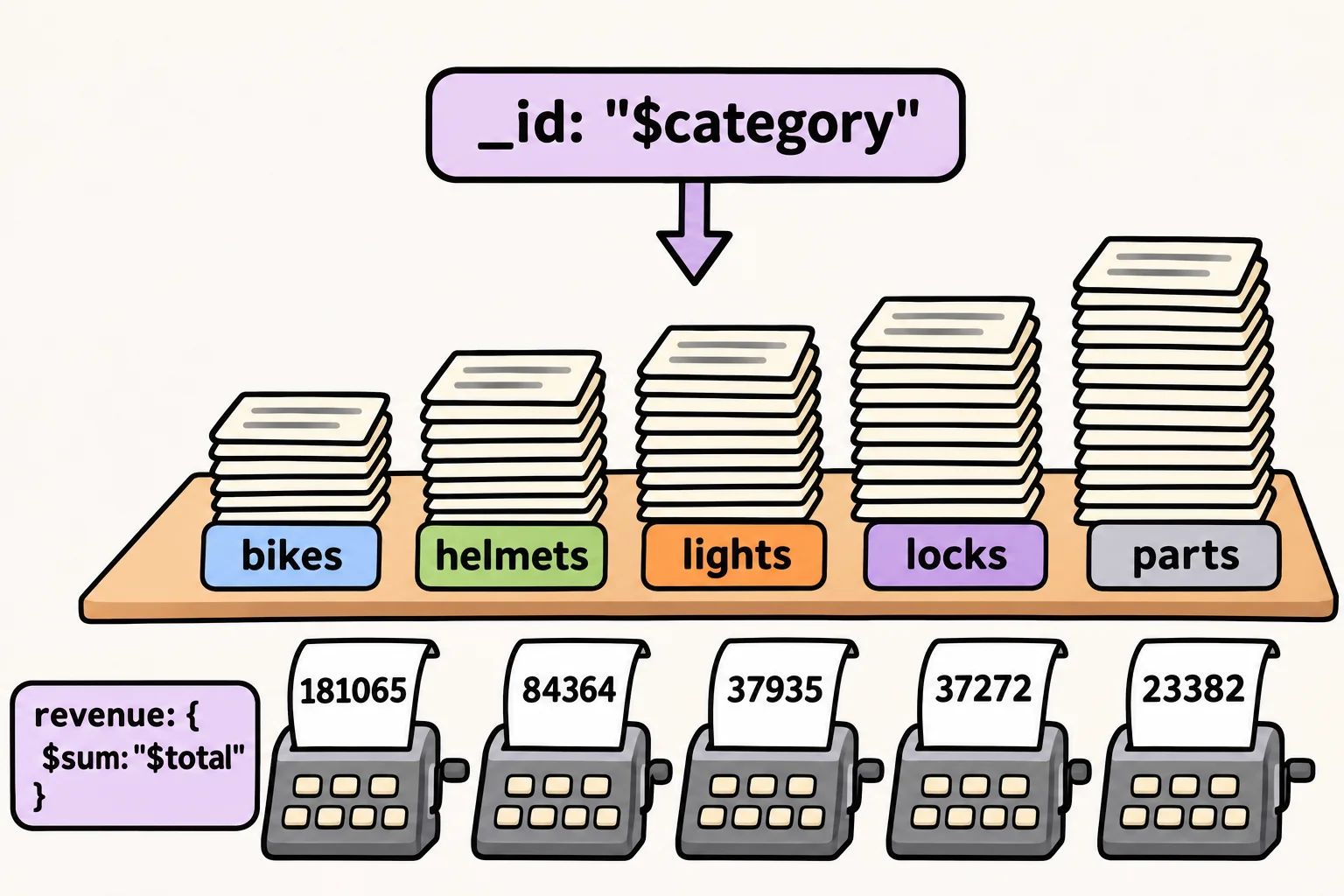
Think of counting a jar of coins by hand. You sort them into piles, one pile per kind of coin, then add up each pile. $group (read "group") does the same: it puts the documents into piles by the value of a field, then works out one number or more for each pile.
Here is the question from the last lesson, how much each category sold:
db.orders.aggregate([
  { $group: { _id: "$category", revenue: { $sum: "$total" } } },
  { $sort: { _id: 1 } }
])
[
  { _id: 'bikes', revenue: 181065 },
  { _id: 'helmets', revenue: 84364 },
  { _id: 'lights', revenue: 37935 },
  { _id: 'locks', revenue: 37272 },
  { _id: 'parts', revenue: 23382 }
]
Every group's output document has an _id, and in $group the _id is what to group by: here, the category, so there's one document per category. revenue is a name you choose, and { $sum: "$total" } says what goes in it: the totals of the group's orders, added up. Bikes earned $181,065 from 197 orders.
$group hands its groups on in no particular order, so yours could come out shuffled. The $sort stage after it, { $sort: { _id: 1 } }, puts them in order of _id, A to Z (1 is read "up"). Shaping the Report: $project, $set, $sort and $limit covers $sort properly.
"$total" with a dollar sign: a field path
Read "$total" aloud as "dollar total". A field name in quotes with a $ in front is a field path: it means "the value of the total field in each document". Without the dollar sign, "total" is only a word. Leave it off the _id, and every order lands in one group named after the word:
db.orders.aggregate([
  { $group: { _id: "category", revenue: { $sum: "$total" } } }
])
[ { _id: 'category', revenue: 364018 } ]
One group called 'category', holding all 2,000 orders. When a group's _id or a total comes out strange, check the dollar signs first.
Accumulators: sum, average, smallest, biggest
$sum is an accumulator: an operator that collects one value from every document in a group and turns them into one answer, the way a running total does on a receipt. $group has several, and one stage can use as many as you need. To put every order in one group, give _id the value null:
db.orders.aggregate([
  { $group: {
      _id: null,
      orders: { $sum: 1 },
      revenue: { $sum: "$total" },
      average: { $avg: "$total" },
      smallest: { $min: "$total" },
      biggest: { $max: "$total" }
  } }
])
[
  {
    _id: null,
    orders: 2000,
    revenue: 364018,
    average: 182.009,
    smallest: 8,
    biggest: 2598
  }
]
$avg (read "average") averages, and $min and $max find the smallest and biggest values. $sum: 1 is the way to count: it adds 1 for every document, so a group of 2,000 orders sums to 2,000. With a field path in _id, the same accumulators work per group. Orders and the average order for each payment method:
db.orders.aggregate([
  { $group: { _id: "$payment", orders: { $sum: 1 }, average: { $avg: "$total" } } },
  { $sort: { _id: 1 } }
])
[
  { _id: 'card', orders: 1196, average: 178.9732441471572 },
  { _id: 'gift card', orders: 205, average: 173.9219512195122 },
  { _id: 'paypal', orders: 599, average: 190.8380634390651 }
]
The averages are correct, but no report shows 13 decimal places. Rounding them is the job of the next lesson.
$first: a value from the first document
$max: "$total" gives each category's biggest total, but not which order it was. $first (read "first") takes a field from the first document that reaches each group. Sort the orders first, biggest total first (-1 is read "down"), and the first order in each group is its biggest:
db.orders.aggregate([
  { $sort: { total: -1, _id: 1 } },
  { $group: { _id: "$category", biggest: { $first: "$total" }, order: { $first: "$_id" } } },
  { $sort: { _id: 1 } }
])
[
  { _id: 'bikes', biggest: 2598, order: 10690 },
  { _id: 'helmets', biggest: 444, order: 10059 },
  { _id: 'lights', biggest: 180, order: 10085 },
  { _id: 'locks', biggest: 192, order: 10007 },
  { _id: 'parts', biggest: 90, order: 10106 }
]
Five bike orders tie at $2,598, so the sort's second field, _id: 1, decides between them: the lowest order number comes first, and the answer is the same every time. Without a $sort before it, $first takes whichever document happens to arrive first.
Check yourself
2 questions to try on the lesson page.
So what
"Per category", "per customer", "in all": with $group, a field path for what to group by and an accumulator for each number, you can now answer the questions a store's dashboard asks, straight from the data.