The Aggregation Pipeline: Data on a Conveyor Belt
An aggregation pipeline sends a collection's documents through a list of stages, each doing one job, so the database can answer report questions that find can't, starting with $match to choose the documents and $count to count them.
Apprentice · MongoDB · Updated
After this lesson you can
- Run a pipeline with aggregate, written as a list of stage documents, and choose its documents with a $match stage
- Count the documents at any point in a pipeline with $count, and explain why $match goes first
Key takeaways
- find and countDocuments list and count documents, but a report such as sales per category needs the database to combine many documents into one answer.
- aggregate takes a list of stages in square brackets, and each stage is a document named after its job, such as $match or $count.
- The documents pass through the stages in order, and each stage sees only what the stage before it handed on.
- $match chooses documents with the same filters find uses, and it goes first, so every later stage has less to do.
- Build a pipeline one stage at a time, and check what each stage hands on before you add the next.
"How much did we sell this year?" "Which category earns the most?" "How many orders came in by gift card?" Every sales dashboard, monthly report and chart in an app asks questions like these, and none of them is about one document: each one combines hundreds. You'll use the aggregation pipeline whenever an app needs a total, a count or an average over its data, and it's how this module turns a year of orders into reports.
A year of orders to work with
This chapter's examples use a year of Riverbend Bike Shop's online orders, November 2025 to October 2026: 2,000 of them. Each order is for one category of product (bikes, helmets, lights, locks or parts): every category ships from its own supplier, so Riverbend's checkout splits a cart that mixes them into one order per category. Every order also has its items, a total in dollars and a payment method.
Typing 2,000 orders isn't an option, so this file builds them. In VS Code, make a new file in your mongodb-course folder named riverbend-orders.js, and copy this into it:
// Riverbend Bike Shop's online orders, November 2025 to October 2026. Load them in mongosh with: load("riverbend-orders.js")
// You don't need to read the code below the drop() line: it builds the same 2,000 orders on every computer.
// drop() removes the orders collection first, so running this file twice is safe.
db.orders.drop();
{
  const catalog = {
    bikes: [["Canal City Bike", 649], ["Little Rider 20", 329], ["Riverbend Road 2", 1199], ["Riverbend Trail 29", 1299]],
    helmets: [["Harbor Helmet", 59], ["Summit Helmet", 89]],
    lights: [["Beacon Front Light", 35], ["Beacon Rear Light", 25]],
    locks: [["Cable Lock", 19], ["Steel U-Lock", 45]],
    parts: [["Brake Pads", 18], ["Chain Oil", 12], ["Inner Tube", 8]]
  };
  const categories = ["parts", "parts", "parts", "lights", "lights", "helmets", "helmets", "locks", "locks", "bikes"];
  const payments = ["card", "card", "card", "card", "card", "card", "paypal", "paypal", "paypal", "gift card"];
  let seed = 2025;
  const pick = (n) => (seed = (seed * 16807) % 2147483647) % n;
  const orders = [];
  for (let i = 0; i < 2000; i++) {
    const category = categories[pick(10)];
    const products = catalog[category];
    const first = pick(products.length);
    const items = [];
    for (let line = 0; line < (category === "bikes" ? 1 : 1 + pick(2)); line++) {
      const [name, price] = products[(first + line) % products.length];
      const quantity = category === "bikes" ? 1 + (pick(10) === 0 ? 1 : 0) : 1 + pick(3);
      items.push({ name, price, quantity });
    }
    orders.push({
      _id: 10001 + i,
      customerId: 1 + pick(400),
      orderedAt: new Date(Date.UTC(2025, 10, 1 + Math.floor(i * 365 / 2000), 9 + pick(12))),
      category,
      items,
      total: items.reduce((sum, item) => sum + item.price * item.quantity, 0),
      payment: payments[pick(10)]
    });
  }
  db.orders.insertMany(orders);
}
Save it. In VS Code's terminal, in your mongodb-course folder, start mongosh, type use riverbend, and load the file, as Adding Many Documents with insertMany did for the recipes:
load("riverbend-orders.js")
true
The orders have fixed numbers, _id 10001 to 12000, so your results will match this chapter's. Loading the file again puts them back as they started.
A question find can't answer
Riverbend wants to know how much each category sold this year. Start with bikes. countDocuments from Finding Documents with find and findOne counts them:
db.orders.countDocuments({ category: "bikes" })
197
That's how many, not how much. For the money, you'd need every bike order's total, and find can list them:
db.orders.find({ category: "bikes" }, { total: 1 })
[
  { _id: 10004, total: 649 },
  { _id: 10009, total: 1299 },
  { _id: 10013, total: 649 },
  { _id: 10015, total: 329 },
  { _id: 10026, total: 1199 },
  { _id: 10028, total: 649 },
  { _id: 10062, total: 649 },
  { _id: 10081, total: 329 },
  { _id: 10098, total: 1299 },
  { _id: 10110, total: 2398 },
  { _id: 10113, total: 1298 },
  { _id: 10187, total: 329 },
  { _id: 10192, total: 1199 },
  { _id: 10193, total: 329 },
  { _id: 10198, total: 649 },
  { _id: 10201, total: 1199 },
  { _id: 10204, total: 329 },
  { _id: 10208, total: 329 },
  { _id: 10215, total: 2398 },
  { _id: 10219, total: 1199 }
]
Type "it" for more
Twenty totals, then it for the next twenty, ten screens in all, for one category of five. You'd copy 197 numbers into a calculator and do it again for helmets. The numbers are already in the database; the database should do the adding. That's what aggregation means: combining many documents into an answer.
Stages on a conveyor belt
Picture a car wash. Each car rolls along a conveyor belt through stations: soap, then brushes, then rinse, then dryers. Each station does one job and hands the car to the next.
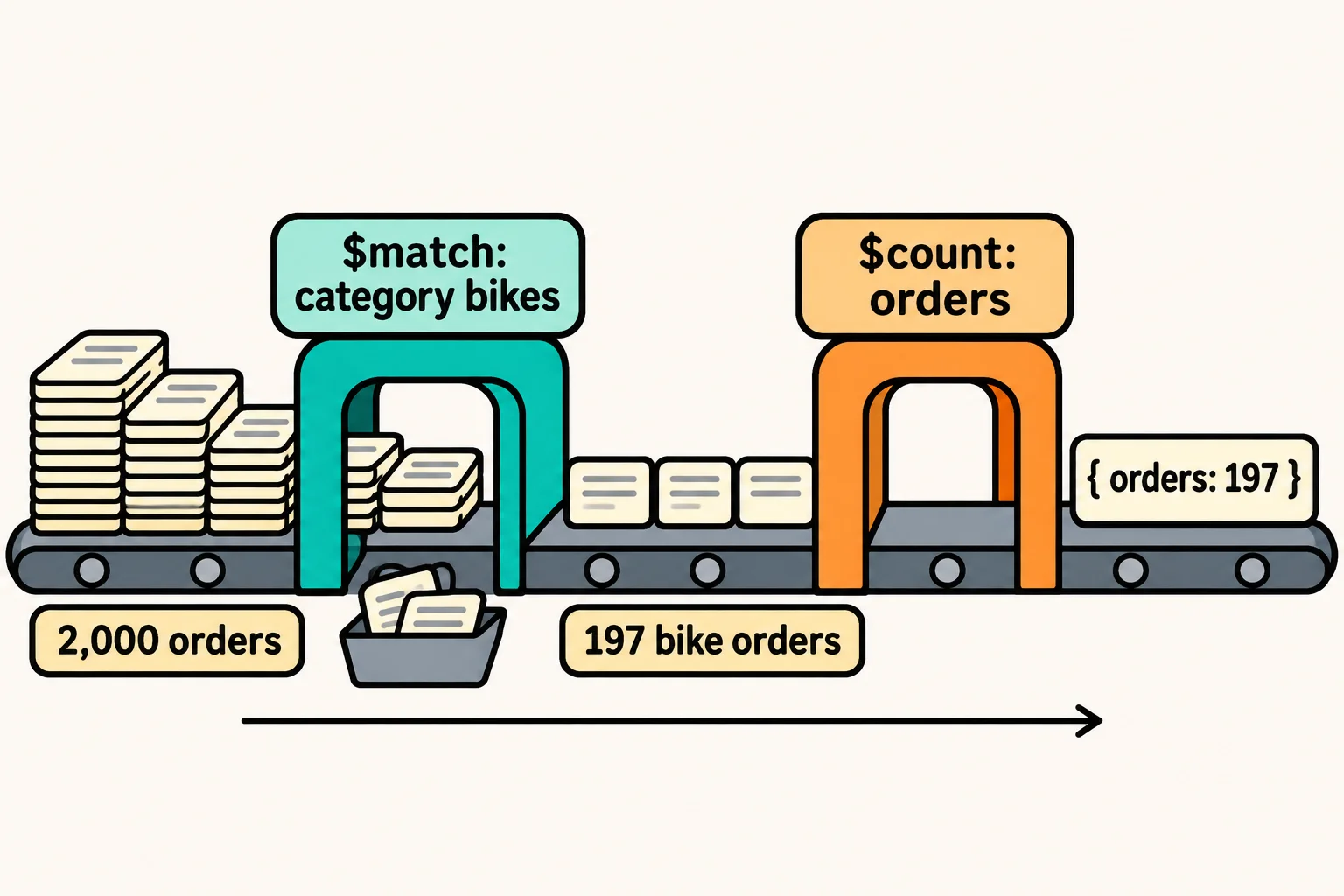
An aggregation pipeline works the same way. The documents of a collection roll through a list of stages, in order, and each stage does one job to whatever reaches it. You run one with aggregate, and write the stages as a list in square brackets [ ]. Each stage is a small document whose one field names its job, with a dollar sign.
The first job is choosing which documents get on the belt. That's $match (read "match"), and it takes exactly the filters find takes. These are the bike orders of $2,000 or more that were paid by gift card:
db.orders.aggregate([
  { $match: { category: "bikes", payment: "gift card", total: { $gte: 2000 } } }
])
[
  {
    _id: 10110,
    customerId: 330,
    orderedAt: ISODate('2025-11-20T12:00:00.000Z'),
    category: 'bikes',
    items: [ { name: 'Riverbend Road 2', price: 1199, quantity: 2 } ],
    total: 2398,
    payment: 'gift card'
  },
  {
    _id: 11186,
    customerId: 115,
    orderedAt: ISODate('2026-06-05T18:00:00.000Z'),
    category: 'bikes',
    items: [ { name: 'Riverbend Road 2', price: 1199, quantity: 2 } ],
    total: 2398,
    payment: 'gift card'
  }
]
With only a $match, a pipeline gives back the documents it chose, like find. The power comes from the stages after it.
$count, and why $match goes first
$count (read "count") is a stage that counts the documents that reach it and hands on one document holding that number. You name the field it puts the number in:
db.orders.aggregate([
  { $match: { category: "bikes" } },
  { $count: "orders" }
])
[ { orders: 197 } ]
Swap the two stages, and the answer disappears:
db.orders.aggregate([
  { $count: "orders" },
  { $match: { category: "bikes" } }
])
mongosh prints nothing at all: the prompt comes straight back. $count turned 2,000 orders into one document, { orders: 2000 }, and that document has no category, so $match let nothing through. Each stage sees only what the stage before it handed on.
That's also why $match goes first in almost every pipeline. Every document it leaves out is one that no later stage has to carry, and a $match at the very start can use an index, which Why Queries Get Slow, and What an Index Is explains.
Build it one stage at a time
A long pipeline is hard to fix when it gives the wrong answer, so build it the way you'd test a car wash: one station at a time. Add a stage, run it, and check what it hands on before you add the next. A $count at the end is a quick check.
How many bike orders were paid by gift card? Start from the bike orders, which you know are 197, and add a second $match:
db.orders.aggregate([
  { $match: { category: "bikes" } },
  { $match: { payment: "gift card" } },
  { $count: "orders" }
])
[ { orders: 16 } ]
16 of the 197. The two $match stages could be one filter, { category: "bikes", payment: "gift card" }; they're split here to show each step checked on its own. The question from the start, how much each category sold, still needs one more kind of stage: one that adds up totals, which is $group: Totals, Counts and Averages.
Check yourself
2 questions to try on the lesson page.
So what
A report is a question about many documents at once. With aggregate, a list of stages, $match first and a $count to check each step, you can now send a whole collection down the conveyor belt and get one answer back.