Copying a Few Fields: the Extended Reference Pattern
An order can keep a product's _id together with a copy of its name and the price paid, so a "my orders" page needs one read and the price stays what the customer paid; copy only a few fields, and decide for each one whether it stays as history or follows the original.
Journeyman · MongoDB · Updated
After this lesson you can
- Write an order item that keeps a product's _id with a copy of its name and the price paid, the extended reference pattern
- Decide whether a copied field should stay as history or follow the original, and update the copies with updateMany
Key takeaways
- A modeling pattern is a named answer to a problem that comes up in many apps, such as a page that keeps needing data from another collection.
- The extended reference pattern keeps the _id of the linked document plus a copy of the few fields a page shows with it.
- An order item that copies the product's name and price shows a whole order in one read, with no second query.
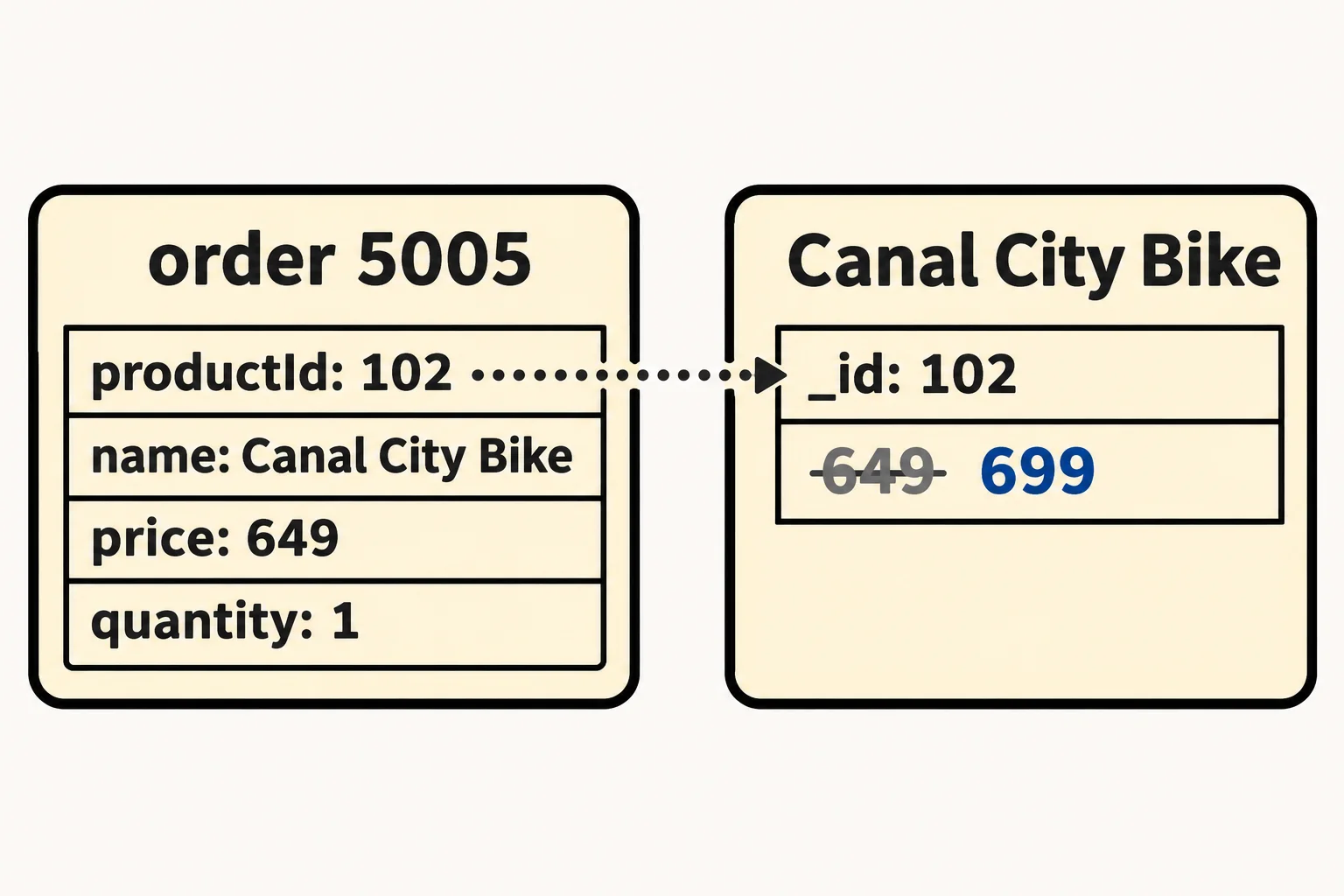
- A copied price is history. It stays what the customer paid when the product's price changes later.
- Copy only a few fields that rarely change. When a copy must follow the original, update every copy with updateMany.
A store receipt lists what you bought by name and what you paid, and it still says the same thing after the store changes its prices. A "my orders" page, an invoice, a packing list and a dashboard of today's sales all work like that receipt: each shows a few details of something that lives in another document. You'll use this lesson whenever a page keeps asking another collection for the same one or two fields, and whenever a number has to stay what it was at the moment something happened.
This chapter's examples use Riverbend's store from Model for the Questions Your App Asks, with its products filled out: each now says what kind of product it is, two new products join, and the best seller has its reviews. In VS Code, make a new file in your mongodb-course folder, beside riverbend-store.js, named riverbend-catalog.js, and copy this into it:
// Riverbend's catalog for the Patterns and Validation chapter. Load it in mongosh with: load("riverbend-catalog.js")
// It loads riverbend-store.js first (customers, categories, products and orders), then replaces the products with the
// filled-out catalog and adds the best seller's reviews. Running it twice is safe.
load("riverbend-store.js");
db.products.drop();
db.reviews.drop();
db.products.insertMany([
  { _id: 101, type: "bike", name: "Riverbend Road 2", price: 1199, categoryIds: ["road-bikes"], photos: ["road-2-side.jpg", "road-2-front.jpg"],
    frameSizes: ["S", "M", "L", "XL"], gears: 22, reviewCount: 12, starsTotal: 54, reviews: [
      { by: "Ana", stars: 5, text: "Climbs like a goat.", date: ISODate("2026-11-08") },
      { by: "Omar", stars: 4, text: "Smooth on gravel too.", date: ISODate("2026-10-30") },
      { by: "Grace", stars: 5, text: "My first real road bike.", date: ISODate("2026-10-12") },
      { by: "Dev", stars: 5, text: "Worth every penny.", date: ISODate("2026-09-21") },
      { by: "Lena", stars: 4, text: "Stiff seat, fast bike.", date: ISODate("2026-09-02") }
    ] },
  { _id: 102, type: "bike", name: "Canal City Bike", price: 649, categoryIds: ["city-bikes", "commuting"], photos: ["canal-side.jpg", "canal-basket.jpg"],
    frameSizes: ["S", "M", "L"], gears: 7 },
  { _id: 103, type: "helmet", name: "Harbor Helmet", price: 59, categoryIds: ["helmets", "commuting"], photos: ["harbor-helmet.jpg"], headSizes: ["M", "L"] },
  { _id: 104, type: "helmet", name: "Summit Helmet", price: 89, categoryIds: ["helmets"], photos: ["summit-helmet.jpg"], headSizes: ["S", "M", "L"] },
  { _id: 105, type: "light", name: "Beacon Front Light", price: 35, categoryIds: ["lights", "commuting"], photos: ["beacon-front.jpg"], lumens: 400, mount: "front" },
  { _id: 106, type: "light", name: "Beacon Rear Light", price: 25, categoryIds: ["lights", "commuting"], photos: ["beacon-rear.jpg"], lumens: 100, mount: "rear" },
  { _id: 107, type: "helmet", name: "Junior Helmet", price: 39, categoryIds: ["helmets"], photos: ["junior-helmet.jpg"], headSizes: ["S"] },
  { _id: 108, type: "light", name: "Beacon 800 Front Light", price: 49, categoryIds: ["lights", "commuting"], photos: ["beacon-800.jpg"], lumens: 800, mount: "front" }
]);
db.reviews.insertMany([
  { _id: 301, productId: 101, by: "Marco", stars: 5, text: "Fast out of the box.", date: ISODate("2026-03-14") },
  { _id: 302, productId: 101, by: "Tom", stars: 4, text: "Took a week to dial in.", date: ISODate("2026-04-02") },
  { _id: 303, productId: 101, by: "Ines", stars: 5, text: "Rode it to work all spring.", date: ISODate("2026-04-26") },
  { _id: 304, productId: 101, by: "Kofi", stars: 4, text: "Great bike, slow shipping.", date: ISODate("2026-05-19") },
  { _id: 305, productId: 101, by: "Rosa", stars: 5, text: "Handles every hill.", date: ISODate("2026-06-08") },
  { _id: 306, productId: 101, by: "Ben", stars: 3, text: "Seat hurt until I swapped it.", date: ISODate("2026-07-01") },
  { _id: 307, productId: 101, by: "Mei", stars: 5, text: "Light and quick.", date: ISODate("2026-08-15") },
  { _id: 308, productId: 101, by: "Lena", stars: 4, text: "Stiff seat, fast bike.", date: ISODate("2026-09-02") },
  { _id: 309, productId: 101, by: "Dev", stars: 5, text: "Worth every penny.", date: ISODate("2026-09-21") },
  { _id: 310, productId: 101, by: "Grace", stars: 5, text: "My first real road bike.", date: ISODate("2026-10-12") },
  { _id: 311, productId: 101, by: "Omar", stars: 4, text: "Smooth on gravel too.", date: ISODate("2026-10-30") },
  { _id: 312, productId: 101, by: "Ana", stars: 5, text: "Climbs like a goat.", date: ISODate("2026-11-08") }
]);
Save it. In the terminal, start mongosh in your mongodb-course folder, type use riverbend, and load the file:
load("riverbend-catalog.js")
true
An order that only knows ids
Priya, customer 3, buys a Canal City Bike and two Beacon Front Lights. Imagine Riverbend saved her order with only references, the way Referencing: Linking Documents by _id links an order to its customer: each item holds the product's _id and how many she bought, and nothing else.
db.orders.insertOne({ _id: 5005, customerId: 3, items: [ { productId: 102, quantity: 1 }, { productId: 105, quantity: 2 } ] })
{ acknowledged: true, insertedId: 5005 }
Her "my orders" page wants to say what she bought and what she paid, and the order knows neither. So the app asks a second question, every time the page opens:
db.products.find({ _id: { $in: [102, 105] } }, { name: 1, price: 1 })
[
  { _id: 102, name: 'Canal City Bike', price: 649 },
  { _id: 105, name: 'Beacon Front Light', price: 35 }
]
Two reads for one order, and a page that lists ten orders asks again for each one. There's a worse problem hiding here: the price. The page shows today's price, and Priya paid the price on the day she ordered.
Copy a few fields beside the reference
This is why Riverbend's orders, since Embedding: Keeping Related Data Together, copy each product's name and the price paid into the item. Each item keeps productId, so the app can still open the product's page, and adds the two fields the order page shows. Riverbend's packing list also prints the customer's name, so the order copies that too, beside customerId. Here's Priya's order put right, with replaceOne from Upserts and Replacing a Whole Document:
db.orders.replaceOne({ _id: 5005 }, {
  customerId: 3, customerName: "Priya",
  items: [ { productId: 102, name: "Canal City Bike", price: 649, quantity: 1 },
           { productId: 105, name: "Beacon Front Light", price: 35, quantity: 2 } ]
})
{
  acknowledged: true,
  insertedId: null,
  matchedCount: 1,
  modifiedCount: 1,
  upsertedCount: 0
}
Now one read gives the whole order:
db.orders.findOne({ _id: 5005 })
{
  _id: 5005,
  customerId: 3,
  customerName: 'Priya',
  items: [
    { productId: 102, name: 'Canal City Bike', price: 649, quantity: 1 },
    { productId: 105, name: 'Beacon Front Light', price: 35, quantity: 2 }
  ]
}
A reference extended with a copy of a few fields is the extended reference pattern. A modeling pattern is a named answer to a problem that comes up in app after app; MongoDB developers share a handful of them, so a name like "extended reference" says a whole design in two words. This one trades a little copying for fast reads, which is the idea behind denormalization: storing a fact in more than one place on purpose.
The price is history
Next spring, the Canal City Bike goes up to $699:
db.products.updateOne({ _id: 102 }, { $set: { price: 699 } })
{
  acknowledged: true,
  insertedId: null,
  matchedCount: 1,
  modifiedCount: 1,
  upsertedCount: 0
}
db.orders.findOne({ _id: 5005 }, { "items.name": 1, "items.price": 1 })
{
  _id: 5005,
  items: [
    { name: 'Canal City Bike', price: 649 },
    { name: 'Beacon Front Light', price: 35 }
  ]
}
Priya's order still says 649, and that's exactly right: it's what she paid. A copy that records a moment, such as a price paid or the address a parcel went to, is history. It should never follow the original, and an order that only kept productId couldn't remember it at all.
When a copy must follow the original
Some copies should follow. Priya changes the name on her account to Pree, and Riverbend wants its packing list to greet her by the name she uses now. That means changing every copy, with updateMany:
db.orders.updateMany({ customerId: 3 }, { $set: { customerName: "Pree" } })
{
  acknowledged: true,
  insertedId: null,
  matchedCount: 2,
  modifiedCount: 2,
  upsertedCount: 0
}
Both of her orders changed: 5005, and 5004 from the store file, which gets the field now. That's the cost of copying: every field you copy is a field you may have to update in many places. So before you copy a field, ask two questions:
| Ask | If yes |
|---|---|
| Does the page show it with the reference every time? | Copy it, and keep the _id beside it |
| Should the copy change when the original changes? | Copy it only if it rarely changes, and update every copy with updateMany when it does |
A price paid passes the first question and answers "no" to the second, so it's the perfect field to copy. A product's stock count changes with every sale, so it stays in the product.
Check yourself
2 questions to try on the lesson page.
So what
Your documents can now carry the few fields a page needs from another collection: one read for the page, a price that stays what the customer paid, and a plan for the copies that must follow.