Documents: Fields, Values, Quotes and Braces
A document is written like a filled-in form, with braces around it, a field name, a colon and a value for each line, commas between them, and quotes around text but not around numbers or true and false; mongosh's errors point at the punctuation that's missing.
Novice · MongoDB · Updated
After this lesson you can
- Write a document in mongosh with braces, fields and values, with text in quotes and numbers and true or false without them
- Fix a document from mongosh's error for a missing comma or text without quotes, and spot the mistakes mongosh can't catch
Key takeaways
- A document goes inside braces, with one field per detail, written as the field's name, a colon and its value, and commas between the fields.
- Text goes in quotes. Numbers and true or false go without them.
- A missing comma, or text without quotes, stops mongosh with an error that points at the spot where it noticed the problem.
- mongosh can't catch a number typed in quotes or a misspelled field name. Both are saved without a warning.
- JSON writes documents the same way, with double quotes around every field name too.
Every time you add a recipe, search for one or change one, you'll write a document: a pair of braces with fields inside. The same shape shows up in the JSON that web APIs send, in settings files and in every exercise of this course, so the few marks it uses are worth learning properly now. They're few, and once you can read them aloud, mongosh's error messages start making sense too.
A document is a filled-in form
A paper recipe card is a small form. Each line has a label and an answer: Name: Saturday Pancakes, Cuisine: American, Minutes: 25. A computer needs three more things a person reads without thinking: where the card starts and ends, which answer belongs to which label, and where one answer stops and the next begins. A document gives it all three:
- Braces
{ }(read "braces", or "curly braces") go around the whole card:{opens it and}closes it. - Each line of the card becomes a field: its name, a colon
:, and its value.minutes: 25is read "minutes is 25". - A comma
,goes between one field and the next.
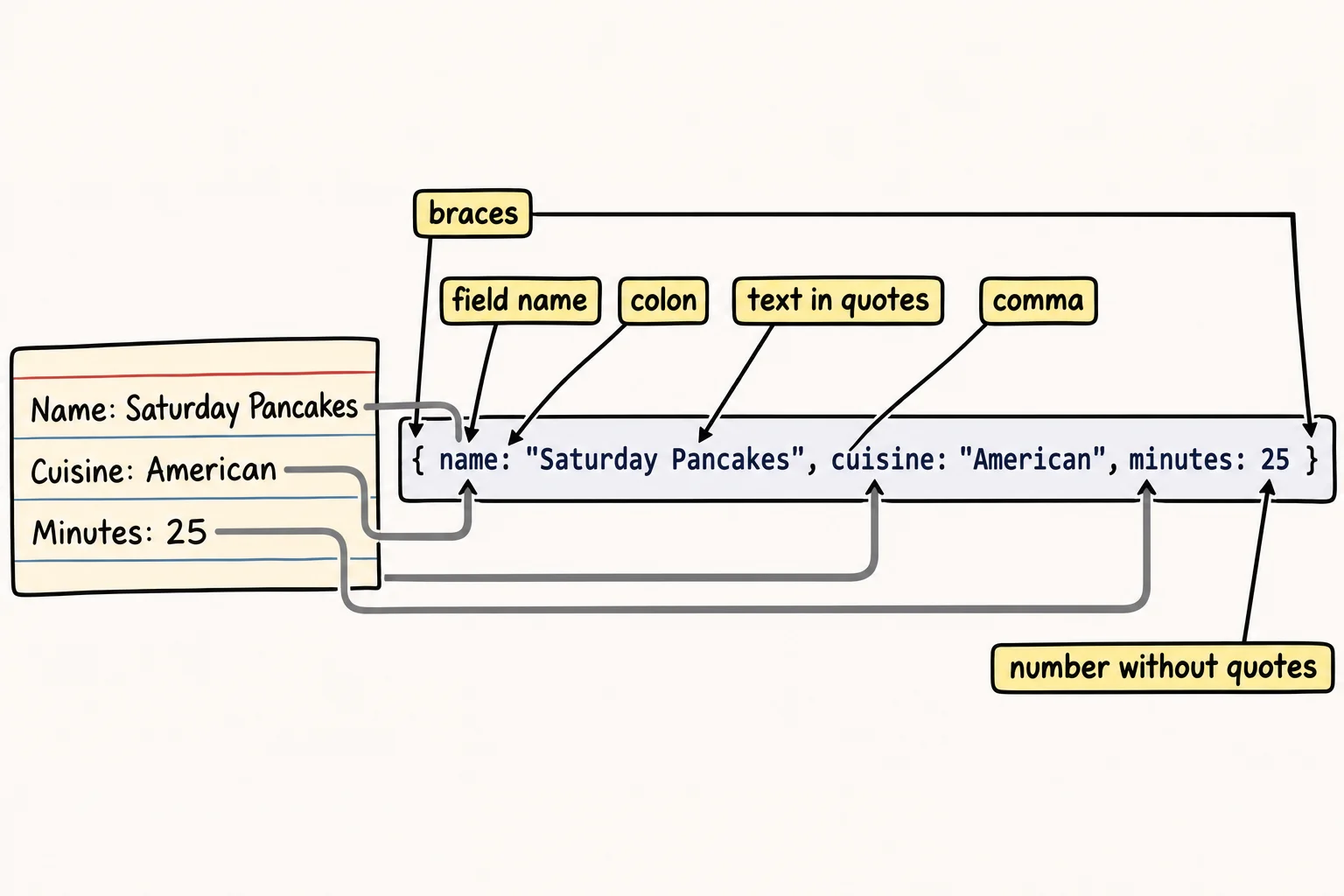
So the shape is { field: value, field: value }, read aloud "a document with field is value, field is value". Here is the top of the Saturday Pancakes card, saved in Sunday Kitchen's database. To follow along, start mongosh in VS Code's terminal and type use sunday_kitchen. This lesson uses a practice collection named drafts, so its mistakes stay out of the way:
db.drafts.insertOne({ name: "Saturday Pancakes", cuisine: "American", minutes: 25, servings: 4, vegetarian: true })
{
  acknowledged: true,
  insertedId: ObjectId('6afc9a7a91f85900b796e5e0')
}
Read it back with find:
db.drafts.find()
[
  {
    _id: ObjectId('6afc9a7a91f85900b796e5e0'),
    name: 'Saturday Pancakes',
    cuisine: 'American',
    minutes: 25,
    servings: 4,
    vegetarian: true
  }
]
Your _id will be a different ObjectId: MongoDB adds that field to every document, and BSON Types and the _id Field explains it. mongosh shows each field on its own line, and text in single quotes. Single or double quotes both work when you type.
Quotes go around text
Look at the values again. "Saturday Pancakes" and "American" are text, so they're in quotes. 25 and 4 are numbers, and true (or false) is a yes-or-no answer, so they're typed as they are. The quotes tell mongosh "this is text, take it exactly as written". Without them, mongosh reads a word as the name of something it should already know:
db.drafts.insertOne({ name: "Saturday Pancakes", cuisine: American })
Uncaught ReferenceError: American is not defined
Not defined means mongosh looked for something called American and found nothing. Text of two words fails differently, because a space can't sit in the middle of a name:
db.drafts.insertOne({ name: Saturday Pancakes, minutes: 25 })
Uncaught:
SyntaxError: Unexpected token, expected "," (1:37)

> 1 | db.drafts.insertOne({ name: Saturday Pancakes, minutes: 25 })
    |                                      ^
  2 |
Reading mongosh's error messages
A SyntaxError means the punctuation doesn't add up, and mongosh saves nothing. (1:37) is line 1, character 37, and the caret ^ points at the spot. It points where mongosh noticed the problem, which can be a little after the real mistake. Here's the most common one, a missing comma:
db.drafts.insertOne({ name: "Saturday Pancakes" minutes: 25 })
Uncaught:
SyntaxError: Unexpected token, expected "," (1:48)

> 1 | db.drafts.insertOne({ name: "Saturday Pancakes" minutes: 25 })
    |                                                 ^
  2 |
Expected "," says it plainly: after the name's value, mongosh wanted a comma before the next field. A field name with a space in it, such as prep time: 10, gives the same error. Put quotes around it, "prep time": 10, or write it as one word, prepMinutes: 10, which is easier to type every time after.
If you press Enter before the closing }), mongosh doesn't complain: it shows ... and waits for the rest. Type the missing }) and press Enter again.
The mistakes mongosh can't catch
mongosh checks the punctuation, not the meaning. These two cards go in without a word of warning:
db.drafts.insertOne({ name: "Lemon Bars", minutes: "50", servigns: 16 })
{
  acknowledged: true,
  insertedId: ObjectId('6afc9a8b9c17b9fb66de50b4')
}
"50" in quotes is text, not a number, so a search for recipes under an hour will skip it. servigns is a typo, so this card has no servings field at all. Neither is an error to MongoDB. Read your values before you press Enter: text in quotes, numbers without, and every field name spelled the same way on every card.
JSON: the same idea, a little stricter
JSON (read "JAY-son") is the text format web APIs use to send data, and the exercises keep their data in JSON files. It writes documents the same way, with one difference: every field name goes in double quotes too.
{ "name": "Saturday Pancakes", "cuisine": "American", "minutes": 25, "servings": 4, "vegetarian": true }
mongosh accepts that as well, so a document copied from a JSON file can be pasted into insertOne as it is.
Check yourself
2 questions to try on the lesson page.
So what
Braces, field names, colons, commas and quotes are the whole grammar of a document. You can now write one, read it aloud, and fix it when mongosh points at a missing mark.