Schema Validation with $jsonSchema
A collection can refuse documents with the wrong shape; a $jsonSchema validator lists the required fields, each field's type, a minimum and the values allowed, createCollection or collMod attaches it, the error names the rule a document broke, and validationLevel and validationAction decide what is checked and what happens.
Journeyman · MongoDB · Updated
After this lesson you can
- Write a $jsonSchema validator with required, bsonType, minimum and enum, and attach it with createCollection or collMod
- Read a Document failed validation error, and choose validationLevel and validationAction for a collection that already holds data
- Choose the pattern or rule a store's problem needs from the extended reference, subset, computed and polymorphic patterns and schema validation
Key takeaways
- Without rules, MongoDB stores whatever it's given, typos included. A validator makes the collection refuse documents with the wrong shape.
- In a $jsonSchema validator, required lists the fields every document needs, and properties gives each field its bsonType, a minimum, or an enum of allowed values.
- createCollection attaches a validator to a new collection, and collMod attaches one to a collection that already has documents.
- A refused write fails with Document failed validation, and its details name each broken rule, the reason and the value that broke it.
- validationLevel decides which writes are checked, and validationAction set to warn lets a bad write in while the server logs a warning.
A sign-up form that saves an age of "twenty", a price typed as text, a product saved with its name misspelled: every app that has run for a while has a few documents like these, and each one breaks a page somewhere. You'll use this lesson whenever a collection must only hold documents of the right shape, so the mistake is caught when it's written, not months later when a page breaks.
The examples use Riverbend's catalog from Copying a Few Fields: the Extended Reference Pattern. In mongosh, after use riverbend, load it again first:
load("riverbend-catalog.js")
true
"Flexible" doesn't mean "anything goes"
A new helmet is added in a hurry, with a capital H in its type and its price typed as prise:
db.products.insertOne({ _id: 110, type: "Helmet", name: "Trail Helmet", prise: 69 })
{ acknowledged: true, insertedId: 110 }
MongoDB stored it without a word. Now the helmet page, which asks for type: "helmet", never shows it, and the "under $50" shelf can't compare a price it doesn't have. A collection with no rules stores whatever it's given, so the mistake waits for a customer to find it. Schema validation turns that around: the collection gets rules, and a document that breaks them is refused when it's written.
Rules from the start: createCollection with $jsonSchema
The rules are written as a validator, given when the collection is made. To see it from the start, drop products (the catalog file can put it back any time) and make it again with rules:
db.products.drop()
true
db.createCollection("products", {
  validator: {
    $jsonSchema: {
      bsonType: "object",
      required: ["name", "type", "price"],
      properties: {
        name: { bsonType: "string" },
        type: { enum: ["bike", "helmet", "light"] },
        price: { bsonType: "number", minimum: 0 }
      }
    }
  }
})
{ ok: 1 }
$jsonSchema (read "JSON schema") describes the shape a document must have, and it reads almost like the rules you'd say out loud. required lists the fields every product needs. properties gives each field its rules: bsonType is the kind of value from BSON Types and the _id Field ("string" for text, "number" for any number); minimum: 0 means no price below zero; and enum (read "e-num", short for "enumeration") lists the only values allowed. A good product goes in as before:
db.products.insertOne({ _id: 110, type: "helmet", name: "Trail Helmet", price: 69, headSizes: ["M", "L"] })
{ acknowledged: true, insertedId: 110 }
Reading the error
Now a product with two mistakes, a type that isn't on the list and a price below zero:
db.products.insertOne({ _id: 111, type: "scooter", name: "Trail Scooter", price: -5 })
Uncaught:
MongoServerError: Document failed validation
Additional information: {
  failingDocumentId: 111,
  details: {
    operatorName: '$jsonSchema',
    schemaRulesNotSatisfied: [
      {
        operatorName: 'properties',
        propertiesNotSatisfied: [
          {
            propertyName: 'type',
            details: [
              {
                operatorName: 'enum',
                specifiedAs: { enum: [ 'bike', 'helmet', 'light' ] },
                reason: 'value was not found in enum',
                consideredValue: 'scooter'
              }
            ]
          },
          {
            propertyName: 'price',
            details: [
              {
                operatorName: 'minimum',
                specifiedAs: { minimum: 0 },
                reason: 'comparison failed',
                consideredValue: -5
              }
            ]
          }
        ]
      }
    ]
  }
}
It's long, so read it from the top. Document failed validation says the collection refused the document, and failingDocumentId: 111 says which one. Under propertiesNotSatisfied, each broken rule has a block: its propertyName, the rule (operatorName), a reason in plain words, and the consideredValue that broke it. Here that's type ("value was not found in enum": 'scooter') and price ("comparison failed": -5). A missing field shows up under required, with its name in missingProperties.
Adding rules later: collMod
Most collections get their rules after they already hold documents. Load the catalog again (it drops products, so the rules above are gone too), then attach a validator with the collMod command (read "coll mod", short for "modify a collection"). This one adds a rule for one kind of product beside the $jsonSchema: a filter, written with the operators from Module 2, that every document must also match:
load("riverbend-catalog.js")
db.runCommand({
  collMod: "products",
  validator: {
    $jsonSchema: {
      bsonType: "object",
      required: ["name", "type", "price"],
      properties: {
        name: { bsonType: "string" },
        type: { enum: ["bike", "helmet", "light"] },
        price: { bsonType: "number", minimum: 0 }
      }
    },
    $or: [ { type: { $ne: "bike" } }, { frameSizes: { $exists: true } } ]
  }
})
true
{ ok: 1 }
Read the $or aloud: "either it isn't a bike, or it has frame sizes". A helmet passes the first half; a bike must pass the second. A bike saved without frameSizes is now refused with the same Document failed validation.
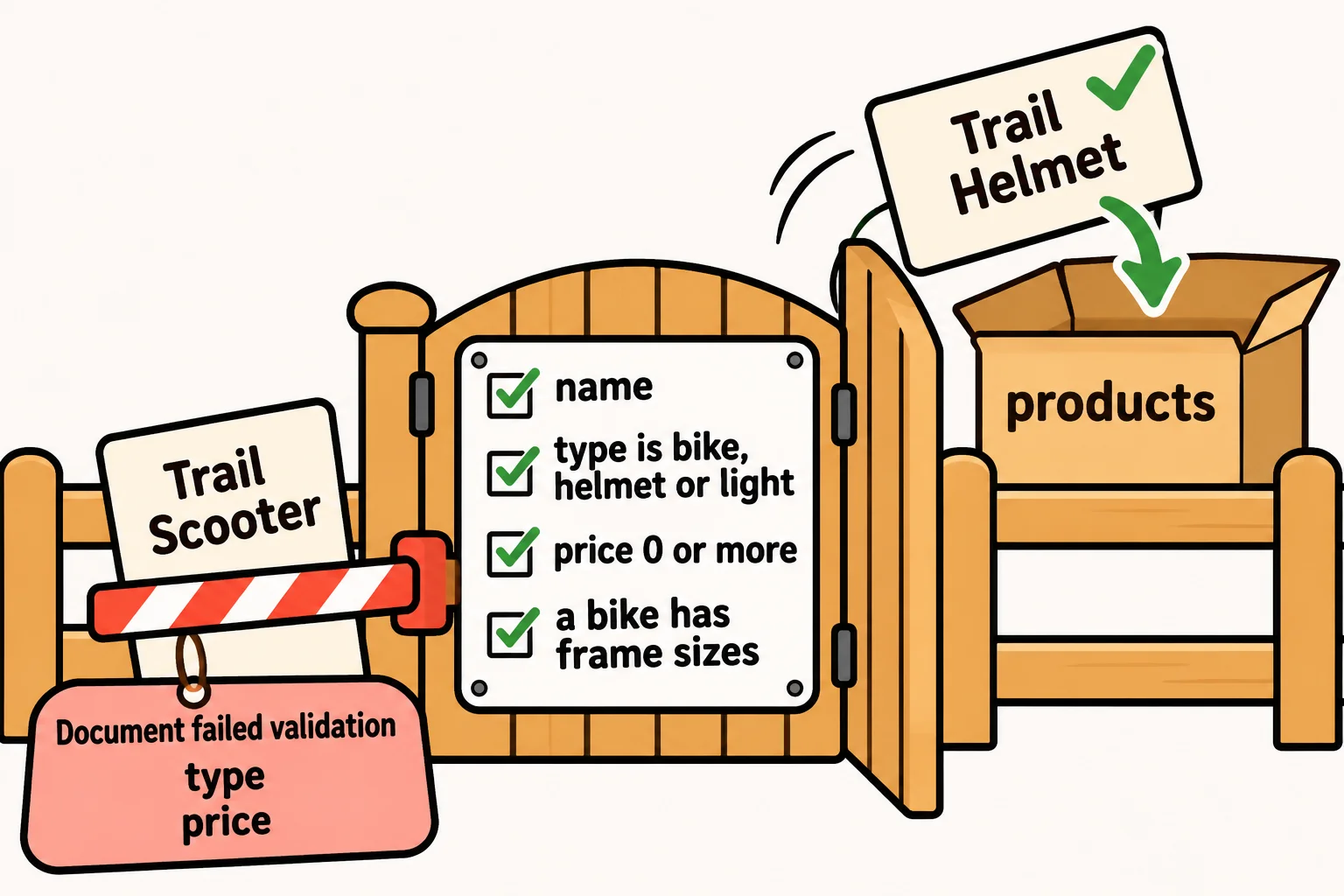
The 8 products already in the collection weren't checked. Two settings decide what happens next:
| Setting | Value | What it does |
|---|---|---|
validationLevel |
"strict" (the default) |
Checks every insert and every update |
validationLevel |
"moderate" |
Also checks every insert, but lets an update through for a document that already broke the rules |
validationAction |
"error" (the default) |
Refuses a document that breaks the rules |
validationAction |
"warn" |
Lets the document in, and the server writes a warning in its log |
"warn" is how a team tries new rules on a live app: for a week, the log shows which writes would have been refused, without turning a customer away.
db.runCommand({ collMod: "products", validationAction: "warn" })
db.products.insertOne({ _id: 111, type: "scooter", name: "Trail Scooter", price: -5 })
{ ok: 1 }
{ acknowledged: true, insertedId: 111 }
The scooter got in this time, and only the server's log knows. Set it back with validationAction: "error" once the log is quiet.
Check yourself
2 questions to try on the lesson page.
So what
Your collections can now say no: a validator catches the typo, the wrong type and the missing field when they're written, the error says exactly which rule broke, and "warn" lets you try new rules before they turn anyone away.