Updating and Deleting Documents
updateOne and updateMany change documents in place with update operators such as $set, $inc, $push and $pull, their result's matchedCount and modifiedCount say what happened, findOneAndUpdate gives back the changed document, and deleteOne removes one.
Apprentice · MongoDB · NoSQL · Node.js · Updated
After this lesson you can
- Change documents in place with updateOne and updateMany and the operators $set, $inc, $push and $pull
- Read an update's result, telling matchedCount from modifiedCount, and get the changed document with findOneAndUpdate
- Delete documents with deleteOne and deleteMany, and check deletedCount
Key takeaways
- An update operator tells MongoDB what to change, and MongoDB changes it in one step, so two changes made at the same moment don't undo each other.
- $set sets fields, $inc adds to a number, $push adds an item to an array, and $pull takes every matching item out of one.
- matchedCount says how many documents matched the filter, and modifiedCount how many really changed. A matchedCount of 0 means there was nothing to update.
- findOneAndUpdate with returnDocument set to "after" gives back the document as it is after the change, or null when nothing matched.
- deleteOne removes the first match and deleteMany every match. deletedCount says how many went, and deleteMany({}) empties the whole collection.
Every PATCH and DELETE route you'll build ends in a few lines like the ones in this lesson: a vendor moves to another stall, a product joins a list, a visit is counted, a vendor leaves the market. Changing a document correctly, and knowing whether anything changed at all, is what keeps an API's data right when many people use it at once.
The examples use the market folder from Finding Documents with Filters. Run node --env-file=.env seed-market.js first, so you start from the twelve vendors, then put each example in the middle of find.js, in this order.
The plain way, and how it loses a change
Herb Corner has started selling thyme. The first idea is to read the vendor, change the copy in JavaScript, and write the whole document back with replaceOne:
const herbs = await vendors.findOne({ name: "Herb Corner" });
herbs.products.push("thyme");
await vendors.replaceOne({ _id: herbs._id }, herbs);
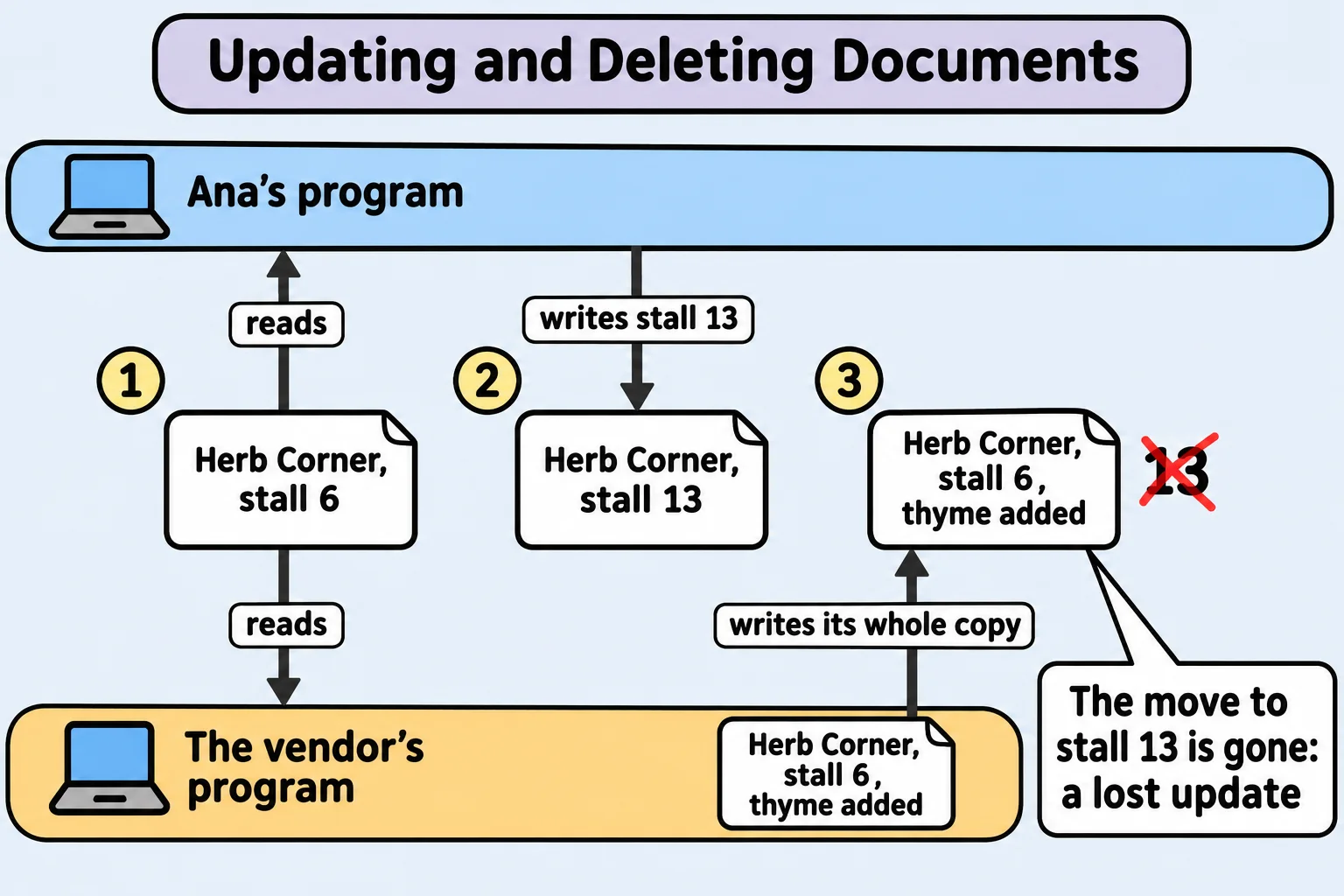
On its own, it works. Now picture Ana, the market's manager, moving Herb Corner to stall 13 the same way, at the same moment. Both programs read the document while it says stall 6. Ana's program writes stall 13. Then the vendor's program writes back its whole copy, which still says stall 6, and the move is gone. That's called a lost update: one change quietly overwrites another.
Changing what you name: updateOne and $set
An update operator tells MongoDB what to change instead of handing it a whole new document. MongoDB makes the change in one step, so changes to different fields can't overwrite each other. updateOne(filter, update) changes the first document that matches; $set (read "set") sets the fields you list:
const result = await vendors.updateOne({ name: "Herb Corner" }, { $set: { stall: 13 } });
console.log(result);

const herbs = await vendors.findOne({ name: "Herb Corner" });
console.log(herbs.stall, herbs.products);
{
  acknowledged: true,
  modifiedCount: 1,
  upsertedId: null,
  upsertedCount: 0,
  matchedCount: 1
}
13 [ 'basil', 'mint', 'rosemary', 'thyme' ]
The stall changed, and the thyme stayed: $set touched only stall. The result says what happened. matchedCount is how many documents matched the filter, and modifiedCount is how many really changed:
const again = await vendors.updateOne({ name: "Herb Corner" }, { $set: { stall: 13 } });
console.log(again.matchedCount, again.modifiedCount);

const nobody = await vendors.updateOne({ name: "Herb Korner" }, { $set: { stall: 13 } });
console.log(nobody.matchedCount, nobody.modifiedCount);
1 0
0 0
Setting stall 13 again matches the vendor but changes nothing. The misspelled name matches nobody: in an API, a matchedCount of 0 is your 404. Forget the $set, as in updateOne(filter, { stall: 13 }), and the driver refuses with MongoInvalidArgumentError: Update document requires atomic operators.
Numbers and lists: $inc, $push and $pull, and updateMany
Three more operators cover most changes:
$inc(read "increment") adds to a number. A field that isn't there yet starts at 0.$pushadds an item to the end of an array.$pulltakes every matching item out of an array.
await vendors.updateOne({ name: "Berry Patch" }, { $push: { products: "raspberries" } });
await vendors.updateOne({ name: "Berry Patch" }, { $pull: { products: "jam" } });
await vendors.updateOne({ name: "Berry Patch" }, { $inc: { visits: 1 } });
await vendors.updateOne({ name: "Berry Patch" }, { $inc: { visits: 1 } });

const berries = await vendors.findOne(
  { name: "Berry Patch" },
  { projection: { _id: 0, products: 1, visits: 1 } },
);
console.log(berries);
{
  products: [ 'strawberries', 'blueberries', 'raspberries' ],
  visits: 2
}
updateMany takes the same filter and update, and changes every match. The three Stone Bridge farms park in the north lot, and $set adds a field they didn't have:
const result = await vendors.updateMany(
  { "farm.town": "Stone Bridge" },
  { $set: { parking: "north lot" } },
);
console.log(result.matchedCount, result.modifiedCount);
3 3
Getting the changed document back: findOneAndUpdate
A PATCH route usually answers with the document as it is now. findOneAndUpdate makes the change and gives back the document in one call. With returnDocument: "after" you get it after the change; without it, you get it as it was before. When nothing matches, you get null:
const moved = await vendors.findOneAndUpdate(
  { name: "Orchard Lane" },
  { $set: { stall: 14 } },
  { returnDocument: "after", projection: { _id: 0, name: 1, stall: 1 } },
);
console.log(moved);
{ name: 'Orchard Lane', stall: 14 }
Deleting: deleteOne and deleteMany
Petal & Stem has left the market. deleteOne(filter) removes the first match, and its result's deletedCount says how many went:
const result = await vendors.deleteOne({ name: "Petal & Stem" });
console.log(result);

const again = await vendors.deleteOne({ name: "Petal & Stem" });
console.log(again.deletedCount);

console.log(await vendors.countDocuments());
{ acknowledged: true, deletedCount: 1 }
0
11
The second delete finds nobody, so deletedCount is 0: another 404. deleteMany(filter) removes every match. Read its filter twice before you run it: deleteMany({}) matches every document and empties the collection, which is what seed-market.js does on purpose before it adds the vendors again.
Check yourself
2 questions to try on the lesson page.
So what
Update operators change exactly what you name, in one step, and the counts that come back tell your API whether to answer 200 or 404, so you can change data safely even when many people use your app at once.