What WebSockets Add to HTTP
HTTP answers only when the client asks, so a page that must hear about a goal the moment it's scored either asks again and again, which is polling, or opens a WebSocket, one connection that stays open so the server can speak first.
Journeyman · Node.js · Web Development · Updated
After this lesson you can
- Explain why HTTP alone can't push an update to a page, and what polling costs in requests and delay
- Explain how a WebSocket opens with an upgrade handshake and 101 Switching Protocols, and when to use ws:// or wss://
- Choose WebSockets or plain HTTP requests for a feature, such as live scores, chat or a schedule that rarely changes
Key takeaways
- With HTTP, the client always speaks first. A server can't send a page anything until the page asks.
- Polling asks again every few seconds. Most answers say nothing changed, and the news still arrives up to one wait late.
- A WebSocket is one connection that stays open, so either side can send a message at any moment, the server included.
- A WebSocket starts as an HTTP request with the header Upgrade websocket, and the server agrees with 101 Switching Protocols.
- ws:// is a WebSocket with no encryption, for your own computer. wss:// is encrypted, like https://, and is the one to use online.
A chat app, live sports scores, the dots that say someone is typing, a notification that pops up the moment a friend replies: each one needs the server to send something without being asked. You'll use what this lesson explains whenever a feature has to feel live, and it's a favorite interview question too: "How would you build a chat?"
This chapter's example is Hilltop Intramurals, a school's intramural soccer league. Parents and friends who can't make it to the field want to follow the game on their phones, and they want to see a goal when it's scored, not five minutes later.
A page that can't hear a goal
Everything you've built so far speaks HTTP: a question, then an answer. The page asks GET /score, the server answers { "hawks": 1, "foxes": 0 }, and the conversation is over. If the Hawks score a second later, the server knows, but it can't tell the page. With HTTP, the client always speaks first.
The first fix anyone tries is a refresh button. It works when fans remember to press it, and nobody presses it at the right moment.
Polling: asking again and again
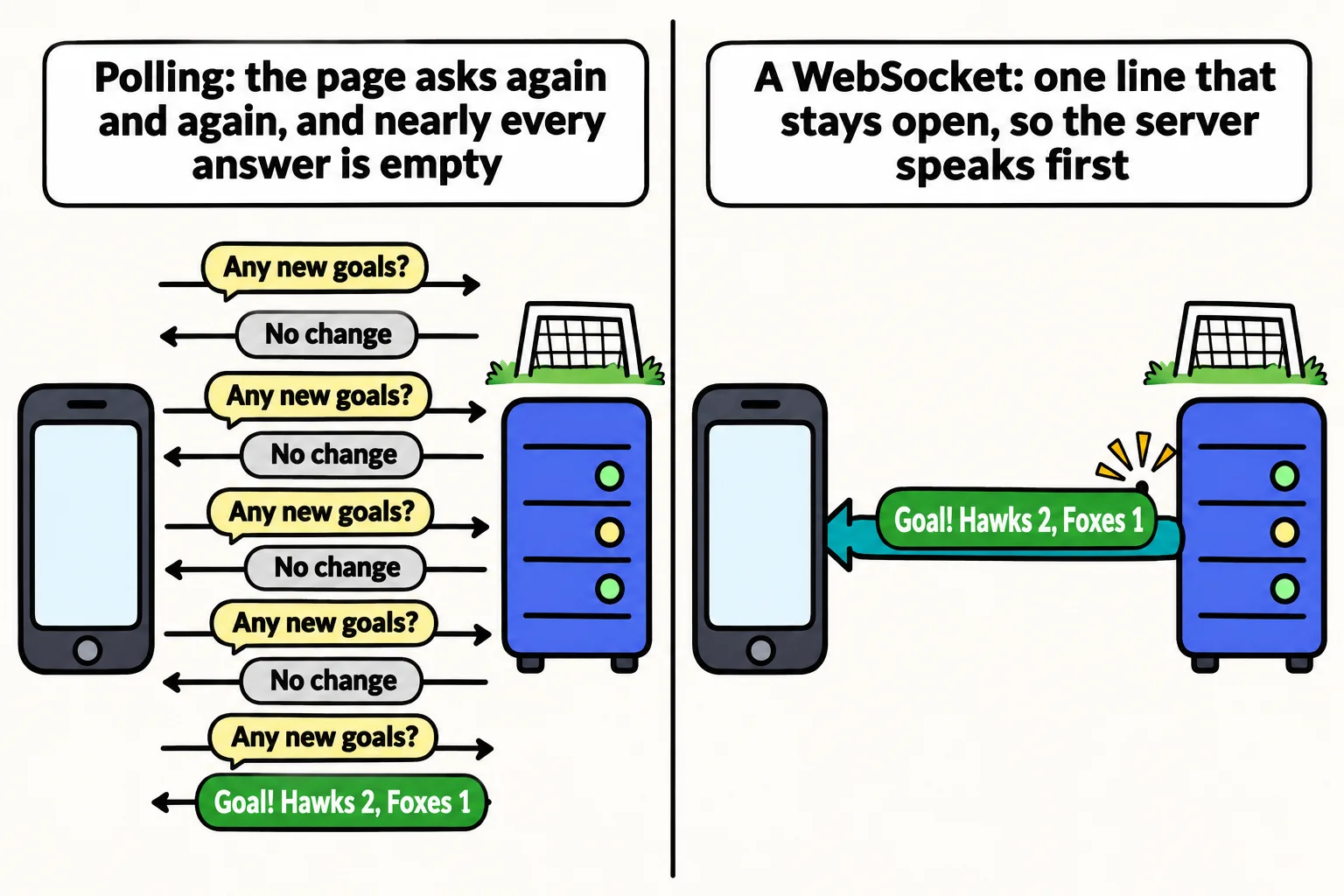
The next fix lets the page press the button itself, every two seconds. That's called polling, like a child in the back seat asking "Are we there yet?" over and over. In the browser it's a few lines (setInterval runs a function again every so many milliseconds):
setInterval(async () => {
  const response = await fetch("/score");
  showScore(await response.json());
}, 2000);
For something that changes rarely, such as the season's schedule, polling now and then is fine. For a live game, count what it costs. This program works it out for one 40-minute game with 200 fans watching and 5 goals:
const fans = 200;
const secondsBetweenChecks = 2;
const gameMinutes = 40;
const goals = 5;

const checksPerFan = (gameMinutes * 60) / secondsBetweenChecks;
const requests = fans * checksPerFan;
const withNews = fans * goals;

console.log(`Requests in one game: ${requests}`);
console.log(`Requests that found a new goal: ${withNews}`);
console.log(`Requests that found nothing new: ${requests - withNews}`);
Requests in one game: 240000
Requests that found a new goal: 1000
Requests that found nothing new: 239000
The server answers 240,000 requests, and 239,000 of them carry no news. The news is still late, too: a goal scored right after a check waits almost two seconds for the next one. Ask more often and the waste grows; ask less often and the news gets later.
An open phone line
Polling is like phoning the field every two seconds to ask the score. A better plan is to call once and keep the line open, so whoever has news says it the moment they have it.
That's a WebSocket: one connection between the page and the server that stays open, so either side can send a message at any moment. The server can speak first. A goal reaches every fan's phone as it happens, and while nothing happens, nothing is sent. Messages go both ways on the same line, so the page can send too, such as a scorekeeper's "goal for the Hawks".
How the line opens: the upgrade handshake
A WebSocket doesn't need a second server or another port. It starts as an ordinary HTTP request with two headers that ask to switch: Upgrade: websocket and Connection: Upgrade. The browser sends something like this, plus a few headers of its own:
GET / HTTP/1.1
Host: localhost:3100
Upgrade: websocket
Connection: Upgrade
Sec-WebSocket-Key: dGhlIHNhbXBsZSBub25jZQ==
Sec-WebSocket-Version: 13
A server that speaks WebSocket answers with a status you haven't met yet, 101 Switching Protocols (read "one-oh-one": we're switching to another language). This answer came from a real Node server:
HTTP/1.1 101 Switching Protocols
Upgrade: websocket
Connection: Upgrade
Sec-WebSocket-Accept: s3pPLMBiTxaQ9kYGzzhZRbK+xOo=
The server works out Sec-WebSocket-Accept from the request's key, which shows the browser that the answer really comes from a server that understands WebSockets. This exchange is the handshake. From then on, the same connection carries WebSocket messages instead of HTTP requests.
A WebSocket address has its own start, called the scheme:
ws://localhost:3100is a WebSocket with no encryption, likehttp://. Use it on your own computer.wss://(read "W-S-S", WebSocket secure) is encrypted, likehttps://. Use it online: a page that came overhttps://is only allowed to openwss://lines.
Where WebSockets fit
Reach for a WebSocket when the server has news at moments only it knows, or when many small messages fly both ways:
| Feature | Fits best | Why |
|---|---|---|
| Live scores during a game | WebSocket | Goals happen at moments only the server knows |
| A chat between fans | WebSocket | Messages go both ways, and each must arrive at once |
| A multiplayer game or a shared whiteboard | WebSocket | Many small messages a second, in both directions |
| The season's schedule | Plain HTTP | It changes a few times a season, so the page asks when it opens |
| Signing up a team | Plain HTTP | One question, one answer |
An open line isn't free: the server holds each connection for as long as the page stays open, and a phone that loses its signal has to open a new one. So keep plain HTTP for everything that's a question and an answer, and add a WebSocket for the live part. When only the server ever sends, another choice is Server-Sent Events, a response that stays open; this course uses WebSockets, which work both ways.
Check yourself
2 questions to try on the lesson page.
So what
HTTP waits to be asked, and a WebSocket keeps the line open so the server can speak first: every live feature you'll build, from scores to chat, starts with that one switch.