Lists and Lookups: Arrays and Hashtables
An array keeps several values in order, made with commas or @( ) and read by position from [0], and a hashtable, made with @{ }, keeps values under names so you can look one up by its name, the way you'd find a word in a dictionary.
Journeyman · PowerShell · Updated
After this lesson you can
- Make an array with commas or @( ), read its items by position from [0], and add to it with +=
- Make a hashtable with @{ }, look up a value by its key, and add or change a key
- Choose a single value, an array or a hashtable for the data a job needs
Key takeaways
- An array is a list in order:
'kettle-bot', 'clock', 'bell', or@( … ).[0]is the first item and[-1]the last. +=adds an item to an array,-containsasks whether something is in it, and.Countsays how many items it has.@( )makes sure you get a list, even of one item, so[0]is the first item and not the first letter.- A hashtable,
@{ springs = 'drawer-2' }, finds a value by its key:$drawers['springs']or$drawers.springs. - A plain hashtable picks its own order;
[ordered]@{ }keeps the order you wrote.
Look at your fridge. There's a list on it, the week's chores in order, and somewhere a note that says where things are: the spare key is on the hook, the batteries are in the junk drawer. One is a list you go through from the top; the other is a lookup where you find a thing by its name. Ada's workshop needs both: every morning her apprentice checks five machines in the same order, and whenever something breaks, the question is which drawer the springs are in. PowerShell has a box for each: an array for a list, a hashtable for a lookup. A tech keeps a list of computers to check in an array, and a developer keeps an app's settings in a hashtable.
A list in order: an array
Commas between values make an array, a list in a single variable:
$machines = 'kettle-bot', 'oil can', 'clock', 'gearbox', 'bell'
$machines.Count
$machines[0]
$machines[-1]
$machines[1..2]
5
kettle-bot
bell
oil can
clock
Square brackets after the name pick an item by its position, its index, read "machines item 0". Counting starts at 0, so [0] is the first, and [-1] counts back from the end. 1..2, read "1 to 2", picks a range. An index past the end, such as $machines[5], gives nothing, with no error.
Adding, and asking what's in it
+= adds an item at the end, and -contains asks whether a value is in the list:
$machines += 'music box'
$machines.Count
$machines -contains 'clock'
$machines -contains 'owl'
6
True
False
You can also write an array as @( ), read "a list of": @('kettle-bot', 'clock'), or @() for an empty one. Its real use is making sure you get a list. Text has indexes too, one per letter, so a single piece of text and a list of one look alike until you ask for [0]:
$job = 'oil the gears'
$job[0]
$jobs = @('oil the gears')
$jobs[0]
o
oil the gears
A command that might find one file or many goes in @( ) for the same reason: @(Get-ChildItem *.ps1)[0] is always the first file.
A lookup by name: a hashtable
A hashtable keeps each value under a name, its key. You've met one already: the @{ Name = …; Expression = … } in Columns You Make Yourself: Calculated Properties. @{ } is read "a lookup of", = joins a key to its value, and ; separates the pairs:
$drawers = @{ screws = 'drawer-1'; springs = 'drawer-2'; string = 'drawer-3' }
$drawers['springs']
$drawers.screws
drawer-2
drawer-1
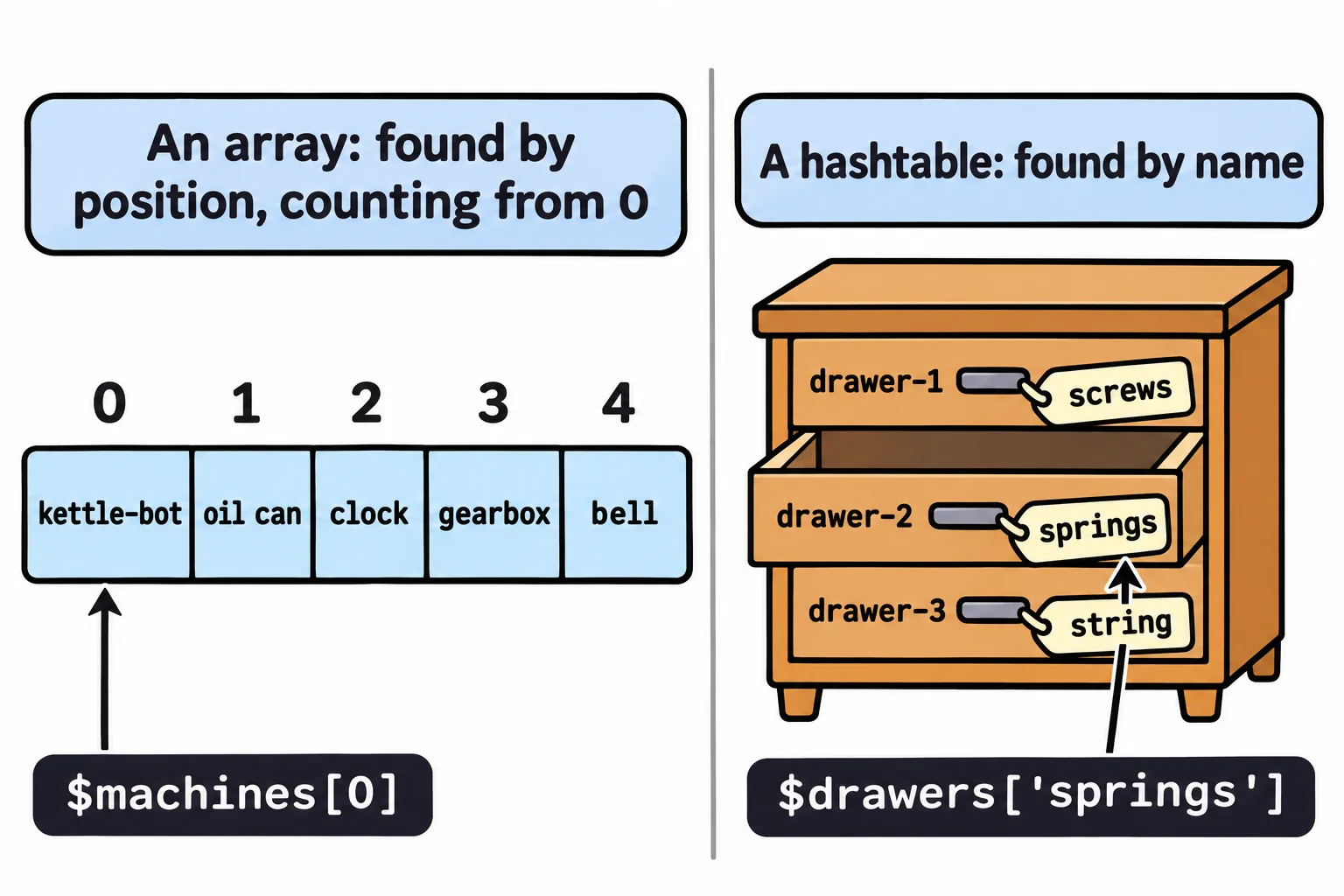
Look a value up with the key in square brackets, or after a dot. Keys ignore capital letters, so $drawers['SPRINGS'] works too. Setting a key that isn't there adds it, and setting one that is changes its value:
$drawers['golden cog'] = 'drawer-3'
$drawers.springs = 'drawer-4'
$drawers.Count
$drawers
4

Name                           Value
----                           -----
springs                        drawer-4
string                         drawer-3
screws                         drawer-1
golden cog                     drawer-3
A key with a space in it needs quotes. Notice the order: a hashtable keeps its pairs in an order of its own choosing, which can change from one run to the next. A key that isn't there gives nothing, and $drawers.ContainsKey('hammer') answers False.
Keeping your order, and which one fits
When the order matters, put [ordered] in front:
$week = [ordered]@{ Monday = 'oil the gears'; Wednesday = 'wind the clock'; Friday = 'polish the bell' }
$week
Name                           Value
----                           -----
Monday                         oil the gears
Wednesday                      wind the clock
Friday                         polish the bell
So which box for the job? Ask how you'll find things in it:
| The job | The box | Example |
|---|---|---|
| One thing to remember | a plain variable | $owl = "$HOME\…\clockwork-owl" |
| Several things, gone through in order | an array | $machines = 'kettle-bot', 'clock' |
| Things you find by a name | a hashtable | $drawers = @{ springs = 'drawer-2' } |
Everything here works the same in Windows PowerShell 5.1 and on a Mac or Linux.
Try it. Make a hashtable of three things in your own home and where they live, such as @{ passport = 'desk drawer'; charger = 'kitchen shelf' }, then look one up by its key.
Check yourself
2 questions to try on the lesson page.
So what
A list you go through in order is an array; a lookup you search by name is a hashtable. Most of the data a script works with, from the files to check to the settings it reads, fits in one of the two.