Functions: Naming a Job
A function you share gets a cmdlet's kind of name, an approved verb from Get-Verb and a singular noun, takes its inputs in param() and outputs objects rather than sentences, so its results can be sorted, filtered and saved; a file of functions is loaded into your session with a dot.
Journeyman · PowerShell · Updated
After this lesson you can
- Write a function with an approved verb-noun name and a param() block, and load a file of functions with a dot
- Return objects from a function instead of text, so its output can be sorted, filtered and saved
Key takeaways
- Name a tool like a cmdlet: an approved verb from Get-Verb, a dash, and a singular noun, such as Get-Song.
- param() gives a function named parameters, with types and default values, the same as a script's.
- Output objects, not sentences. The next command can sort, filter, count and save objects, but text has no properties to work with.
- Running a file of functions forgets them when it ends. A dot and a space in front, . .\PlaylistTools.ps1, loads them into your session.
You keep your road-trip playlist in a spreadsheet: each song, who plays it, how many minutes it lasts and its mood. Before every drive you ask it the same questions. Which songs are chill? What fits in a 20-minute run to the store? Can I drop the one I'm tired of? You could type a long pipeline each time, or you could build a few tools that answer by name, like Get-Song -Mood Chill. That's what IT teams and developers do with the jobs they repeat: they write functions that look and behave like PowerShell's own commands, so anyone can guess how to use them. This chapter builds those playlist tools, one feature at a time.
Make the practice folder, with the playlist as a CSV file (Spreadsheets as Objects: Import-Csv). These lines are safe to run again, and they put the playlist back to these seven songs whenever you want a fresh start:
New-Item -ItemType Directory -Force -Path "$HOME\terminal-practice\playlist-tools" | Out-Null
Set-Location "$HOME\terminal-practice\playlist-tools"
Set-Content road-trip.csv @'
Title,Artist,Minutes,Mood
Mile Marker 9,Juniper Kite,4,Upbeat
Gas Station Coffee,The Night Owls,3,Upbeat
Rainy Overpass,Juniper Kite,6,Chill
Backseat Snacks,Maple Street,3,Upbeat
Cruise Control,The Night Owls,5,Chill
Left at the Lighthouse,Maple Street,7,Focus
Last Exit Home,Juniper Kite,4,Chill
'@
They print nothing when they work.
A name from Get-Verb's list
In Aliases and Small Functions you made mkcd, a short name for your own use. A tool that other people use deserves a name like a cmdlet's: a verb, a dash and a noun (Verb-Noun: Names That Explain Themselves). The noun is the thing the tool works on, and it's singular even when there are many: Get-Song, not Get-Songs, the same as Get-ChildItem. The verb comes from PowerShell's list of approved verbs, which Get-Verb shows. Ask it about the verbs this chapter uses:
Get-Verb -Verb Get, Add, Remove, Show, Limit
Verb   AliasPrefix Group  Description
----   ----------- -----  -----------
Add    a           Common Adds a resource to a container, or attaches an item to another item
Get    g           Common Specifies an action that retrieves a resource
Remove r           Common Deletes a resource from a container
Show   sh          Common Makes a resource visible to the user
Limit  l           Data   Applies constraints to a resource
Each verb means the same thing all over PowerShell: Get only reads and never changes anything, and Remove takes something away. Try Get-Verb -Verb Play, Shuffle, Delete: it prints nothing, because none of the three is on the list (the job of Delete belongs to Remove). When you turn your tools into a module in Your Own Module, PowerShell warns about names whose verbs aren't on the list, so choose from it now. In Windows PowerShell 5.1, Get-Verb shows only the Verb and Group columns.
Text, or objects?
Here's a first try at a playlist tool, with an approved name. Type it at the prompt (Enter after an open brace starts a new line), then run it:
function Show-Song {
    param($Mood)
    foreach ($song in Import-Csv road-trip.csv) {
        if ($song.Mood -eq $Mood) {
            "$($song.Title) by $($song.Artist), $($song.Minutes) min"
        }
    }
}
Show-Song -Mood Chill
Rainy Overpass by Juniper Kite, 6 min
Cruise Control by The Night Owls, 5 min
Last Exit Home by Juniper Kite, 4 min
It reads nicely. Now ask for the shortest song first:
Show-Song -Mood Chill | Sort-Object Minutes
Rainy Overpass by Juniper Kite, 6 min
Cruise Control by The Night Owls, 5 min
Last Exit Home by Juniper Kite, 4 min
Nothing moved. Show-Song outputs sentences, and a sentence is only text: it has no Minutes for Sort-Object to sort by. The cmdlets you've used since Module 3 hand on objects, things with properties (What an Object Is: Get-Member), and your tools should too. This one outputs the songs themselves, the objects Import-Csv makes:
function Get-Song {
    param(
        [string]$Mood,
        [string]$Path = 'road-trip.csv'
    )
    $songs = Import-Csv -Path $Path
    if ($Mood) {
        $songs = $songs | Where-Object Mood -eq $Mood
    }
    $songs
}
Get-Song -Mood Chill | Sort-Object Minutes
Title          Artist         Minutes Mood
-----          ------         ------- ----
Last Exit Home Juniper Kite   4       Chill
Cruise Control The Night Owls 5       Chill
Rainy Overpass Juniper Kite   6       Chill
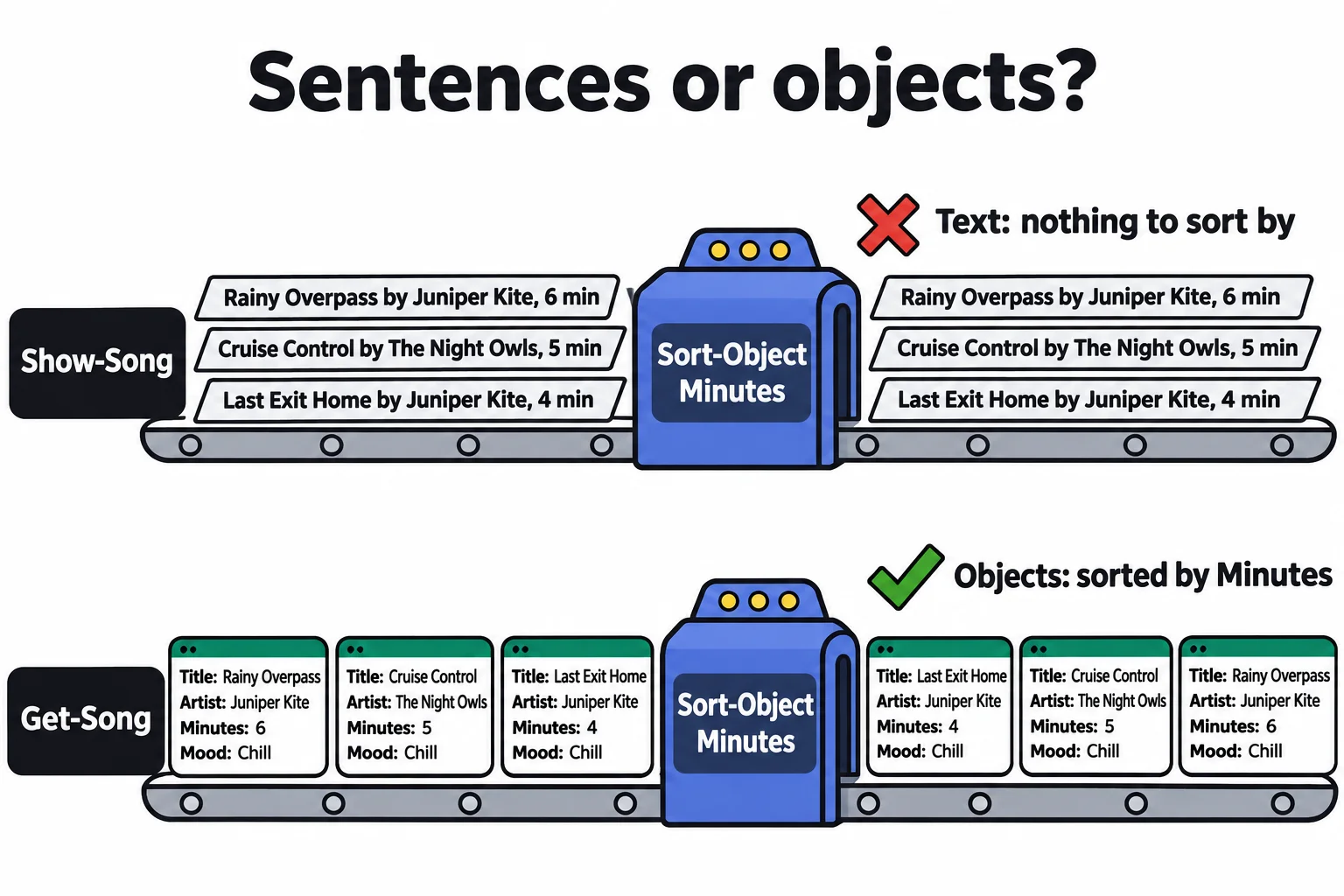
The param() block works exactly as a script's does (Parameters: param()): types, and a default value for -Path. if ($Mood) is true only when you gave a mood, so Get-Song on its own gets every song. The last line, $songs on its own, is the function's output. Now every pipeline you know works on your tool:
(Get-Song | Measure-Object Minutes -Sum).Sum
Get-Song | Where-Object Artist -eq 'Maple Street'
32

Title                  Artist       Minutes Mood
-----                  ------       ------- ----
Backseat Snacks        Maple Street 3       Upbeat
Left at the Lighthouse Maple Street 7       Focus
The rule: output objects, and let whoever runs the tool decide how to show them. Words meant only for the screen belong to Write-Host and Write-Verbose (Where Output Goes: Write-Output, Write-Host and Friends).
Keep your tools in a file
A function typed at the prompt lasts until the window closes. Put Get-Song in a file instead: run code PlaylistTools.ps1 in the practice folder, paste the Get-Song function without the line that runs it, and save. Then open a new PowerShell window and run the file the way you'd run a script:
Set-Location "$HOME\terminal-practice\playlist-tools"
.\PlaylistTools.ps1
Get-Song -Mood Focus
Get-Song: The term 'Get-Song' is not recognized as a name of a cmdlet, function, script file, or executable program.
Check the spelling of the name, or if a path was included, verify that the path is correct and try again.
The script ran in a room of its own, made Get-Song there, and ended, and the room was cleared with Get-Song in it: the same thing that happened to $snackBudget in Your Profile. The fix is the same too. Put a dot and a space in front, called dot-sourcing, and the file runs in your own session, so whatever it makes stays:
. .\PlaylistTools.ps1
Get-Song -Mood Focus
Get-Command -Noun Song
Title                  Artist       Minutes Mood
-----                  ------       ------- ----
Left at the Lighthouse Maple Street 7       Focus

CommandType     Name                                               Version    Source
-----------     ----                                               -------    ------
Function        Get-Song
Each time you change the file, dot-source it again to load the new version. On a Mac or Linux, write . ./PlaylistTools.ps1. Your Own Module turns this file into a module.
Try it. In the first window, save the Upbeat songs with Get-Song -Mood Upbeat | Export-Csv upbeat.csv, and the same songs as text with Show-Song -Mood Upbeat | Export-Csv upbeat-text.csv. Open both with Get-Content. The text version kept only one fact about each sentence: its Length.
Check yourself
2 questions to try on the lesson page.
So what
A function with a cmdlet's name, real parameters and objects for output isn't only a shortcut any more: it's a tool other people can guess, pipe and build on.