Backups That Work: `robocopy`
robocopy, the copying program that comes with Windows, copies a folder and after that only what changed, mirrors it with /MIR (which deletes from the backup too), rehearses with /L, and ends with an exit code where anything below 8 means success.
Journeyman · PowerShell · Operating System · Updated
After this lesson you can
- Copy a folder with robocopy, then only what changed, mirroring with /MIR only after rehearsing it with /L
- Read robocopy's exit code from $LASTEXITCODE and turn it into success or failure, where anything below 8 is success
- Choose between a scheduled task, a log, and robocopy with /E, /MIR or /L for each part of a backup that runs by itself
Key takeaways
- robocopy SOURCE DESTINATION /E copies a folder and every folder inside it; run again, it copies only new and changed files.
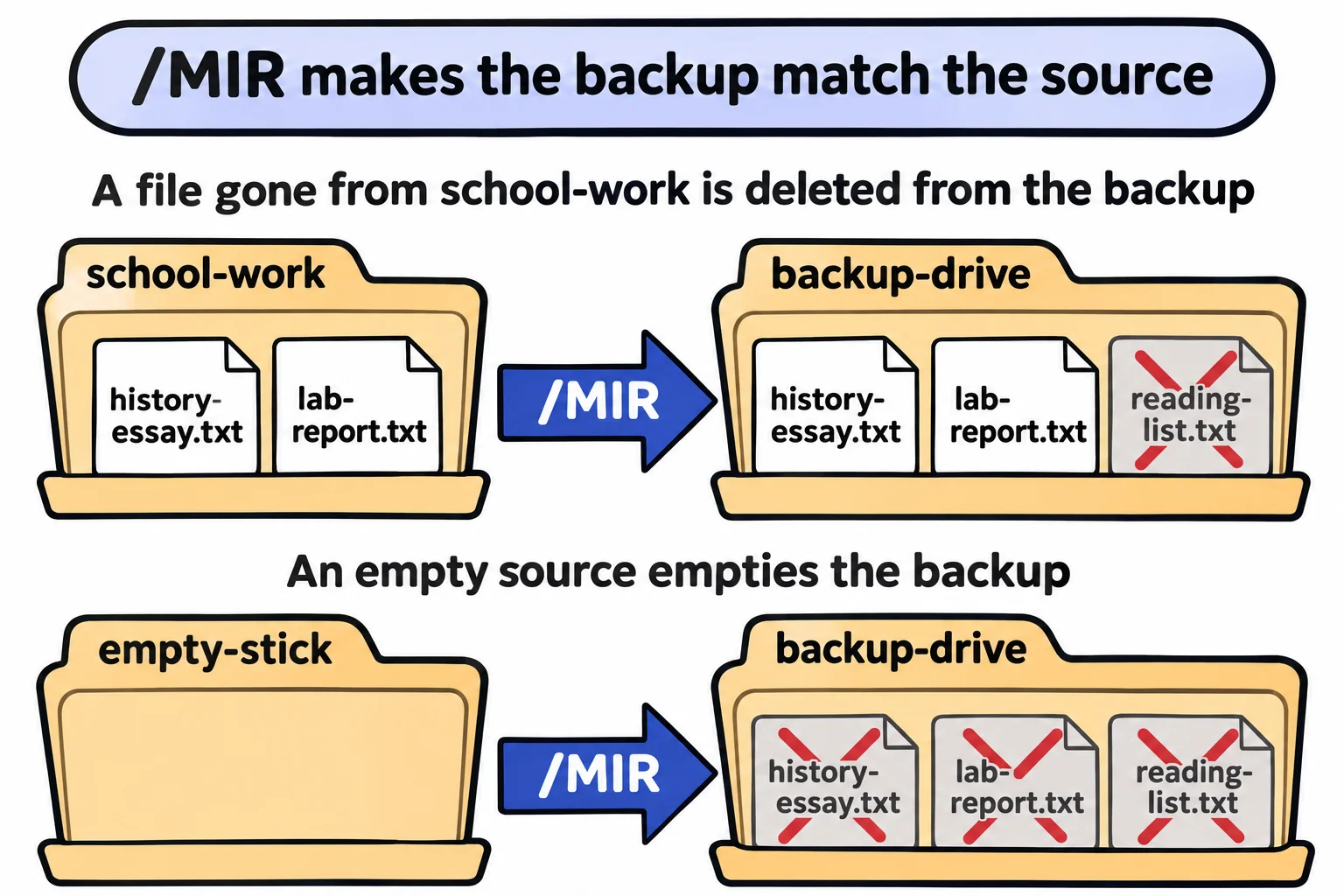
- /MIR makes the backup a mirror: a file gone from the source is deleted from the backup. An empty or wrong source empties the backup.
- /L only lists what robocopy would copy and delete, and changes nothing. Rehearse every new /MIR line with it.
- robocopy's exit code: 0 nothing to copy, 1 files copied, 2 extra files, 8 or more something failed. Below 8 is success.
- In a script, /R:2 /W:5 replace robocopy's default of a million retries, 30 seconds apart.
Every Friday, Sam drags the school-work folder onto a USB stick. Windows asks "Replace or skip?" about files that haven't changed, copies the whole folder again to update three files, and a draft Sam deleted in September is still on the stick in November. Copy-Item has the same habits. Windows comes with a copier built for this job: robocopy, read "robo-copy", short for robust copy. IT techs use it to move whole file servers, and it sits inside a great many backup scripts. It's a program, not a cmdlet, so its options start with /, and it works the same in Windows PowerShell 5.1 and Command Prompt.
The first copy
Make the school work, and an empty backup-drive folder to play the USB stick:
New-Item -ItemType Directory -Force -Path "$HOME\terminal-practice\school-work\science", "$HOME\terminal-practice\school-work\math", "$HOME\terminal-practice\backup-drive" | Out-Null
Set-Content -Path "$HOME\terminal-practice\school-work\history-essay.txt" -Value 'Why the Town Library Matters', 'Second draft, with the quotes fixed.'
Set-Content -Path "$HOME\terminal-practice\school-work\reading-list.txt" -Value 'Chapter 4 of the science book', 'Two poems for English class'
Set-Content -Path "$HOME\terminal-practice\school-work\science\lab-report.txt" -Value 'Lab 4: how fast does ice melt in salt water?'
Set-Content -Path "$HOME\terminal-practice\school-work\science\volcano.jpg" -Value '(a practice photo: the science fair volcano)'
Set-Content -Path "$HOME\terminal-practice\school-work\math\homework-week-10.txt" -Value 'Problems 1 to 20, page 112'
Then copy, source first and destination second, as with Copy-Item:
Set-Location "$HOME\terminal-practice"
robocopy school-work backup-drive\school-work /E /NP
-------------------------------------------------------------------------------
   ROBOCOPY     ::     Robust File Copy for Windows
-------------------------------------------------------------------------------

  Started : Monday, November 9, 2026 8:14:15 AM
   Source : C:\Users\Sam\terminal-practice\school-work\
     Dest : C:\Users\Sam\terminal-practice\backup-drive\school-work\

    Files : *.*

  Options : *.* /S /E /DCOPY:DA /COPY:DAT /NP /R:1000000 /W:30

------------------------------------------------------------------------------

          New Dir          2    C:\Users\Sam\terminal-practice\school-work\
            New File                  68        history-essay.txt
            New File                  60        reading-list.txt
          New Dir          1    C:\Users\Sam\terminal-practice\school-work\math\
            New File                  28        homework-week-10.txt
          New Dir          2    C:\Users\Sam\terminal-practice\school-work\science\
            New File                  46        lab-report.txt
            New File                  46        volcano.jpg

------------------------------------------------------------------------------

               Total    Copied   Skipped  Mismatch    FAILED    Extras
    Dirs :         3         3         0         0         0         0
   Files :         5         5         0         0         0         0
   Bytes :       248       248         0         0         0         0
   Times :   0:00:00   0:00:00                       0:00:00   0:00:00


   Speed :              62,000 Bytes/sec.
   Speed :               3.548 MegaBytes/min.
   Ended : Monday, November 9, 2026 8:14:15 AM
/E takes every folder inside, empty ones too, and /NP (no progress) leaves out a percentage for each file, which keeps a log readable. The report is a header, a line for each folder (with how many files it holds) and file (with its size in bytes), and a summary table. Your dates and speeds will be your own.
Only what changed
Change one file, add one, and run again. /NJH (no job header) leaves out the header you've already read:
Add-Content -Path school-work\science\lab-report.txt -Value 'Result: the salt water melted it twice as fast.'
Set-Content -Path school-work\math\homework-week-11.txt -Value 'Problems 1 to 15, page 120'
robocopy school-work backup-drive\school-work /E /NP /NJH
$LASTEXITCODE
                           2    C:\Users\Sam\terminal-practice\school-work\
                           2    C:\Users\Sam\terminal-practice\school-work\math\
            New File                  28        homework-week-11.txt
                           2    C:\Users\Sam\terminal-practice\school-work\science\
            Newer                     95        lab-report.txt

------------------------------------------------------------------------------

               Total    Copied   Skipped  Mismatch    FAILED    Extras
    Dirs :         3         0         3         0         0         0
   Files :         6         2         4         0         0         0
   Bytes :       325       123       202         0         0         0
   Times :   0:00:00   0:00:00                       0:00:00   0:00:00


   Speed :              61,500 Bytes/sec.
   Speed :               3.519 MegaBytes/min.
   Ended : Monday, November 9, 2026 8:14:15 AM

1
Two copied, four skipped: robocopy compares each file's size and date with the backup's copy and leaves matching files alone. Run it once more and it copies nothing, in a moment, whether the folder holds six files or sixty thousand. The 1 is its exit code; more on that below.
/MIR with care, and /L first
/E never deletes, so a file you delete from school-work stays in the backup forever. /MIR (mirror) is /E plus one more job: it deletes from the backup whatever is no longer in the source, so the backup becomes a mirror. Deleting is exactly why to rehearse first, with /L (list only), which lists what robocopy would do and changes nothing. Delete one practice file and rehearse:
Remove-Item school-work\reading-list.txt
robocopy school-work backup-drive\school-work /MIR /NP /NJH /L
$LASTEXITCODE
Test-Path backup-drive\school-work\reading-list.txt
                           1    C:\Users\Sam\terminal-practice\school-work\
          *EXTRA File                 60        reading-list.txt
                           2    C:\Users\Sam\terminal-practice\school-work\math\
                           2    C:\Users\Sam\terminal-practice\school-work\science\

------------------------------------------------------------------------------

               Total    Copied   Skipped  Mismatch    FAILED    Extras
    Dirs :         3         0         3         0         0         0
   Files :         5         0         5         0         0         1
   Bytes :       265         0       265         0         0        60
   Times :   0:00:00   0:00:00                       0:00:00   0:00:00
   Ended : Monday, November 9, 2026 8:14:15 AM

2
True
*EXTRA File means "in the backup, not in the source": with /MIR, it gets deleted. The file is still there, because /L only looked. The same line without /L deletes it. Now see why the rehearsal matters. A USB stick that comes up empty, or a typo that names the wrong folder, and /MIR makes the backup match nothing:
New-Item -ItemType Directory -Force -Path empty-stick | Out-Null
robocopy empty-stick backup-drive\school-work /MIR /NP /NJH /L
                           0    C:\Users\Sam\terminal-practice\empty-stick\
        *EXTRA Dir        -1    C:\Users\Sam\terminal-practice\backup-drive\school-work\math\
          *EXTRA File                 28        homework-week-10.txt
          *EXTRA File                 28        homework-week-11.txt
        *EXTRA Dir        -1    C:\Users\Sam\terminal-practice\backup-drive\school-work\science\
          *EXTRA File                 95        lab-report.txt
          *EXTRA File                 46        volcano.jpg
          *EXTRA File                 68        history-essay.txt

------------------------------------------------------------------------------

               Total    Copied   Skipped  Mismatch    FAILED    Extras
    Dirs :         1         0         1         0         0         2
   Files :         0         0         0         0         0         5
   Bytes :         0         0         0         0         0       265
   Times :   0:00:00   0:00:00                       0:00:00   0:00:00
   Ended : Monday, November 9, 2026 8:14:15 AM
Every file in the backup, listed for deleting. So: rehearse each new /MIR line with /L, keep the source first, and in a script check that the source is there and not empty before mirroring.
Exit codes: below 8 is success
Most programs end with 0 for "it worked" (Did It Work? $?, $LASTEXITCODE, && and ||). robocopy's number says what it did, and only 8 and up mean trouble:
| Exit code | Means |
|---|---|
| 0 | Nothing needed copying |
| 1 | Files were copied |
| 2 | Extra files in the destination (deleted by /MIR, or listed by /L) |
| 3 | 1 and 2 together; 4 to 7 add mismatched files to the mix |
| 8 | Some files or folders couldn't be copied |
| 16 | A serious error: nothing was copied |
A typo in the source is a 16:
robocopy school-wrok backup-drive\school-work /MIR /NP /NJH
$LASTEXITCODE
2026/11/09 08:14:15 ERROR 2 (0x00000002) Accessing Source Directory C:\Users\Sam\terminal-practice\school-wrok\
The system cannot find the file specified.

16
A scheduled task treats any number but 0 as a failure, so a script turns robocopy's answer into its own, right after robocopy runs:
robocopy $Source $Destination /MIR /R:2 /W:5 /NP
if ($LASTEXITCODE -ge 8) { exit 1 } else { exit 0 }
/R:2 /W:5 (read "retry twice, wait five seconds") matter in a script too. The first report's Options line showed robocopy's defaults, /R:1000000 /W:30: a file another program holds open would be tried a million times, 30 seconds apart, which is almost a year. A Mac or Linux has no robocopy; backups there use other tools.
Check yourself
2 questions to try on the lesson page.
So what
Copy only what changed, mirror only after a rehearsal, and read the exit code the way robocopy means it: that's a backup you can schedule and stop thinking about.