Did It Work? `$?`, `$LASTEXITCODE`, `&&` and `||`
$? says whether the last command worked, $LASTEXITCODE holds the number a program ended with (0 when it worked), && runs the next command only if the last one worked, and || runs it only if the last one failed.
Apprentice · PowerShell · Updated
After this lesson you can
- Tell whether the last command worked with $?, and read a program's exit code with $LASTEXITCODE
- Chain commands with && to run the next only if one worked, and || to run it only if one failed
Key takeaways
- $? is True when the last command worked and False when it didn't. It changes after every command, so check it right away.
- $? is about whether a command worked, not what it answered: Test-Path can answer False and still have worked.
- A program ends with an exit code, 0 when it worked, which $LASTEXITCODE holds until the next program runs.
- a && b runs b only if a worked: read && as "and then, if it worked". a || b runs b only if a failed: read || as "or else".
- Windows PowerShell 5.1 has $? and $LASTEXITCODE, but not && or ||.
Your camera's memory card is full. Before you wipe it, every photo has to be safe on the laptop, so you copy them, glance at the screen, and wipe the card. But what if the copy failed, a typo in a folder name, and the red line scrolled past while you looked away? When one step depends on another, let PowerShell do the checking. Every command reports whether it worked, and two marks make the next command wait for the answer. People who look after computers chain steps this way every day ("back up, and only if that worked, install the update"), and every script that runs at night while nobody watches depends on it.
The examples use the photo-book folder from Keyboard Shortcuts at the Prompt.
Did the last command work? `$?`
$? (read "dollar question mark") is a variable PowerShell fills in for you, an automatic variable. It holds the answer about the last command: True if it worked, False if it didn't. A yes-or-no value like that is a Boolean (Is It There? Test-Path).
Set-Location ~\terminal-practice\photo-book
Get-ChildItem edited\2026\08-august\birthday -Name
$?
IMG_0815-edit.jpg
IMG_0817-edit.jpg
True
Get-ChildItem edited\2026\06-june
$?
Get-ChildItem: Cannot find path 'C:\Users\Sam\terminal-practice\photo-book\edited\2026\06-june' because it does not exist.
False
$? is about whether the command worked, not about what it answered. Test-Path answers False for a missing folder, and that answer is the job done:
Test-Path edited\2026\06-june
$?
False
True
$? changes after every command, even one that only reads a variable, so check it right away.
Programs answer with a number: `$LASTEXITCODE`
Programs that aren't PowerShell commands, such as robocopy, ping or git, finish with a number instead: their exit code. 0 means it worked; any other number means it didn't, and the number can say why. PowerShell keeps the last program's number in $LASTEXITCODE (read "dollar last exit code").
where.exe is a small Windows program that finds where a program lives: a quick way to ask "is it installed?" Write it with .exe, because in PowerShell where on its own is a short name for Where-Object.
where.exe robocopy
$LASTEXITCODE
C:\Windows\System32\Robocopy.exe
0
where.exe rsync
$LASTEXITCODE
INFO: Could not find files for the given pattern(s).
1
robocopy is Windows' own copying program for backups. rsync, a backup program from Mac and Linux, isn't here, so where.exe ended with 1. Right after a program, $? follows its number: False for anything but 0. $LASTEXITCODE changes only when a program runs; PowerShell's own commands leave it as it was. On a Mac or Linux, which does the job of where.exe, with the same exit codes.
And then, if it worked: `&&`
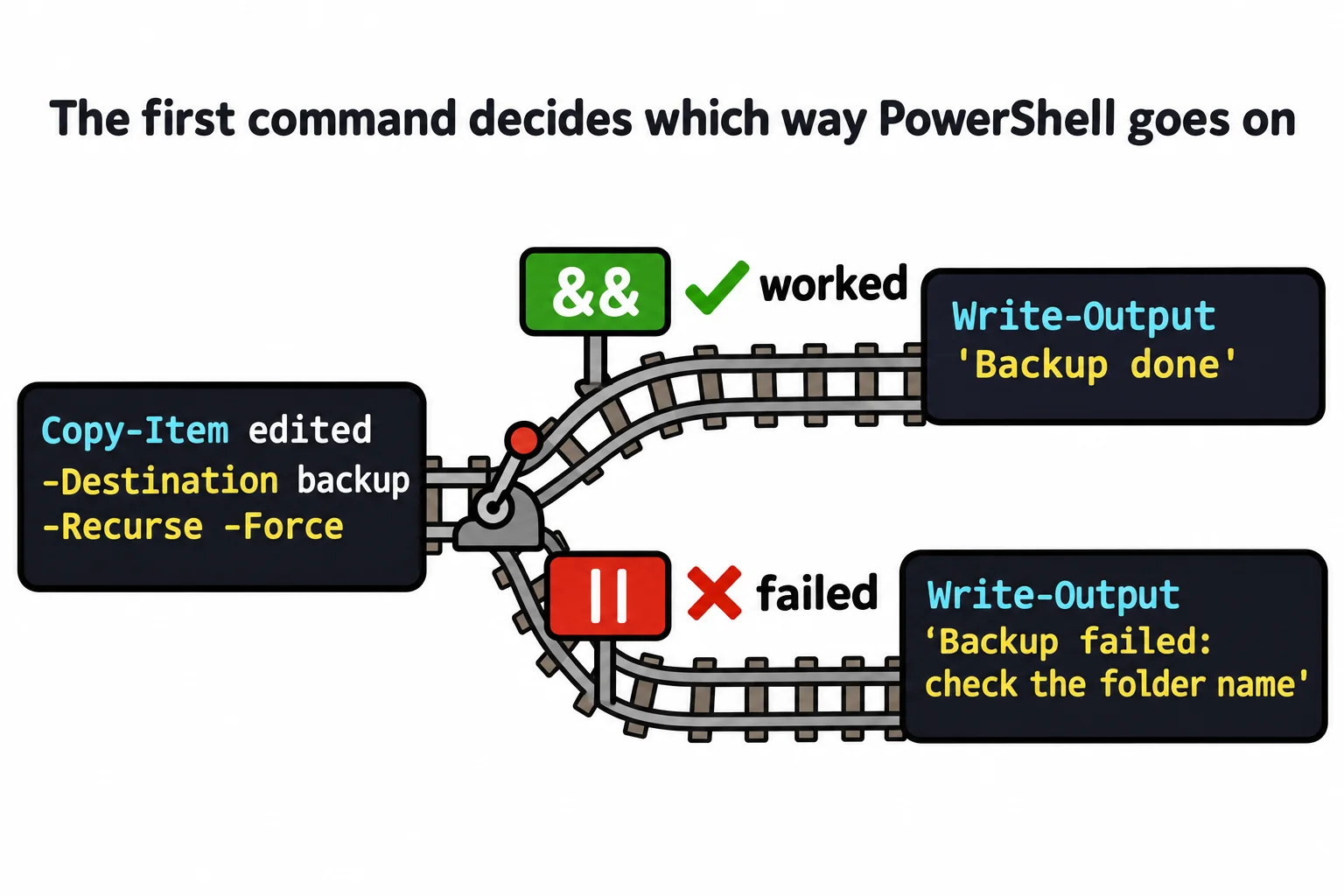
&& (read "and then, if it worked") joins two commands on one line: the second runs only if the first worked. That's the memory card's rule, written down. Copy the edited photos into the backup folder, and only then say so:
Copy-Item edited -Destination backup -Recurse -Force && Write-Output 'Backup done'
Backup done
-Recurse copies the folder with everything in it, and -Force lets a second run copy over the first, so the line is safe to run again. Write-Output prints its text. Now the same line with a slip of the keyboard:
Copy-Item edtied -Destination backup -Recurse -Force && Write-Output 'Backup done'
Copy-Item: Cannot find path 'C:\Users\Sam\terminal-practice\photo-book\edtied' because it does not exist.
No "Backup done", so you'd know not to wipe the card. Compare a semicolon, ;, which puts two commands on one line and runs the second whatever happened:
Copy-Item edtied -Destination backup -Recurse -Force; Write-Output 'Backup done'
Copy-Item: Cannot find path 'C:\Users\Sam\terminal-practice\photo-book\edtied' because it does not exist.
Backup done
That's a message you'd believe. Use && whenever the second step depends on the first.
Or else: `||`
|| (read "or else") works the other way around: the second command runs only if the first one failed. Use it for a warning or a plan B:
Copy-Item edtied -Destination backup -Recurse -Force || Write-Output 'Backup failed: check the folder name'
Copy-Item: Cannot find path 'C:\Users\Sam\terminal-practice\photo-book\edtied' because it does not exist.
Backup failed: check the folder name
Together, && and || are PowerShell's pipeline chain operators. They go by $?, so they ask whether a command worked, not what it answered:
Test-Path backup\photos || Write-Output 'No backup yet'
False
Test-Path worked, so "or else" never happened. To act on an answer, you need if, which Module 6 teaches.
Windows PowerShell 5.1 has $? and $LASTEXITCODE, but not && or ||: it stops with The token '&&' is not a valid statement separator in this version. There, run the second command on its own line after you've checked $?.
Try it in the terminal
Terminal Quest: The Clockwork Workshop, goal 7: played right on the lesson page.
Ada's clock tower bell has to ring at noon, but only once the gearbox is turning. Run the gearbox, and only if it works, ring the bell.
Check yourself
2 questions to try on the lesson page.
So what
$? and $LASTEXITCODE tell you whether something worked; && and || let the next step depend on it. That's how a careful person works, written into one line.