Arrays
An array keeps a list in numbered slots, counted from 0: songs=("Highway Tea" "Window Down") makes one, ${songs[0]} reads a slot, ${#songs[@]} counts the items, songs+=( ) adds one, "${songs[@]}" hands on every item in one piece, and mapfile -t fills an array from a file's lines.
Journeyman · Unix · Linux · Updated
After this lesson you can
- Make an array, read one item by its index, count its items and add to it
- Loop over every item of an array with "${songs[@]}", and fill an array from a file with mapfile -t
Key takeaways
- An array is a list in numbered slots, counted from 0: ${songs[0]} is the first item, and ${songs[-1]} the last.
- ${#songs[@]} counts the items, and songs+=("Home by Dark") adds one at the end.
- "${songs[@]}", in double quotes, is every item, each in one piece. Without the quotes, titles fall apart at their spaces.
- mapfile -t songs < songs.txt fills an array with a file's lines, one line a slot; -t cuts off the newline at the end of each.
- $((RANDOM % ${#songs[@]})) is a random slot number, so it picks a random song.
You can't decide what to play, so you press shuffle and let the phone pick. To build a shuffle of your own, a script needs a list: every song, each title in one piece, that it can count, number and pick from at random. So far a variable has held one value, and a playlist is many. Scripts at work need lists too: an administrator's script goes through a list of servers to check or new users to set up, and spend will keep its categories in one. This lesson gives your scripts lists.
One variable can't hold a list
Go into the shuffler folder (mkdir -p ~/terminal-practice/shuffler && cd ~/terminal-practice/shuffler), and try keeping three titles in one variable:
songs="Highway Tea, Paper Lanterns, Window Down"
for song in $songs; do
  echo "$song"
done
Highway
Tea,
Paper
Lanterns,
Window
Down
Without quotes, bash split the text at every space, the word splitting you met in Quotes: Double, Single and None. With quotes, the loop gets one long item instead. Either way, the variable doesn't know where one title ends and the next begins.
An array: numbered slots
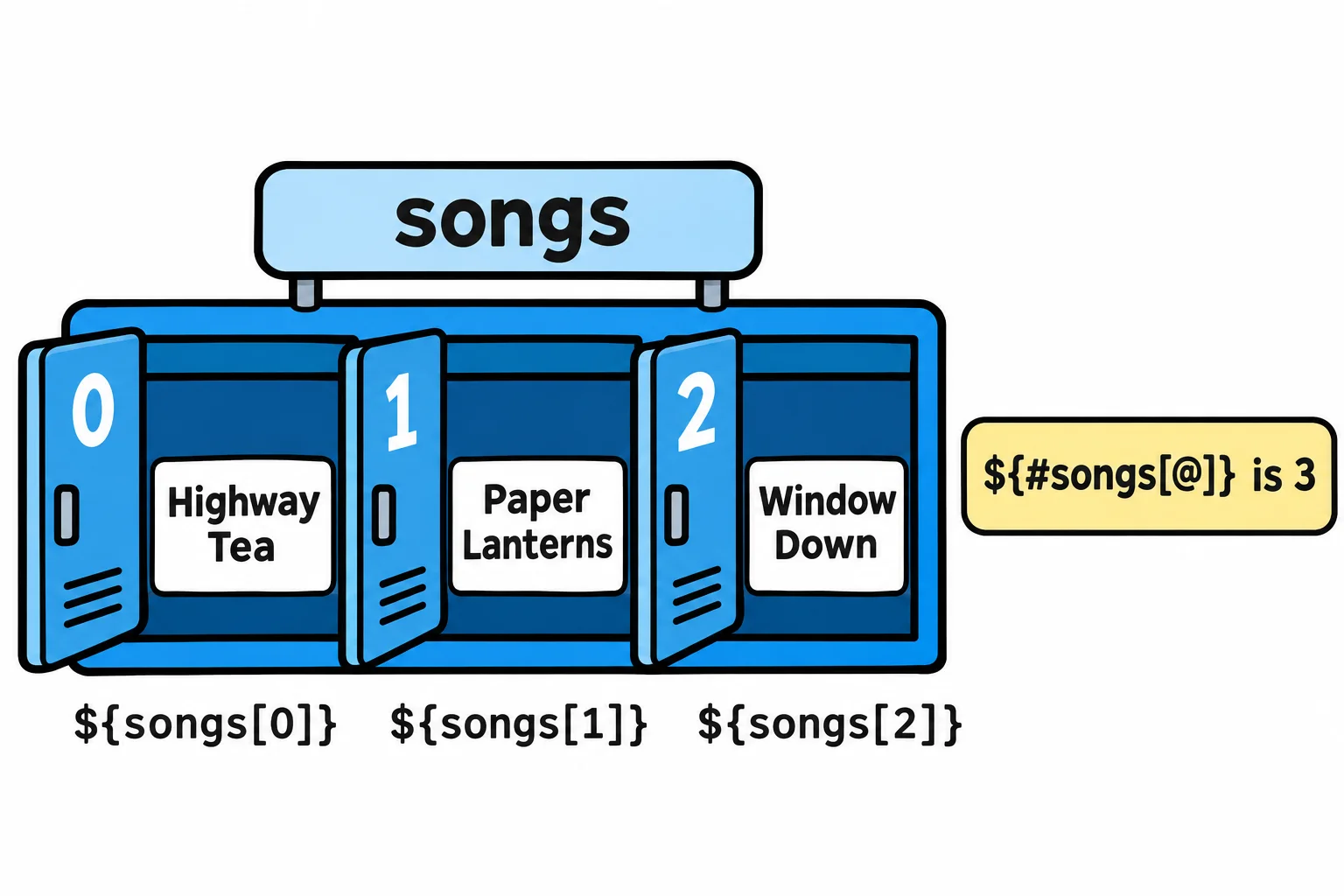
Think of the lockers at a swimming pool: a row of slots, each with a number, and you open one by its number. An array is a variable like that:
songs=("Highway Tea" "Paper Lanterns" "Window Down")
echo "${songs[0]}"
echo "${songs[2]}"
echo "${#songs[@]}"
Highway Tea
Window Down
3
The brackets, ( ), list the items, each title in quotes so its spaces stay. A slot's number is its index, and bash counts from 0: the index says how many slots from the start, so the first is 0 and the third is 2. Read ${songs[0]} as "songs, item zero", and ${#songs[@]} (the # is read "number of") as "the number of songs". ${songs[-1]} is the last item, however many there are.
The braces are required. $songs[1] prints Highway Tea[1]: without braces, bash reads $songs, which is item 0, and then the text [1].
Every song, each in one piece
"${songs[@]}" (read "every item of songs") is the whole list, and in double quotes each item stays in one piece, the same as "$@" in Arguments: $1, $# and "$@". += adds items at the end:
songs+=("Home by Dark")
for song in "${songs[@]}"; do
  echo "Now playing: $song"
done
Now playing: Highway Tea
Now playing: Paper Lanterns
Now playing: Window Down
Now playing: Home by Dark
Take the double quotes away, and the titles fall apart again: the loop prints nine lines, from Now playing: Highway to Now playing: Dark. Keep the quotes, every time.
To number the songs, loop over the slot numbers instead. "${!songs[@]}" (read "the indexes of songs") is 0, 1, 2, 3:
for i in "${!songs[@]}"; do
  echo "$((i + 1)). ${songs[$i]}"
done
1. Highway Tea
2. Paper Lanterns
3. Window Down
4. Home by Dark
From a file, and one at random
A real playlist lives in a file, one title a line. Make one, then fill an array from it with mapfile:
printf '%s\n' 'Highway Tea' 'Paper Lanterns' 'Window Down' 'Gas Station Sunrise' 'Last Exit Waltz' 'Home by Dark' > songs.txt
mapfile -t songs < songs.txt
echo "${#songs[@]} songs"
echo "${songs[3]}"
6 songs
Gas Station Sunrise
mapfile puts each line of its input in the next slot, and -t cuts off the newline at the end of each line; without it, every title would carry an invisible line break. It's the short way to write a while read loop that adds each line (Line by Line: while read).
Now the shuffler's first trick. $RANDOM is a new whole number from 0 to 32767 every time you read it, and % gives the remainder after dividing (Values from Commands: $( ) and $(( ))). The remainder after dividing by 6 is always 0 to 5: exactly the slot numbers.
pick=$((RANDOM % ${#songs[@]}))
echo "Now playing: ${songs[$pick]}"
pick=$((RANDOM % ${#songs[@]}))
echo "Now playing: ${songs[$pick]}"
Now playing: Paper Lanterns
Now playing: Home by Dark
Yours will pick different songs: that's the point.
On a Mac, zsh at the prompt counts array slots from 1, not 0, and the Mac's own bash 3.2 has no mapfile. Try this lesson's lines in a script, or type bash first to get a prompt from bash 5 (Setup: The Terminal on a Mac).
Check yourself
2 questions to try on the lesson page.
So what
An array keeps a list with every item whole: count it, number it, loop over it, fill it from a file and pick from it at random, which is everything a shuffler, or any tool that handles more than one thing, needs from a list.