Associative Arrays: Lists with Names
An associative array finds each value by a name instead of a number: declare -A total makes one, total[chill]=15 stores a value under a name, "${!total[@]}" lists the names, and adding to total[$mood] inside a loop keeps a total for every category; it needs bash 4 or newer, which on a Mac means bash 5 from Homebrew.
Freelancer · Unix · Linux · Updated
After this lesson you can
- Store and look up values by name in an associative array made with declare -A
- Add up a total per category with an associative array, and loop over its keys with "${!total[@]}"
Key takeaways
- An associative array finds a value by its name, called its key: best[chill]="Window Down" stores a value, and ${best[chill]} reads it.
- declare -A total has to come first. Without it, bash makes a numbered array, and every name lands in slot 0.
- total[$mood]=$(( total[$mood] + minutes )) inside a loop keeps a total for every category the file has, even ones the script has never heard of.
- "${!total[@]}" is every key, in no set order, so pipe the loop's output to sort.
- Associative arrays need bash 4 or newer. A Mac's own bash is 3.2, so scripts run in bash 5 from Homebrew, found by #!/usr/bin/env bash.
How many minutes of each mood does your playlist have: enough chill songs for the drive home? The same question runs your money at the end of the month: how much went on food, how much on the bus, how much on fun? Some people budget with envelopes, one labeled for each kind of spending, and drop each receipt's amount into the right one. An array with numbered slots can't do that, because the answer is a number for each name. This lesson's list finds its slots by name. It's how spend will work out its report, one total per category, and how an administrator's script counts errors per server or logins per user.
The long way: a variable for each mood
In the shuffler folder (mkdir -p ~/terminal-practice/shuffler && cd ~/terminal-practice/shuffler), make a playlist where each line is a mood, the minutes, then the title:
printf '%s\n' 'chill 4 Highway Tea' 'upbeat 3 Paper Lanterns' 'chill 5 Window Down' 'upbeat 4 Gas Station Sunrise' 'singalong 5 Rainy Tuesday' 'chill 6 Last Exit Waltz' 'upbeat 3 Home by Dark' > playlist.txt
With what you know so far, you'd keep a variable for each mood and a case to pick the right one (Menus and Choices: case and select):
chill_total=0
upbeat_total=0
while read -r mood minutes title; do
  case $mood in
    chill) chill_total=$((chill_total + minutes)) ;;
    upbeat) upbeat_total=$((upbeat_total + minutes)) ;;
  esac
done < playlist.txt
echo "chill: $chill_total, upbeat: $upbeat_total"
chill: 15, upbeat: 10
Rainy Tuesday is missing, with no error: the script only knows the moods written into it. Add a song with a new mood, and you have to edit the script again.
An associative array: slots with names
An associative array is a row of envelopes with labels instead of numbers. Each label is a key, and what's in the envelope is its value, so each slot holds a key-value pair. Make one with declare -A (read "declare associative"), then store and read values by key. Here's your favorite song for each mood:
declare -A best
best[chill]="Window Down"
best[upbeat]="Paper Lanterns"
echo "${best[chill]}"
echo "${#best[@]}"
echo "${!best[@]}"
Window Down
2
chill upbeat
${#best[@]} counts the pairs, as it counted songs in Arrays, and ${!best[@]} (read "the keys of best") is every key. A key that isn't there reads as empty, so ${best[party]} prints nothing.
declare -A has to come first. Skip it, and bash makes an ordinary numbered array, reads chill and upbeat as the number 0, and puts both values in the same slot:
favorite[chill]="Window Down"
favorite[upbeat]="Paper Lanterns"
echo "${favorite[chill]}"
Paper Lanterns
Inside a function, declare -A makes the array the function's own, the way local does (Local Variables and Getting a Value Back).
A total for every mood
Now the playlist, with no mood written into the script:
declare -A total
while read -r mood minutes title; do
  total[$mood]=$(( total[$mood] + minutes ))
done < playlist.txt
for mood in "${!total[@]}"; do
  echo "$mood: ${total[$mood]} minutes"
done
singalong: 5 minutes
chill: 15 minutes
upbeat: 10 minutes
Read total[$mood] as "the envelope labeled with this line's mood". The first time a mood comes up, its slot is empty, and an empty value counts as 0 inside $(( )), so the first song starts its total. singalong came along by itself.
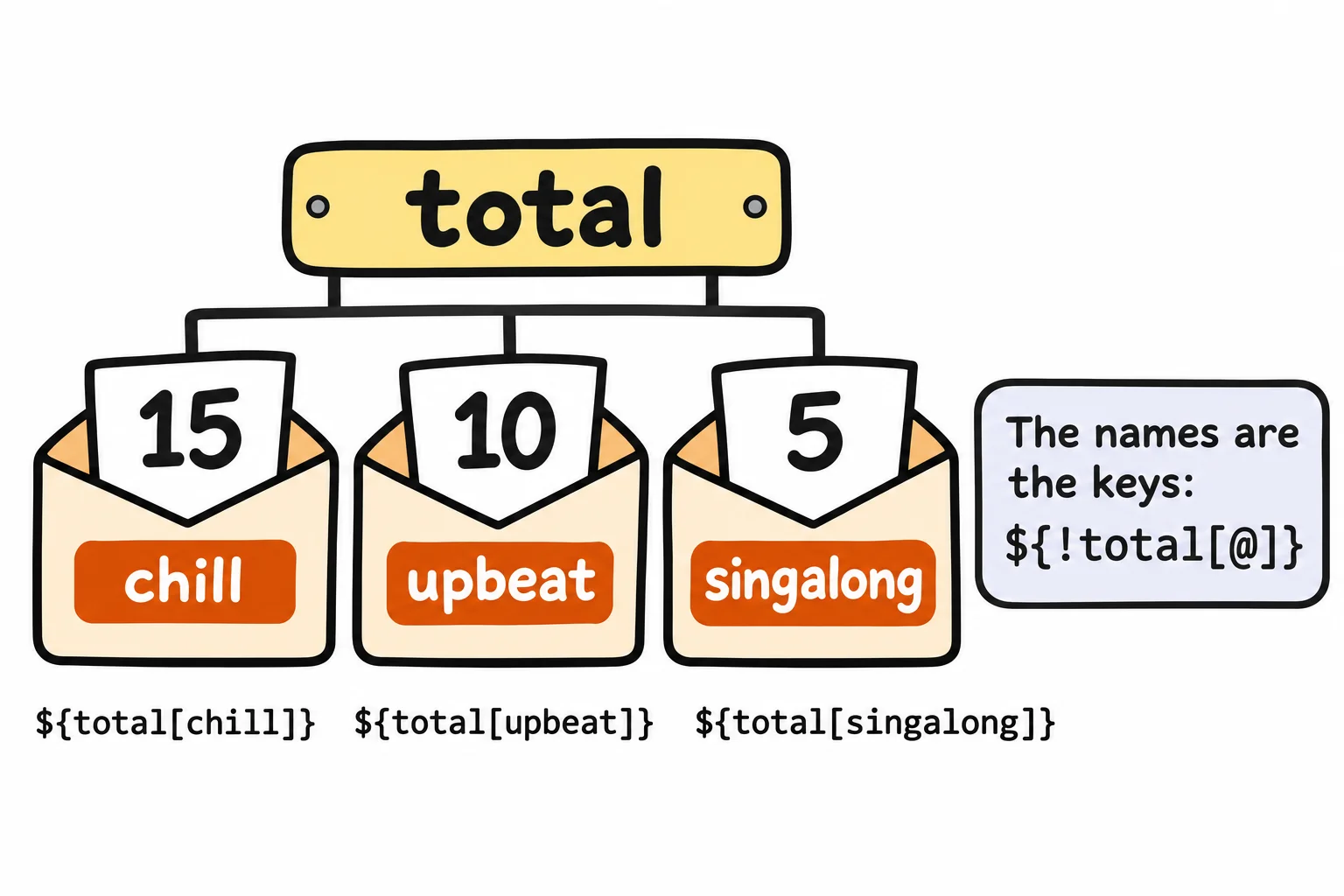
The moods came out in neither the file's order nor alphabetical order: bash keeps keys in an order of its own. When order matters, pipe the loop to sort by changing its last line to done | sort:
chill: 15 minutes
singalong: 5 minutes
upbeat: 10 minutes
The same lines add up money. Each line of spending.txt is a category and an amount in whole dollars, since $(( )) adds whole numbers only:
printf '%s\n' 'food 12' 'bus 3' 'food 9' 'fun 25' 'food 7' 'bus 3' > spending.txt
declare -A spent
while read -r category dollars; do
  spent[$category]=$(( spent[$category] + dollars ))
done < spending.txt
for category in "${!spent[@]}"; do
  echo "$category: ${spent[$category]} dollars"
done | sort
bus: 6 dollars
food: 28 dollars
fun: 25 dollars
For amounts with cents, Columns and Totals: awk does the adding.
Why a Mac needs bash 5
declare -A and mapfile came in bash 4, in 2009. A Mac's own bash is 3.2, from 2006, and there declare -A stops with an error saying -A is an invalid option. That's why the setup in Setup: The Terminal on a Mac installed bash 5 with Homebrew, and why every script starts with #!/usr/bin/env bash, which runs the first bash on your PATH: Homebrew's, once it's installed. Never #!/bin/bash on a Mac: that's always the old one. Check which bash your scripts get:
bash --version | head -n 1
GNU bash, version 5.3.9(1)-release (x86_64-pc-linux-gnu)
Yours should say version 5 or newer; the part in brackets names your own system. zsh at a Mac's prompt has associative arrays too, made with typeset -A, but writes some of these lines differently, so try them in a script, or after typing bash.
Check yourself
2 questions to try on the lesson page.
So what
An associative array is a set of labeled envelopes: drop each value into the one with its name, and you get a total for every category in the file, which is the heart of every report, from a playlist's moods to a month's spending.