Patterns: Regular Expressions for grep
A regular expression describes the shape of the text you want instead of the exact words, so grep can find every phone number or every date in a file; this lesson builds patterns from . and [ ], ^ and $, * and, with grep -E, + and |.
Journeyman · Unix · Linux · Updated
After this lesson you can
- Write a grep pattern with ., [ ], ^, $ and *, building it a piece at a time
- Use grep -E with + to match one or more of something, and with an or bar to match one of several words
Key takeaways
- A regular expression describes the shape of text. . is any one character and [0-9] is any one digit.
- ^ means the start of the line and $ the end, so ^Action finds lines that begin with Action.
- repeats the thing before it any number of times, even none, so .* is anything at all. It isn't the * of file names.
- With grep -E, + means one or more of the thing before it and | means or.
- Put patterns in single quotes, so the shell passes every symbol to grep unchanged.
You run a book club, and the sign-up sheet and a year of meeting notes are text files. You need everyone's phone number for a call list, but you don't know the numbers: that's why you're looking. grep 555-0142 only finds a number you already have. What you do know is the shape of a phone number: three digits, something in between, four digits. A regular expression, or regex for short, is a way of writing that shape so grep can find every piece of text that has it. Data analysts use them to pull dates out of reports, and web developers use the same patterns to check that an email address looks right.
Set up the club folder
Copy these lines into your terminal. They make ~/terminal-practice/club, with the sign-up sheet and four meetings' notes, and are safe to run again:
mkdir -p ~/terminal-practice/club/notes && cd ~/terminal-practice/club
printf 'Maya Chen      555-0142   joined 2025-03-08\nDiego Ramos    555-0187   joined 2025-06-21\nSam Patel      ask Maya   joined 2026-01-10\nInes Duarte    555.0119   joined 2026-02-14\nLee Park       555 0163   joined 2026-04-02\nRosa Lind      555-0170   joined 2026-09-17\n' > members.txt
printf 'Riverside Book Club, 2026-09-03\nBook: The Lost Canal\nAction: Maya books the library room for 2026-09-17\nAction: Diego brings snacks\nWhat do we read next?\n' > notes/2026-09-03.txt
printf 'Riverside Book Club, 2026-09-17\nBook: Night Skies\nNew member: Rosa Lind, 555-0170\nAction: Rosa sends the reading list\nWho hosts in October?\n' > notes/2026-09-17.txt
printf 'Riverside Book Club, 2026-10-01\nBook: Salt and Sea\nReminder: every Action is due by the next meeting\nAction: Ines picks the next three books\nCan we meet at the cafe?\n' > notes/2026-10-01.txt
printf 'Riverside Book Club, 2026-11-05\nBook: Winter Stories\nDiego has a new number: 555-0193\nAction: Sam books the room for 2026-11-19\n' > notes/2026-11-05.txt
ls notes
2026-09-03.txt 2026-09-17.txt 2026-10-01.txt 2026-11-05.txt
One character at a time: . and [ ]
Build a pattern a piece at a time, checking each piece. Start with what you know: every number begins 555, then a dash.
grep '555-0' members.txt
Maya Chen      555-0142   joined 2025-03-08
Diego Ramos    555-0187   joined 2025-06-21
Rosa Lind      555-0170   joined 2026-09-17
Three, but Ines wrote a dot and Lee a space. In a pattern, . (read "dot") means any one character, so 555.0 matches all three ways of writing it:
grep '555.0' members.txt
Maya Chen      555-0142   joined 2025-03-08
Diego Ramos    555-0187   joined 2025-06-21
Ines Duarte    555.0119   joined 2026-02-14
Lee Park       555 0163   joined 2026-04-02
Rosa Lind      555-0170   joined 2026-09-17
Now the digits. [0-9] (read "any one of 0 to 9") matches one digit, the same brackets as in Wildcards: *, ? and [ ]. Brackets around a list of characters make a character class: [aeiou] is any one vowel. Write one class for every digit you expect, and the pattern is the shape of any phone number:
grep -r '[0-9][0-9][0-9].[0-9][0-9][0-9][0-9]' notes
notes/2026-09-17.txt:New member: Rosa Lind, 555-0170
notes/2026-11-05.txt:Diego has a new number: 555-0193
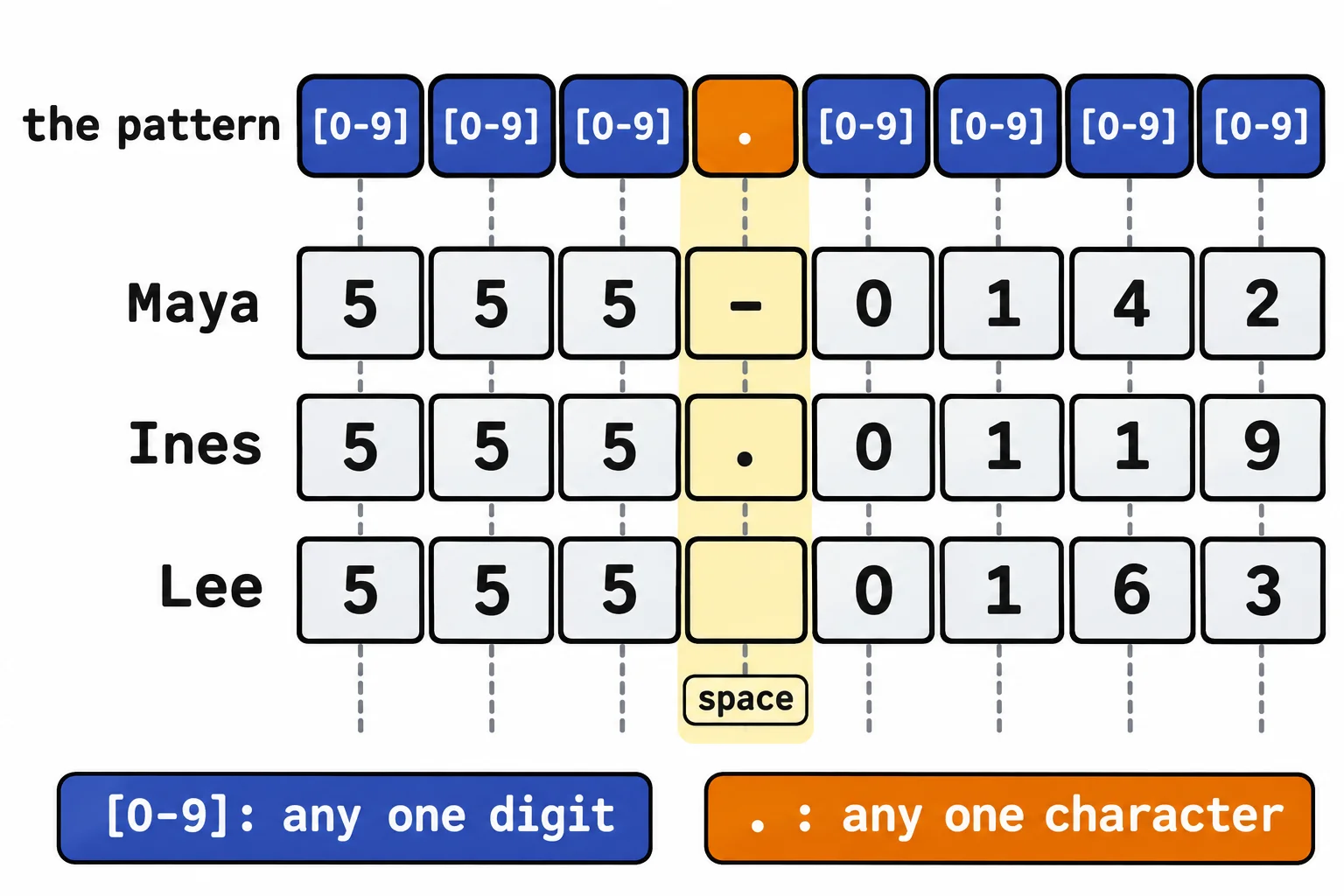
Two numbers from the notes that weren't on the sheet. The single quotes matter: inside them the shell changes nothing, so the brackets reach grep as you typed them, rather than being matched against file names first.
Start and end: ^ and $
^ (read "caret", or "the start") pins a pattern to the start of the line. The notes put each task on a line that begins Action, but the word appears elsewhere too. Compare grep -r 'Action' notes with this:
grep -r '^Action' notes
notes/2026-09-17.txt:Action: Rosa sends the reading list
notes/2026-10-01.txt:Action: Ines picks the next three books
notes/2026-11-05.txt:Action: Sam books the room for 2026-11-19
notes/2026-09-03.txt:Action: Maya books the library room for 2026-09-17
notes/2026-09-03.txt:Action: Diego brings snacks
The reminder line, every Action is due…, is gone: there, Action isn't at the start. $ (read "dollar", or "the end") pins a pattern to the end of the line, so ?$ finds every line that ends in a question mark, the questions still open:
grep -r '?