Debounce and Throttle
Debounce waits for a pause before it runs a function, throttle runs it at most once every so often, and an AbortController cancels a request that's out of date, so a busy page stays fast and shows the right answer.
Freelancer · JavaScript · Web Development · Updated
After this lesson you can
- Write a debounce function with a closure and a timer, and predict when the function it wraps runs
- Choose between debounce and throttle for an event such as typing, scrolling or resizing
- Cancel an out-of-date request with AbortController so an old answer never replaces a newer one
Key takeaways
- Debounce waits until the calls stop for a set time, then runs the function once, with the values from the last call.
- A debounce function is a closure that keeps one timer ID. Every call clears the old timer and starts a new one.
- Throttle runs a function at most once every so often while the calls keep coming, which fits scrolling and resizing.
- Use debounce when you want the result after a person pauses (a search box, an autosave), and throttle when you want updates while they move.
- An AbortController cancels a request that's out of date, so a slow, old answer never replaces a newer one.
Inkwell & Oak Books has 500 books and a search box that shows results as you type. Type harbor and you've pressed six keys, so a page that searches on every key sends six searches to the server: h, ha, har and so on, when you only wanted the last one. Multiply that by everyone shopping at once and the server slows down for all of them. Worse, the answers can come back out of order, and the results for h can arrive last and replace the right ones. Every search-as-you-type box, autosave and "load more as you scroll" page you'll ever build has this problem, and this lesson gives you the three small tools that fix it.
The elevator that waits for the last person
An elevator doesn't close its doors the moment one person steps in. It waits a few seconds. If someone else steps in, it starts waiting again. The doors close only when nobody has come in for a few seconds, and then the elevator makes one trip for everyone.
A search box should work the same way: wait until the person stops typing for a moment, then search once, for what's in the box. That pattern has a name: debounce. A debounced function waits until it hasn't been called for a set time (say 300 milliseconds), then runs once, with the values from the last call. The word comes from electronics: when you press a button, its metal contacts bounce and send several signals, and a "debounce" circuit turns them back into one press.
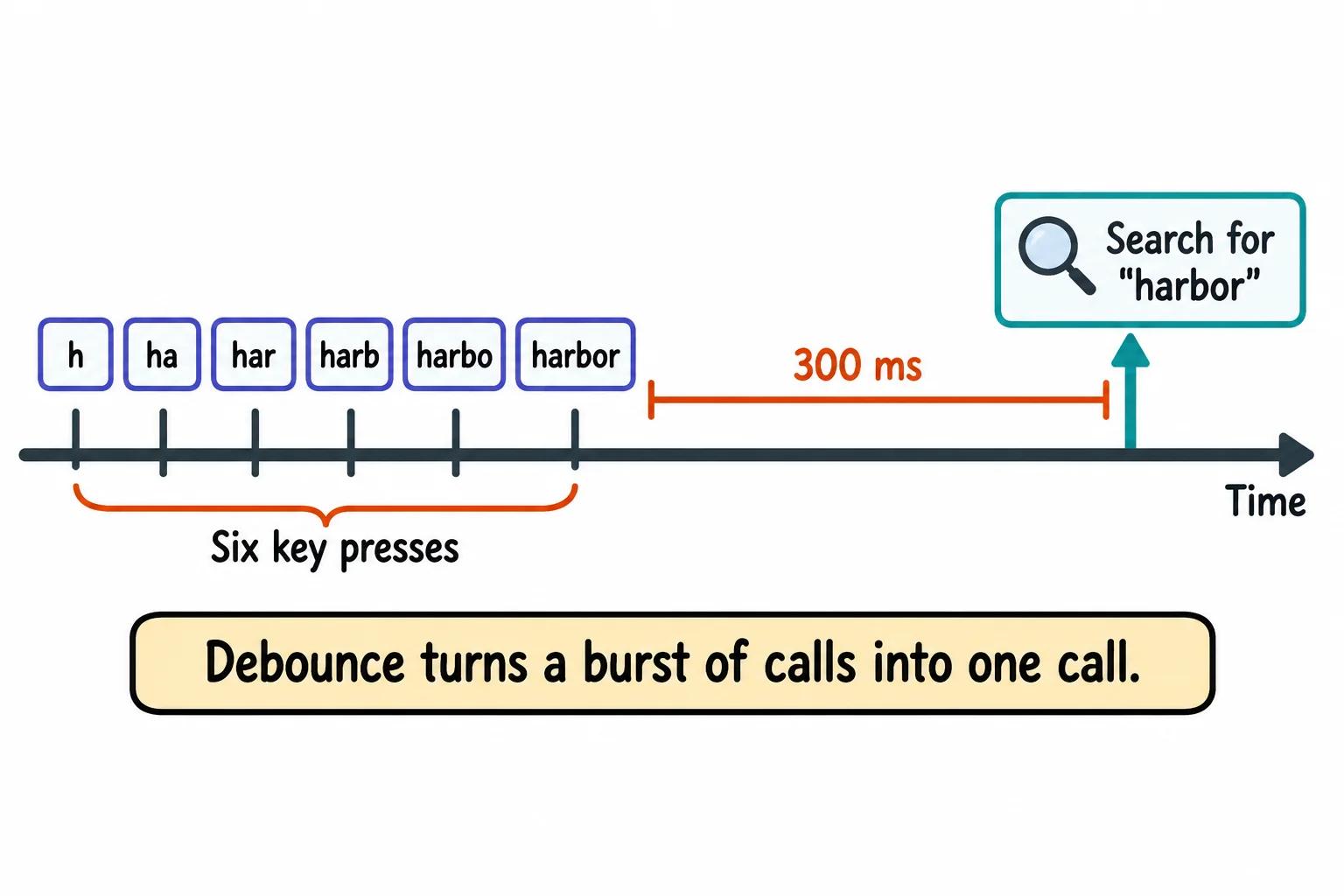
Writing debounce: a closure and a timer
debounce takes a function and a wait, and gives back a new function. The new function needs to remember one thing between calls: the ID of the timer it started last time. A variable inside debounce does that, because the function it returns is a closure (Closures: Functions That Remember): it keeps the variables it could see where it was made.
function debounce(fn, ms) {
  let timerId;
  return (...args) => {
    clearTimeout(timerId);
    timerId = setTimeout(() => fn(...args), ms);
  };
}

const search = (query) => console.log(`Searching the catalog for "${query}"`);
const searchAfterPause = debounce(search, 300);

searchAfterPause('h');
searchAfterPause('ha');
searchAfterPause('har');
searchAfterPause('harbor');
console.log('Typed four times');
Typed four times
Searching the catalog for "harbor"
Every call does two things: clearTimeout(timerId) cancels the timer from the call before (it does nothing when there isn't one yet), and setTimeout starts a new 300 ms timer. Only the last timer is ever left running, so search runs once, with 'harbor'. ...args is read "dot dot dot args": it collects every argument the call got into an array, and fn(...args) hands them all on (Spread and Rest).
On a page, you debounce the work and leave the listener as it is: input.addEventListener('input', () => searchAfterPause(input.value)). The listener still runs on every key; the search runs only after a pause.
Watching it wait
A pause starts a search, and typing again starts the wait over. This program types the way a person does: three keys, a pause of half a second, then three more. The times it prints are rounded to the nearest 100 ms.
function debounce(fn, ms) {
  let timerId;
  return (...args) => {
    clearTimeout(timerId);
    timerId = setTimeout(() => fn(...args), ms);
  };
}

const start = Date.now();
const elapsed = () => Math.round((Date.now() - start) / 100) * 100;
const searchAfterPause = debounce((query) => console.log(`${elapsed()} ms: search for "${query}"`), 300);

const keys = [[0, 'h'], [100, 'ha'], [200, 'har'], [700, 'harb'], [800, 'harbo'], [900, 'harbor']];
for (const [time, text] of keys) {
  setTimeout(() => searchAfterPause(text), time);
}
500 ms: search for "har"
1200 ms: search for "harbor"
The last key before the pause came at 200 ms, so the first search runs at 200 + 300 = 500 ms. The last key of all came at 900 ms, so the second search runs at 1200 ms. Six keys, two searches.
Try it. Save the program as typing.js and run it with node typing.js. Change the 300 to 600: the pause is now shorter than the wait, so you get one search instead of two. Change it to 50, and every key gets its own search. Choosing the wait is a trade: too short and you save nothing, too long and the page feels slow. 250 to 400 ms suits most search boxes.
Throttle: once every so often
Some events never pause. While someone scrolls down a long page, the browser fires a scroll event dozens of times a second, and a reading-progress bar at the top of the page should move while they scroll, not only after they stop. Debounce would wait for the end; that's the wrong tool here.
Think of a ticket gate at a theme park ride: it lets one person through, then stays locked for a few seconds, however many people push on it. That's throttle: a throttled function runs at most once every so often while the calls keep coming, and ignores the calls in between.
function throttle(fn, ms) {
  let resting = false;
  return (...args) => {
    if (resting) {
      return;
    }
    fn(...args);
    resting = true;
    setTimeout(() => {
      resting = false;
    }, ms);
  };
}

const updateProgressBar = (event) => console.log(`Progress bar updated on scroll event ${event}`);
const updateNowAndThen = throttle(updateProgressBar, 200);

for (let event = 1; event <= 10; event++) {
  setTimeout(() => updateNowAndThen(event), (event - 1) * 60);
}
Progress bar updated on scroll event 1
Progress bar updated on scroll event 5
Progress bar updated on scroll event 9
Ten scroll events, 60 ms apart, and the progress bar updates three times: right away on the first, then at most once every 200 ms (events 5 and 9, at 240 and 480 ms, are the first to arrive after each rest). Like debounce, throttle is a closure, and here the variable it keeps is resting.
Which one fits:
| What's happening | What you want | Use |
|---|---|---|
| Typing in a search box | One search, after they pause | Debounce |
| Typing in a note that saves itself | One save, after they pause | Debounce |
| Resizing the window, then redrawing a chart | One redraw, once they let go | Debounce |
| Scrolling, with a reading-progress bar | Steady updates while they scroll | Throttle |
| Scrolling to the bottom to load more books | A check every so often, while they scroll | Throttle |
| Dragging a slider that previews a photo filter | Steady updates while they drag | Throttle |
The question to ask: do you want the answer after the person stops (debounce), or while they're still going (throttle)?
Old answers arriving late: AbortController
Debounce cuts six searches down to one or two, but two can still overlap. A short search like h matches hundreds of books and takes the server longer. If the h search is still on its way when the harbor search goes out, harbor can come back first, and then h arrives and replaces the right results with the wrong ones. This program shows it with a pretend server that answers a one-letter search in 1.7 seconds and harbor in 0.2 seconds:
// A pretend server: a short search is slow, the way a long list of results would be.
function slowSearch(query, signal) {
  const wait = Math.max(200, 2000 - query.length * 300);
  return new Promise((resolve, reject) => {
    const timerId = setTimeout(() => resolve(`results for "${query}"`), wait);
    signal?.addEventListener('abort', () => {
      clearTimeout(timerId);
      reject(signal.reason);
    });
  });
}

async function search(query) {
  const results = await slowSearch(query);
  console.log(`Showing ${results}`);
}

search('h');
setTimeout(() => search('harbor'), 500);
Showing results for "harbor"
Showing results for "h"
The last thing on the screen is the answer to a question nobody is asking any more. Think of ordering at a sandwich counter, then changing your mind: you tell them to cancel the first order, so the wrong sandwich never shows up. An AbortController is that "cancel my last order". You make one with new AbortController(), hand its signal to the request, and call controller.abort() to cancel it. A canceled request ends with an error named AbortError, which you let go quietly. fetch takes the signal in its options: fetch(url, { signal: controller.signal }), and the pretend server above takes it the same way. Here's search again, canceling the search before it each time:
let controller = null;

async function search(query) {
  controller?.abort();
  controller = new AbortController();
  try {
    const results = await slowSearch(query, controller.signal);
    console.log(`Showing ${results}`);
  } catch (error) {
    if (error.name === 'AbortError') {
      console.log(`Canceled the old search for "${query}"`);
      return;
    }
    throw error;
  }
}
With this search in place of the old one, the program prints:
Canceled the old search for "h"
Showing results for "harbor"
controller?.abort() is read "controller, question-mark dot, abort": it cancels the last search if there is one (the first time, controller is still null, and ?. skips the call). Any other error is still thrown, so a real failure, such as the network being down, still shows up. Debounce and AbortController work as a team: debounce sends fewer requests, and AbortController makes sure only the newest one counts.
Try it. Save the first program as stale.js and run it with node stale.js. Then replace its search with the one above and run it again. Change the 500 to 2000: now the h search finishes before harbor starts, so there's nothing to cancel, and both show, in the right order.
Check yourself
2 questions to try on the lesson page.
So what
Debounce, throttle and AbortController are each a few lines of code, and they're the difference between a search box that hammers the server and flickers with old results, and one that feels instant. Every search bar, autosave and endless feed you use runs on these three ideas.