Missing Values: null, undefined, ?. and ??
Real data has holes, so learn the difference between undefined and null, read a property that might be missing with ?., and give a missing value a default with ?? instead of ||.
Apprentice · JavaScript · Updated
After this lesson you can
- Tell null from undefined and read a property that might be missing with ?.
- Give a missing value a default with ??, and choose between ?? and ||
Key takeaways
- undefined means nothing was ever put there, such as a missing property. null means someone left it empty on purpose.
- Reading a property of undefined or null stops the program with a TypeError: Cannot read properties of undefined.
- ?. (optional chaining) reads a property only when the value before it exists, and gives undefined instead of crashing.
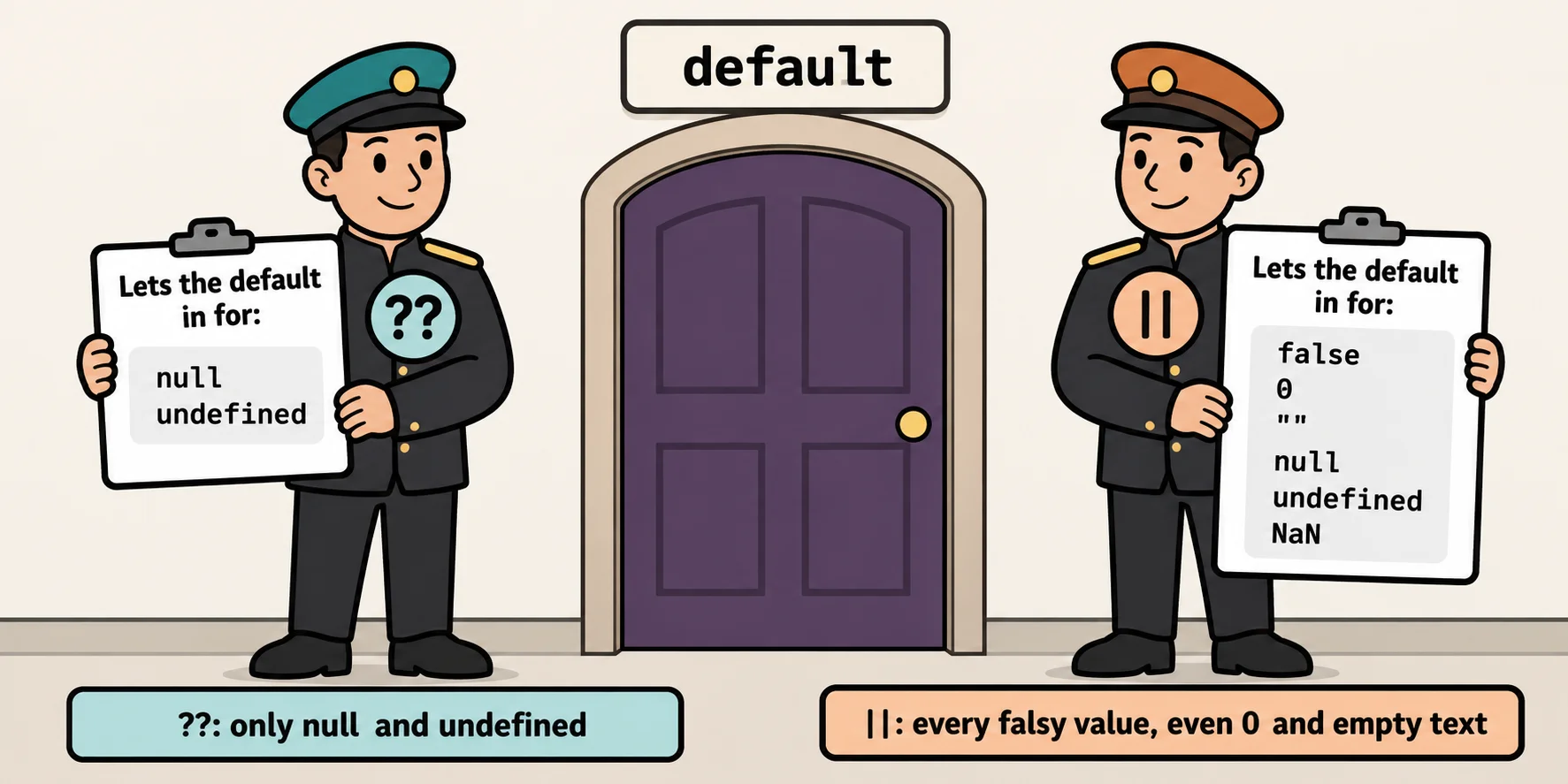
- ?? gives a default only when the value is null or undefined. || gives the default for every falsy value, so it replaces a real 0 or "" too.
Jamal signed up for the Riverside 5K but skipped the emergency contact. Sam never picked a shirt size. Real data always has holes like these: a form field someone left blank, a user with no profile picture, a song with no album. The code that reads the data has to cope, or the page stops with one of the most common error messages in JavaScript: Cannot read properties of undefined. This lesson shows the two kinds of "nothing" JavaScript has, and two short operators that handle them: ?. and ??.
undefined: nothing was ever put here
Think of a row of mailboxes in an apartment building. A box with no name on it was never given to anyone. That's undefined: JavaScript's value for "nothing has been put here yet". You get it without asking for it, in a few everyday ways:
const sam = { name: "Sam Okafor", email: "sam.okafor@example.com" };

let bibNumber;
console.log(bibNumber);
console.log(sam.shirtSize);

function sayHello() {
  console.log("Hello!");
}
console.log(sayHello());
undefined
undefined
Hello!
undefined
A variable declared with no value, a property the object doesn't have, and the result of a function with no return: all three are undefined.
null: empty on purpose
Now picture a form that asks "Emergency contact?" and Jamal ticks None for now. That's a real answer: the box is empty because someone said so. JavaScript's value for that is null. You never get null by accident; a person or a program puts it there. (Some built-in methods you'll meet later give back null to mean "nothing found".)
const jamal = {
  name: "Jamal Reed",
  email: "jamal.reed@example.com",
  emergencyContact: null,
};

console.log(jamal.emergencyContact);
console.log(jamal.emergencyContact === null);
console.log(null == undefined);
console.log(null === undefined);
null
true
true
false
null and undefined are loosely equal (from the last lesson, == treats them as the same), but not strictly equal. Both are falsy, and together they're called nullish values. One old quirk to know: typeof null gives "object", a mistake from JavaScript's first version that can't be fixed now without breaking old websites.
The crash: reading a property of nothing
Maria gave an emergency contact, so maria.emergencyContact.phone is her contact's number. Try the same line on Jamal, whose contact is null, and the program stops:
const jamal = { name: "Jamal Reed", emergencyContact: null };

console.log(jamal.emergencyContact.phone);
console.log("Check-in sheet printed.");
Node prints TypeError: Cannot read properties of null (reading 'phone'), and the second line never runs. jamal.emergencyContact is null, and null has no properties to read. With a property that doesn't exist at all, the message says undefined instead of null. When you see this error, look at the part before the last dot: that's the value that was missing.
Read carefully with ?.
Optional chaining, ?. (read "question mark dot"), is a careful dot. It looks at the value on its left first: if that value is null or undefined, it stops and gives back undefined instead of crashing. Otherwise it reads the property as a plain dot would:
const maria = {
  name: "Maria Lopez",
  emergencyContact: { name: "Ana Lopez", phone: "555-555-0142" },
};
const jamal = { name: "Jamal Reed", emergencyContact: null };

console.log(maria.emergencyContact?.phone);
console.log(jamal.emergencyContact?.phone);
console.log(jamal.coach?.name);
555-555-0142
undefined
undefined
Put ?. only where something really might be missing. A missing runner name is a bug you want to hear about, so runner.name keeps its plain dot.
A default with ??
A missing value often needs a stand-in. The Riverside 5K's rule is that a runner who doesn't pick a shirt gets a medium. Nullish coalescing, ?? (read "double question mark"), gives you that: a ?? b is a, unless a is null or undefined, and then it's b. (Coalescing means "coming together into one": two values in, one out.)
const sam = { name: "Sam Okafor" };
const priya = { name: "Priya Shah", shirtSize: "S" };

console.log(sam.shirtSize ?? "M");
console.log(priya.shirtSize ?? "M");

const jamal = { name: "Jamal Reed", emergencyContact: null };
const contactPhone = jamal.emergencyContact?.phone ?? "No emergency contact yet";
console.log(contactPhone);
M
S
No emergency contact yet
The last example is a pair you'll write often: ?. reads safely, and ?? fills the gap.
Try it. Make a file named contacts.js with Maria, Jamal and Sam as objects in an array (give Sam no emergencyContact property at all). Loop over them with for...of, and print each runner's name and their contact's name, or none when there isn't one.
?? or ||?
Before ?? existed, people wrote defaults with || (read "or"). a || b gives back a if it's truthy, and b otherwise. That looks the same, until the value is 0 or empty text. The sign-up form asks for a donation, and says leave it blank for the suggested $10. Priya typed 0; Sam left it blank:
const priyaDonation = 0;
let samDonation;

console.log(priyaDonation || 10);
console.log(priyaDonation ?? 10);
console.log(samDonation || 10);
console.log(samDonation ?? 10);
10
0
10
10
|| replaces every falsy value, so it would charge Priya $10 after she chose 0. ?? replaces only null and undefined, so her 0 stands. Pick by asking one question: is 0, "" or false a real answer here? If it is, use ??. If every falsy value should get the default (an empty nickname box falling back to the runner's name, say), || is the one.
Check yourself
2 questions to try on the lesson page.
So what
Data from forms and from the internet is never complete. With ?. to read carefully and ?? to fill the gaps, your code keeps going when a value is missing, and keeps the 0s and empty answers people really gave.