$lookup: Bringing in Related Documents
$lookup brings matching documents from another collection into each document of a pipeline, such as each order's customer, as an array you can unwind, and a lookup a screen needs on every read is a sign to embed or copy those fields instead.
Journeyman · MongoDB · Updated
After this lesson you can
- Bring related documents into a pipeline with $lookup, naming from, localField, foreignField and as
- Turn the array $lookup makes into one embedded document with $unwind, and predict the array when nothing matches
- Explain what a $lookup costs, and when needing one on every read is a sign to embed or copy fields instead
Key takeaways
- $lookup names four things, from, localField, foreignField and as, and matches localField here with foreignField in the other collection.
- $lookup always gives an array, empty when nothing matches, and $unwind after it turns a one-item array into one embedded document.
- A misspelled collection in from gives empty arrays, not an error, so check the first rows of a new $lookup.
- Every document that reaches a $lookup needs its own search of the other collection, so group, match or limit first.
- When a screen needs the same $lookup on every read, embed or copy those fields instead, the way orders copy product names.
A report of the top customers, an invoice with the buyer's name on it, a list of orders that shows who placed each one: the moment a report needs something that lives in another collection, you'll use $lookup. It follows the references you designed in Module 3 inside one pipeline, instead of one extra query per row.
The examples use Riverbend's sales from $unwind: One Document per Array Item. If you changed them, load("riverbend-sales.js") puts them back as they started.
Ids aren't names
Riverbend wants its top customers by money spent on shipped orders. $group by customerId gets the numbers:
db.orders.aggregate([
  { $match: { status: "shipped" } },
  { $group: { _id: "$customerId", spent: { $sum: "$total" } } },
  { $sort: { spent: -1 } }
])
[
  { _id: 1, spent: 1373 },
  { _id: 3, spent: 1284 },
  { _id: 2, spent: 861 },
  { _id: 5, spent: 778 }
]
Customer 1 spent 1373, but who is customer 1? Orders hold only a reference, the customer's _id, and the names live in customers. Referencing: Linking Documents by _id followed a reference with a second query. Here that's four more queries, one per row, and a page of 50 customers would need 50.
$lookup: from, localField, foreignField and as
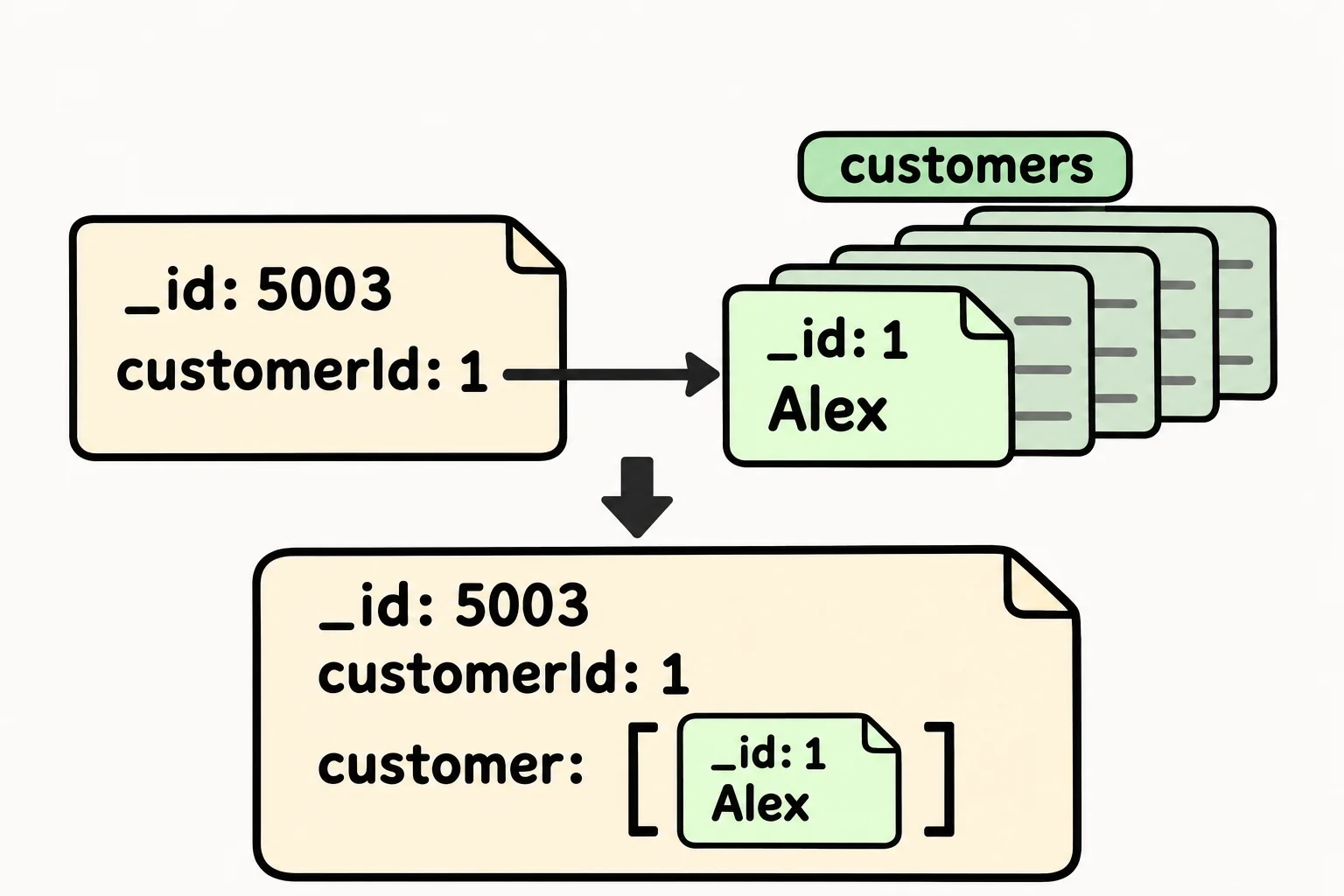
At a coat check, you hand over a ticket with a number, and the attendant brings back the coat with that number. The $lookup stage does the same for every document that reaches it: it takes a value from the document, finds the documents in another collection that hold the same value, and attaches them. Here it is on one order:
db.orders.aggregate([
  { $match: { _id: 5003 } },
  { $lookup: { from: "customers", localField: "customerId", foreignField: "_id", as: "customer" } }
])
[
  {
    _id: 5003,
    customerId: 1,
    orderedAt: ISODate('2026-02-11T16:30:00.000Z'),
    status: 'shipped',
    total: 50,
    items: [
      { productId: 106, name: 'Beacon Rear Light', price: 25, quantity: 2 }
    ],
    customer: [ { _id: 1, name: 'Alex', email: 'alex@example.com' } ]
  }
]
| Field | What it names | Here |
|---|---|---|
from |
The other collection | "customers" |
localField |
The field in this document | "customerId" |
foreignField |
The field in the other collection that must equal it | "_id" |
as |
The new field that holds the matches | "customer" |
Read it aloud as "look in customers for the documents whose _id equals this order's customerId, and put them in customer". In a database class this is called a join; a $lookup keeps every document even when nothing matches, which SQL calls a left outer join.
An array, and $unwind after it
Look at customer in that output: square brackets. $lookup always gives an array, because in general many documents could match. Each order has exactly one customer, so $unwind, from the lesson before, turns that one-item array into one embedded document, and $project can reach inside it. The whole top-customers report:
db.orders.aggregate([
  { $match: { status: "shipped" } },
  { $group: { _id: "$customerId", spent: { $sum: "$total" } } },
  { $sort: { spent: -1 } },
  { $lookup: { from: "customers", localField: "_id", foreignField: "_id", as: "customer" } },
  { $unwind: "$customer" },
  { $project: { _id: 0, name: "$customer.name", spent: 1 } }
])
[
  { spent: 1373, name: 'Alex' },
  { spent: 1284, name: 'Priya' },
  { spent: 861, name: 'Jordan' },
  { spent: 778, name: 'Leo' }
]
After the $group, the customer's id is in _id, so localField is "_id" here. "$customer.name" reaches into the embedded customer the way dot notation does in a filter.
When nothing matches
The lookup works in the other direction too. Starting from customers, each customer can bring in their orders. Maya hasn't ordered yet, so her array is empty, and $size: 0 from Querying Arrays: One Value, $all and $size finds her:
db.customers.aggregate([
  { $lookup: { from: "orders", localField: "_id", foreignField: "customerId", as: "orders" } },
  { $match: { orders: { $size: 0 } } },
  { $project: { name: 1, email: 1 } }
])
[ { _id: 4, name: 'Maya', email: 'maya@example.com' } ]
An empty array has a catch: a $unwind after the lookup would drop Maya without a word, as it dropped the canceled order. And a typo gives the same empty arrays with no error. This lookup names "customer", and the collection is customers:
db.orders.aggregate([
  { $match: { _id: 5003 } },
  { $lookup: { from: "customer", localField: "customerId", foreignField: "_id", as: "customer" } },
  { $project: { customer: 1 } }
])
[ { _id: 5003, customer: [] } ]
Before you trust a new $lookup, look at its first few rows.
What a $lookup costs, and when to embed instead
Each document that reaches a $lookup needs its own search of the other collection. When foreignField has an index, as _id always does, each search is quick; without one, MongoDB has to work through the other collection to find the matches, and the work grows with both collections. Why Queries Get Slow, and What an Index Is shows how indexes help. Put $match, $group or $limit first: the report above looks up 4 customers, not 9 orders.
A lookup in a report run once a night is fine. A lookup the app runs on every view of a busy screen is a sign the model doesn't fit that screen. Riverbend's orders already copy each product's name and price into their items, the choice Copying a Few Fields: the Extended Reference Pattern made, which is why $unwind: One Document per Array Item found the best sellers without looking up products at all. If the order page always shows the customer's name, copy the name into the order too, or embed what is read together.
Check yourself
2 questions to try on the lesson page.
So what
$lookup lets a report follow references inside one pipeline, so ids become names. Use it for reports and occasional screens, check its first rows, and when every read needs it, let the model carry the data instead.