$unwind: One Document per Array Item
$unwind turns a document with an array into one document per item, so a pipeline can count, group and total the items themselves, such as the units of each product sold across every order.
Journeyman · MongoDB · Updated
After this lesson you can
- Turn an array into one document per item with $unwind, and predict how many documents come out, including for an empty or missing array
- Total an array's items across documents with $unwind and $group, such as each product's units sold and sales
Key takeaways
- $unwind with "$items" gives one document per item in the items array, each a copy of the order holding that one item.
- After $unwind, a count counts items, not orders, so 10 orders with 15 line items become 15 documents.
- Grouping by "$items.name" after $unwind totals each product across every order, such as its units sold.
- A document whose array is empty or missing disappears at $unwind, unless preserveNullAndEmptyArrays is set to true.
"Best sellers this year." "The most popular tags." "The ingredient used in the most recipes." Each of these counts things that live inside arrays: the line items of an order, the tags on a post, the ingredients of a recipe. Whenever a report needs to count or total the items of an array rather than the documents that hold them, you'll reach for $unwind.
This chapter's examples use a small set of Riverbend Bike Shop's sales, small enough to check every number by hand: 5 customers, 6 products and 10 orders, in the shape Embedding: Keeping Related Data Together gave orders. In VS Code, make a new file in your mongodb-course folder named riverbend-sales.js, and copy this into it:
// Riverbend Bike Shop's sales: 5 customers, 6 products and 10 orders. Load it with: load("riverbend-sales.js")
// drop() empties each collection first, so running this file twice is safe.
db.customers.drop();
db.products.drop();
db.orders.drop();
db.customers.insertMany([
  { _id: 1, name: "Alex", email: "alex@example.com" },
  { _id: 2, name: "Jordan", email: "jordan@example.com" },
  { _id: 3, name: "Priya", email: "priya@example.com" },
  { _id: 4, name: "Maya", email: "maya@example.com" },
  { _id: 5, name: "Leo", email: "leo@example.com" }
]);
db.products.insertMany([
  { _id: 101, name: "Riverbend Road 2", category: "bikes", price: 1199 },
  { _id: 102, name: "Canal City Bike", category: "bikes", price: 649 },
  { _id: 103, name: "Harbor Helmet", category: "helmets", price: 59 },
  { _id: 104, name: "Summit Helmet", category: "helmets", price: 89 },
  { _id: 105, name: "Beacon Front Light", category: "lights", price: 35 },
  { _id: 106, name: "Beacon Rear Light", category: "lights", price: 25 }
]);
db.orders.insertMany([
  { _id: 5000, customerId: 5, orderedAt: ISODate("2025-12-14T18:20:00Z"), status: "shipped", total: 59,
    items: [ { productId: 103, name: "Harbor Helmet", price: 59, quantity: 1 } ] },
  { _id: 5001, customerId: 1, orderedAt: ISODate("2026-01-09T17:05:00Z"), status: "shipped", total: 1288,
    items: [ { productId: 101, name: "Riverbend Road 2", price: 1199, quantity: 1 },
             { productId: 104, name: "Summit Helmet", price: 89, quantity: 1 } ] },
  { _id: 5002, customerId: 2, orderedAt: ISODate("2026-01-24T20:40:00Z"), status: "shipped", total: 743,
    items: [ { productId: 102, name: "Canal City Bike", price: 649, quantity: 1 },
             { productId: 103, name: "Harbor Helmet", price: 59, quantity: 1 },
             { productId: 105, name: "Beacon Front Light", price: 35, quantity: 1 } ] },
  { _id: 5003, customerId: 1, orderedAt: ISODate("2026-02-11T16:30:00Z"), status: "shipped", total: 50,
    items: [ { productId: 106, name: "Beacon Rear Light", price: 25, quantity: 2 } ] },
  { _id: 5004, customerId: 3, orderedAt: ISODate("2026-02-27T19:15:00Z"), status: "shipped", total: 60,
    items: [ { productId: 105, name: "Beacon Front Light", price: 35, quantity: 1 },
             { productId: 106, name: "Beacon Rear Light", price: 25, quantity: 1 } ] },
  { _id: 5005, customerId: 5, orderedAt: ISODate("2026-03-14T18:00:00Z"), status: "shipped", total: 719,
    items: [ { productId: 102, name: "Canal City Bike", price: 649, quantity: 1 },
             { productId: 105, name: "Beacon Front Light", price: 35, quantity: 2 } ] },
  { _id: 5006, customerId: 2, orderedAt: ISODate("2026-04-01T03:30:00Z"), status: "shipped", total: 118,
    items: [ { productId: 103, name: "Harbor Helmet", price: 59, quantity: 2 } ] },
  { _id: 5007, customerId: 3, orderedAt: ISODate("2026-04-18T17:45:00Z"), status: "shipped", total: 1224,
    items: [ { productId: 101, name: "Riverbend Road 2", price: 1199, quantity: 1 },
             { productId: 106, name: "Beacon Rear Light", price: 25, quantity: 1 } ] },
  { _id: 5008, customerId: 1, orderedAt: ISODate("2026-05-06T15:10:00Z"), status: "shipped", total: 35,
    items: [ { productId: 105, name: "Beacon Front Light", price: 35, quantity: 1 } ] },
  { _id: 5009, customerId: 5, orderedAt: ISODate("2026-05-20T21:00:00Z"), status: "canceled", total: 0,
    items: [] }
]);
Save it. In VS Code's terminal, in your mongodb-course folder, start mongosh, type use riverbend_sales (a database of its own, so the chapter before's orders stay as they are), then load the file:
load("riverbend-sales.js")
true
The best sellers are inside arrays
Riverbend wants its best sellers: which products sold the most units. $group: Totals, Counts and Averages grouped orders by a field, so the first try groups by the product name inside items. Here it is on order 5002 alone:
db.orders.aggregate([
  { $match: { _id: 5002 } },
  { $group: { _id: "$items.name", units: { $sum: "$items.quantity" } } }
])
[
  {
    _id: [ 'Canal City Bike', 'Harbor Helmet', 'Beacon Front Light' ],
    units: 0
  }
]
That isn't three products. On a whole order, "$items.name" is the list of every name in its items array, so the group's _id is the whole list. "$items.quantity" is a list too, and $sum adds only numbers, so it gives 0. While the items sit together in one array, $group sees one order, not three products.
$unwind: one document per item
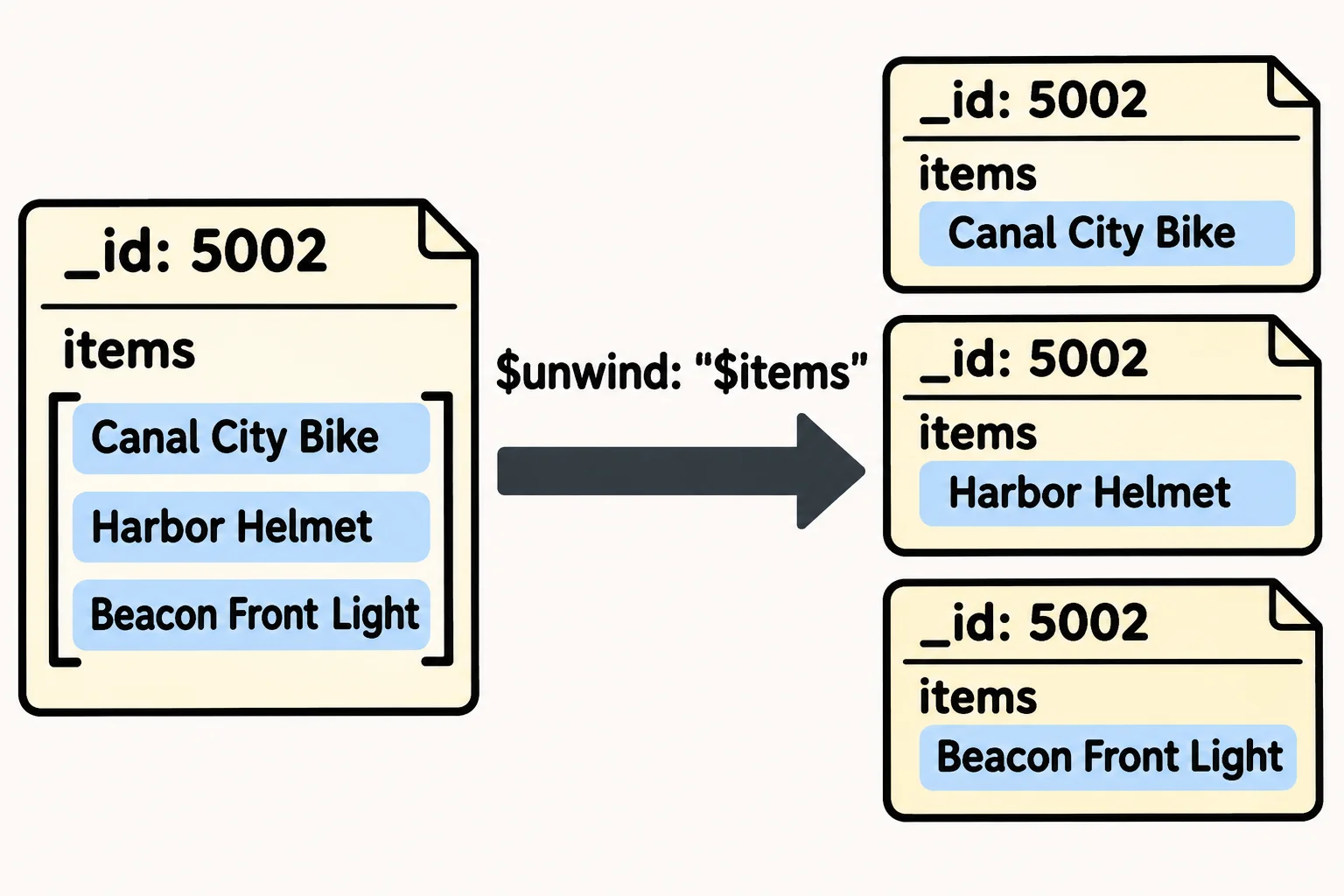
Picture a receipt with three lines, cut into three strips, each strip stapled to its own copy of the receipt's header. That is what the $unwind stage does: it takes the array a field path names ("$items", read "dollar items") and gives one document per item, each a copy of the order with that one item in place of the array.
db.orders.aggregate([
  { $match: { _id: 5002 } },
  { $unwind: "$items" },
  { $project: { customerId: 1, items: 1 } }
])
[
  {
    _id: 5002,
    customerId: 2,
    items: { productId: 102, name: 'Canal City Bike', price: 649, quantity: 1 }
  },
  {
    _id: 5002,
    customerId: 2,
    items: { productId: 103, name: 'Harbor Helmet', price: 59, quantity: 1 }
  },
  {
    _id: 5002,
    customerId: 2,
    items: { productId: 105, name: 'Beacon Front Light', price: 35, quantity: 1 }
  }
]
All three documents keep _id: 5002 and the order's other fields, and items now holds one document, not an array.
What $unwind does to the count
Riverbend has 10 orders. After $unwind, there is one document per line item:
db.orders.aggregate([
  { $unwind: "$items" },
  { $count: "lineItems" }
])
[ { lineItems: 15 } ]
Nine orders hold 15 line items between them, and order 5009, canceled with an empty items array, makes no document at all: an empty or missing array has nothing to unwind. So a count after $unwind counts items, not orders. When you need the number of orders, count before the $unwind.
When every order must stay, even one with no items, write $unwind the long way, with its array in path and preserveNullAndEmptyArrays set to true:
db.orders.aggregate([
  { $match: { _id: { $gte: 5008 } } },
  { $unwind: { path: "$items", preserveNullAndEmptyArrays: true } },
  { $project: { status: 1, items: 1 } }
])
[
  {
    _id: 5008,
    status: 'shipped',
    items: { productId: 105, name: 'Beacon Front Light', price: 35, quantity: 1 }
  },
  { _id: 5009, status: 'canceled' }
]
Order 5009 comes through once, with no items field. Across all 10 orders, that makes 16 documents instead of 15.
Best sellers: $unwind, then $group
With one item per document, grouping by "$items.name" groups by one product name at a time. $sum: "$items.quantity" adds each line's units, and $multiply works out each line's sales before they're added up:
db.orders.aggregate([
  { $unwind: "$items" },
  { $group: {
      _id: "$items.name",
      units: { $sum: "$items.quantity" },
      sales: { $sum: { $multiply: ["$items.price", "$items.quantity"] } }
  } },
  { $sort: { units: -1, _id: 1 } }
])
[
  { _id: 'Beacon Front Light', units: 5, sales: 175 },
  { _id: 'Beacon Rear Light', units: 4, sales: 100 },
  { _id: 'Harbor Helmet', units: 4, sales: 236 },
  { _id: 'Canal City Bike', units: 2, sales: 1298 },
  { _id: 'Riverbend Road 2', units: 2, sales: 2398 },
  { _id: 'Summit Helmet', units: 1, sales: 89 }
]
The Beacon Front Light sold the most units, 5 across four orders. Two products tie on 4 units, so the sort's second field, _id: 1, puts them in A to Z order. And the two bikes sold only 2 units each but brought in the most money, a reminder to say which "best" a report means.
Check yourself
2 questions to try on the lesson page.
So what
Most of what a store wants to count sits inside arrays. $unwind stands each item on its own, so $group can count and total the items themselves, as long as you remember that the count is now items, not orders.