A Free MongoDB Atlas Cluster
An API online can't reach the MongoDB on your laptop, so this lesson makes a free MongoDB Atlas cluster with a database user and network access, keeps its connection string secret in .env, and checks that Node connects to it.
Journeyman · MongoDB · Node.js · Updated
After this lesson you can
- Explain why an API online needs a hosted database, such as a free MongoDB Atlas cluster, and what in Atlas would cost money
- Set up an Atlas database user and network access, and explain the trade-off of allowing access from anywhere with 0.0.0.0/0
- Keep an Atlas connection string secret in .env, encode special characters in its password, and check that it connects
Key takeaways
- On a host, localhost means the host's own computer, so an API online needs a database that's always on at an address it can reach, such as a free Atlas cluster.
- Atlas's Free cluster costs nothing and holds 512 MB. Every other cluster type costs money, and if a screen asks for a card, stop.
- Atlas checks two things. The IP access list decides which addresses may connect, and a database user's name and password let the connection in.
- Render connects from addresses that change, so the course allows 0.0.0.0/0, every address. Then the password is the only lock, so make it long and random.
- The connection string holds the password, so it lives in .env and in the host's settings, never in the code or on GitHub.
The day you send someone a link to your API, its data has to live somewhere other than your laptop. This lesson puts it there, for free, and it's the same setup you'll use for every project you show to a friend, a teacher or an employer.
This chapter's example is Willow Creek Parks. Hikers keep calling the ranger station to ask which trails are muddy, so the parks department has a small API with six trails, each with its status (open, muddy or closed) and its latest report. Hikers should be able to check it from their phones at the trailhead.
Why your laptop's database can't come along
On your computer, the trails API reads MONGODB_URI=mongodb://localhost:27017 from .env. localhost means "this computer". Once the code runs on a host's computer (the next lesson puts it there), localhost means that computer, and no MongoDB runs there. After about 30 seconds the driver gives up with MongoServerSelectionError and ECONNREFUSED 127.0.0.1:27017: nobody answered.
Leaving your laptop on, with its database open to the internet, doesn't fix it either. A laptop sleeps, moves between Wi-Fi networks and changes address. A database for an API online is like a post office box rather than your own mailbox: it's open all day, at an address that doesn't move, and someone else keeps the lights on.
MongoDB Atlas is that for MongoDB: a hosted database, run by MongoDB's makers in the cloud. Atlas calls what it runs for you a cluster: the MongoDB servers behind one address.
A free cluster, and what would cost money
Atlas's Free cluster (it used to be called M0) is free with no end date, which is what Atlas's own documentation says. It holds 512 MB, which is thousands of times more than six trails need, and Atlas pauses it after 30 days with no connections (you can resume it). Every other cluster type is paid, so the rule is: choose the option labeled Free, every time. If any screen asks for a credit card, stop there and go back. Nothing in this course needs a paid plan.
- Sign up for Atlas on mongodb.com, and finish the welcome questions.
- On your project's Project Overview page, click Create, and choose Free.
- Choose any provider (AWS, Google Cloud or Azure) and a region close to you. Name the cluster
trails(you can't rename it later), and click Create.
A database user, and who may connect
Atlas checks every connection twice, like a building with a guard at the gate and a lock on the door. The gate is the IP access list: the addresses allowed to connect at all. The lock is a database user: a name and password your API signs in with. It isn't your Atlas account; it's only for code.
After Create, Atlas opens its security steps. Make the user trailsapi, click Autogenerate Secure Password, copy the password somewhere safe (a password manager is ideal), and click Create Database User. Then click Add My Current IP Address, so your own computer can connect, and Finish and Close.
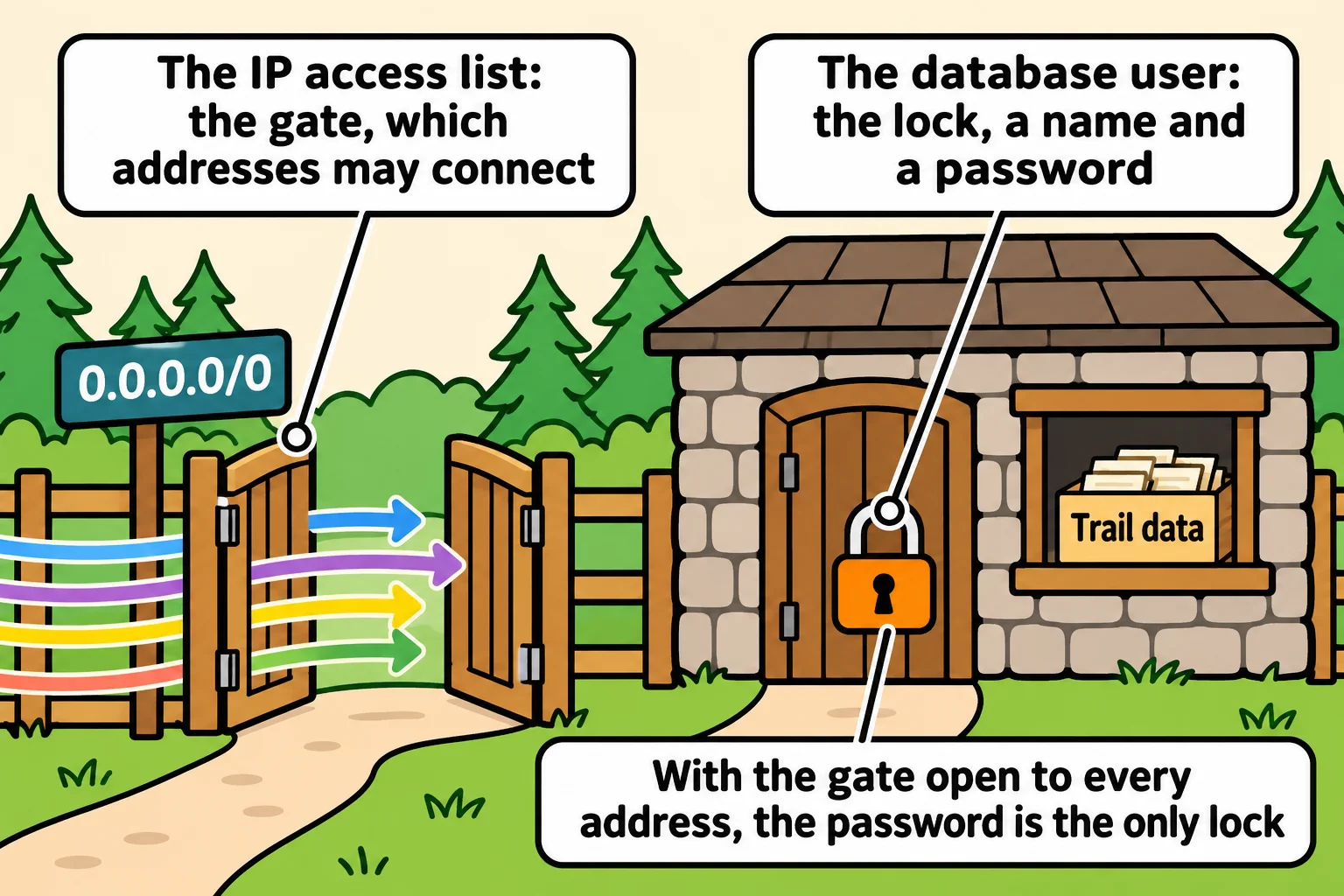
Render, where the API will run, sends its traffic from addresses that change and that other Render apps share, so no single address fits. The common answer is 0.0.0.0/0, read "zero zero zero zero slash zero": every address there is. Add it under Database & Network Access, IP Access List, Add IP Address, then Confirm. Atlas emails you a warning when you do, and it's a fair one: the gate is now open, so anyone who learns the password gets in. That's why the password is long and random, and why it never leaves your .env and the host's settings.
The connection string is a secret
On the cluster, click Connect, then Drivers, and copy the string Atlas shows. It has this shape, with your own values where the angle brackets are:
MONGODB_URI=mongodb+srv://<db_username>:<db_password>@<cluster-address>/?retryWrites=true&w=majority
Put it in .env, with your password in place of <db_password>. .env is already in .gitignore, as Keeping Secrets Out of Your Code set up. A password with @, :, / or % in it breaks the string, because those characters mean something in an address. encodeURIComponent turns them into codes the string can hold:
const password = "pine@cone/42";

console.log(encodeURIComponent(password));
console.log(encodeURIComponent("Trailhead2026"));
pine%40cone%2F42
Trailhead2026
Letters and digits come through unchanged. Then check that Node gets an answer. Save this as check-connection.js:
import { MongoClient } from "mongodb";

const client = new MongoClient(process.env.MONGODB_URI);

try {
  await client.db("trail_conditions").command({ ping: 1 });
  console.log("The database answered.");
} catch (error) {
  console.error(`No answer: ${error.name}: ${error.message}`);
  process.exitCode = 1;
} finally {
  await client.close();
}
node --env-file=.env check-connection.js
The database answered.
ping asks the database to answer and changes nothing. A wrong password stops with an authentication error. An address missing from the IP access list waits about 30 seconds, then reports MongoServerSelectionError.
Check yourself
2 questions to try on the lesson page.
So what
Your trails now live where any computer you allow can reach them, behind a gate and a lock you chose, and the one string that opens them is kept out of your code.