APIs as Objects: `Invoke-RestMethod`
Invoke-RestMethod asks a web API for data and turns its JSON answer into objects, so a weather forecast arrives ready for Select-Object, Where-Object and the rest of the pipeline, and query parameters after a ? in the address ask for exactly what you want.
Journeyman · PowerShell · Updated
After this lesson you can
- Get a web API's JSON as objects with Invoke-RestMethod, and pick out the data with dots, Select-Object and Where-Object
- Add query parameters to an API's address with ?, = and &, and keep the whole address in quotes
Key takeaways
- An API is a web address made for programs. It answers with data, usually JSON, instead of a page.
Invoke-RestMethodasks the address and turns the JSON answer into objects, so dots,Select-ObjectandWhere-Objectwork on it.- Query parameters go after
?asname=value, joined by&:?units=siasks for Celsius. - Put the whole address in quotes. Without them, a comma makes it a list and
&runs part of it in the background. - A saved copy, read with
Get-Content -RawandConvertFrom-Json, gives the same objects with no internet.
Every morning before you bike to class, you open a weather site, wait for the ads, and scroll past the radar to find one thing: will it rain on the way home? A program can't read that page easily: the numbers are buried among pictures and menus, and the site moves things around whenever it likes. So many services offer a second way in, made for programs. That way in is an API, and PowerShell's Invoke-RestMethod speaks it. Web developers fill their pages from APIs, IT techs pull ticket lists from them, and data analysts collect prices from them every day.
An address for programs: an API
Think of a restaurant. The dining room, with its menus and pictures on the wall, is the website, made for people. The takeout window is the API: you order by the menu's exact name, and you get a labeled box, the same shape every time. API stands for application programming interface: a way for one program to ask another for data.
The US National Weather Service runs a free one at api.weather.gov, with no account and no key. It answers in JSON, the labeled text from JSON: ConvertFrom-Json and ConvertTo-Json.
A forecast takes two questions. First you ask which forecast covers a spot on the map, given as latitude and longitude (here, a park in downtown Chicago):
(Invoke-RestMethod 'https://api.weather.gov/points/41.8826,-87.6233').properties | Select-Object gridId, gridX, gridY, forecast
gridId gridX gridY forecast
------ ----- ----- --------
LOT       76    73 https://api.weather.gov/gridpoints/LOT/76,73/forecast
Read the name as invoke (run) a REST method; REST is the usual style of web API, where every thing has its own address. Invoke-RestMethod asks the address and turns the JSON answer into objects, so the parentheses and the dot work as on any command's answer. Inside properties is the forecast's own address: LOT is the Chicago weather office, and 76,73 a square on its map.
Put the address in quotes. Without them, PowerShell reads the comma in 41.8826,-87.6233 as a list of two things, and stops:
Invoke-RestMethod https://api.weather.gov/points/41.8826,-87.6233
Invoke-RestMethod: Cannot convert 'System.Object[]' to the type 'System.Uri' required by parameter 'Uri'. Specified method is not supported.
The answer is objects
Now ask the forecast address. Its properties hold periods: fourteen forecasts, a day or a night at a time, for the week ahead. Each one is an object, so everything from Module 3 works on it:
(Invoke-RestMethod 'https://api.weather.gov/gridpoints/LOT/76,73/forecast').properties.periods | Select-Object -First 4 name, temperature, shortForecast
name          temperature shortForecast
----          ----------- -------------
Today                  59 Mostly Sunny
Tonight                46 Mostly Clear
Tuesday                59 Sunny
Tuesday Night          44 Mostly Cloudy
Dots go down into the answer one level at a time: properties, then periods. Not sure what a level holds? | Get-Member, from What an Object Is: Get-Member, lists it. Now the question you opened the site for. The chance of rain is a property inside a property, so it goes inside braces:
(Invoke-RestMethod 'https://api.weather.gov/gridpoints/LOT/76,73/forecast').properties.periods | Where-Object { $_.probabilityOfPrecipitation.value -ge 50 } | Select-Object name, temperature, shortForecast
name           temperature shortForecast
----           ----------- -------------
Thursday                46 Rain Showers Likely
Thursday Night          37 Rain Likely
Friday                  44 Rain Likely
And the next few hours in one line, the way a weather radio reads them:
(Invoke-RestMethod 'https://api.weather.gov/gridpoints/LOT/76,73/forecast').properties.periods | Select-Object -First 1 -ExpandProperty detailedForecast
Mostly sunny. High near 59, with temperatures falling to around 55 in the afternoon. West southwest wind 5 to 10 mph.
Your forecast will be today's, not this one. weather.gov covers only the United States; the saved copy at the end of this lesson works anywhere. On a Mac or Linux, every command here is the same.
Asking for more: query parameters
At a takeout window you can say "large, no onions". An address can carry options too, after a question mark. ?units=si asks for the forecast in Celsius and kilometers:
(Invoke-RestMethod 'https://api.weather.gov/gridpoints/LOT/76,73/forecast?units=si').properties.periods | Select-Object -First 4 name, temperature, temperatureUnit
name          temperature temperatureUnit
----          ----------- ---------------
Today                  15 C
Tonight                 8 C
Tuesday                15 C
Tuesday Night           7 C
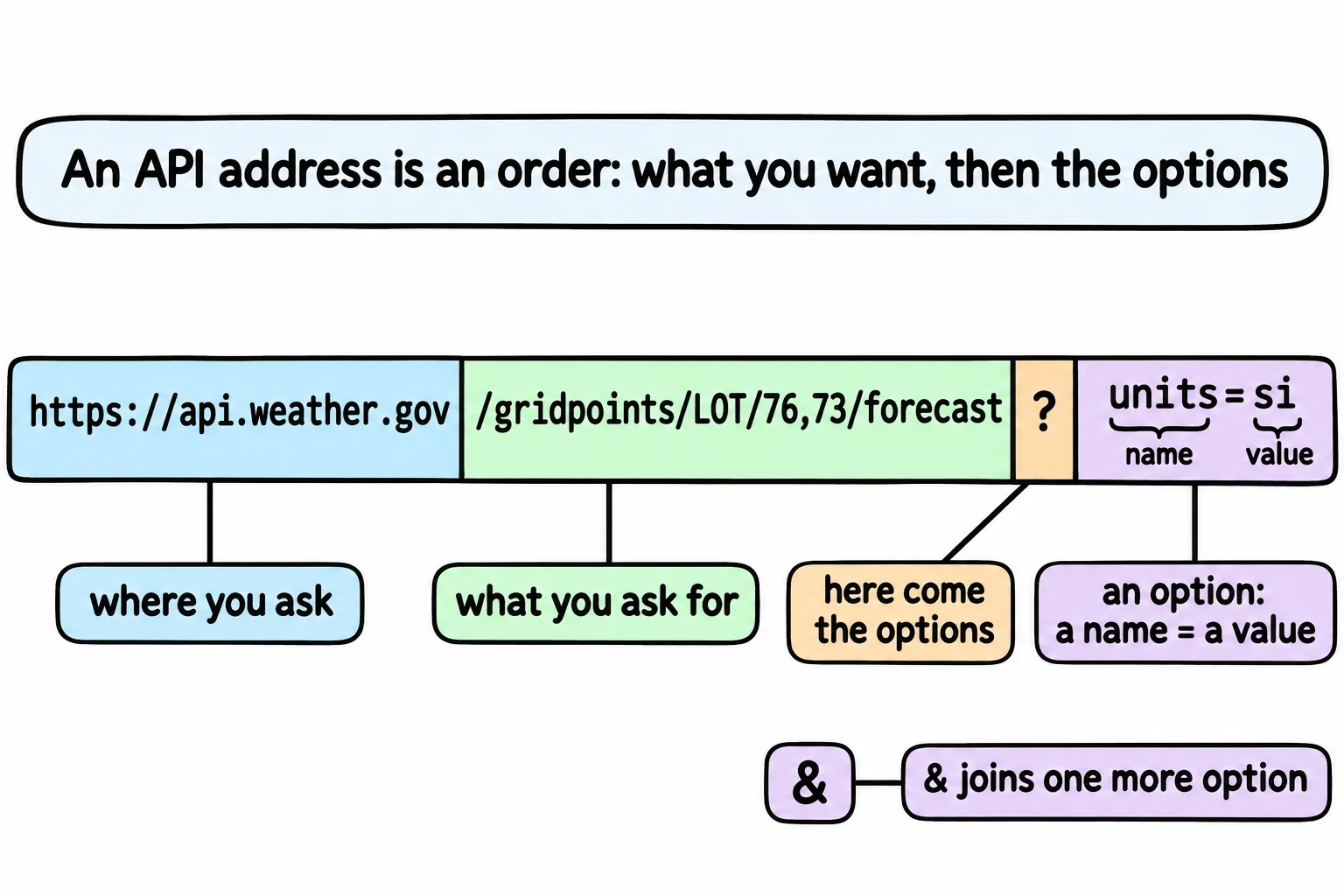
Read it aloud: ? is "here come the options", and units=si is "units is si" (si is the metric system). Each option, a name, = and a value, is a query parameter; together they're the query string. More are joined with &, read "and". This asks for California's weather alerts of moderate severity:
(Invoke-RestMethod 'https://api.weather.gov/alerts/active?area=CA&severity=Moderate').features.properties.event
Beach Hazards Statement
Dense Fog Advisory
Beach Hazards Statement
Beach Hazards Statement
Beach Hazards Statement
Beach Hazards Statement
Yours will be today's alerts, or nothing on a calm day. Which names an API understands is in its documentation: here, weather.gov/documentation/services-web-api.
Quotes matter even more here. In PowerShell 7, an unquoted & means "run what's before me in the background", so the line breaks in two:
Invoke-RestMethod https://api.weather.gov/alerts/active?area=CA&severity=Moderate
Id     Name            PSJobTypeName   State         HasMoreData     Location             Command
--     ----            -------------   -----         -----------     --------             -------
1      Job1            BackgroundJob   Running       True            localhost            Invoke-RestMethod https:…
severity=Moderate: The term 'severity=Moderate' is not recognized as a name of a cmdlet, function, script file, or executable program.
Check the spelling of the name, or if a path was included, verify that the path is correct and try again.
PowerShell started the first half as a background job, then found no command called severity=Moderate. Get-Job | Remove-Job -Force clears the leftover job. Windows PowerShell 5.1 stops instead, saying & is not allowed.
Working without the internet: a saved copy
An answer is only text, so you can keep a copy: for the train with no signal, or to practice on the same data every time. These lines make a practice folder with a copy of the forecast above, cut down to the facts this lesson uses. Running them again is safe.
New-Item -ItemType Directory -Force -Path "$HOME\terminal-practice\weather" | Out-Null
Set-Content -Path "$HOME\terminal-practice\weather\forecast.json" -Value '{ "properties": { "periods": [
  {"name":"Today","temperature":59,"probabilityOfPrecipitation":{"value":0},"shortForecast":"Mostly Sunny","detailedForecast":"Mostly sunny. High near 59, with temperatures falling to around 55 in the afternoon. West southwest wind 5 to 10 mph."},
  {"name":"Tonight","temperature":46,"probabilityOfPrecipitation":{"value":0},"shortForecast":"Mostly Clear"},
  {"name":"Tuesday","temperature":59,"probabilityOfPrecipitation":{"value":0},"shortForecast":"Sunny"},
  {"name":"Tuesday Night","temperature":44,"probabilityOfPrecipitation":{"value":0},"shortForecast":"Mostly Cloudy"},
  {"name":"Veterans Day","temperature":54,"probabilityOfPrecipitation":{"value":40},"shortForecast":"Mostly Cloudy then Chance Rain Showers"},
  {"name":"Wednesday Night","temperature":43,"probabilityOfPrecipitation":{"value":45},"shortForecast":"Chance Rain Showers"},
  {"name":"Thursday","temperature":46,"probabilityOfPrecipitation":{"value":69},"shortForecast":"Rain Showers Likely"},
  {"name":"Thursday Night","temperature":37,"probabilityOfPrecipitation":{"value":65},"shortForecast":"Rain Likely"},
  {"name":"Friday","temperature":44,"probabilityOfPrecipitation":{"value":56},"shortForecast":"Rain Likely"},
  {"name":"Friday Night","temperature":35,"probabilityOfPrecipitation":{"value":23},"shortForecast":"Slight Chance Rain"},
  {"name":"Saturday","temperature":48,"probabilityOfPrecipitation":{"value":10},"shortForecast":"Mostly Sunny"},
  {"name":"Saturday Night","temperature":38,"probabilityOfPrecipitation":{"value":2},"shortForecast":"Mostly Clear"},
  {"name":"Sunday","temperature":52,"probabilityOfPrecipitation":{"value":1},"shortForecast":"Sunny"},
  {"name":"Sunday Night","temperature":43,"probabilityOfPrecipitation":{"value":2},"shortForecast":"Mostly Clear"}
] } }'
They print nothing when they work. Read the copy back with Get-Content -Raw, the whole file as one piece of text, and ConvertFrom-Json, and you get the same objects:
Set-Location "$HOME\terminal-practice\weather"
(Get-Content forecast.json -Raw | ConvertFrom-Json).properties.periods | Select-Object -First 4 name, temperature, shortForecast
name          temperature shortForecast
----          ----------- -------------
Today                  59 Mostly Sunny
Tonight                46 Mostly Clear
Tuesday                59 Sunny
Tuesday Night          44 Mostly Cloudy
That's all Invoke-RestMethod did: fetch the JSON and convert it. Pages and Downloads: Invoke-WebRequest shows how to save a fresh copy. And an API is someone else's computer: ask once and work with the answer, rather than asking over and over.
Try it. Get the forecast for a town you know in the US: find its latitude and longitude (a map app shows them when you right-click or hold a spot), ask points for its forecast address, then list the periods with a chance of rain of 30 or more.
Check yourself
2 questions to try on the lesson page.
So what
A website is for reading; an API is for asking. With Invoke-RestMethod, the answer arrives as objects, and everything you know about the pipeline works on it.