Stopping Early: `break` and `continue`
A loop keeps a count or a running total in a variable started before it, continue skips the rest of one pass and goes on with the next item, break leaves the loop at once, and inside ForEach-Object return skips an item instead.
Apprentice · PowerShell · Updated
After this lesson you can
- Keep a count or a running total in a loop with ++ and +=
- Skip an item with continue and leave a loop early with break, and use return to skip one in ForEach-Object
Key takeaways
- Start a counter at 0 before the loop, then add to it inside: $count++ adds one, and $total += $minutes keeps a running total.
- continue skips the rest of this pass and goes on with the next item. break leaves the loop at once.
- break and continue belong to foreach, for, while and do loops. Inside ForEach-Object's braces, break stops the whole line or script.
- To skip an item inside ForEach-Object, use return.
You're putting together music for a 20-minute run from a longer playlist. You skip the songs you've gone off, add the rest one by one, and stop when the next song won't fit. That's a loop with two extra moves in it: skip this one, and stop here. Scripts at work make the same moves all the time: a script that sends out invoices skips the customers who've already paid and stops when it reaches the end of the month, and a log reader skips the comment lines and stops at the end marker.
Make the practice folder, with the playlist as a CSV file, a spreadsheet saved as text (Spreadsheets as Objects: Import-Csv):
New-Item -ItemType Directory -Force -Path "$HOME\terminal-practice\playlist" | Out-Null
Set-Location "$HOME\terminal-practice\playlist"
Set-Content playlist.csv @'
Title,Minutes,Liked
Night Launch,4,yes
Static Again,6,no
Solar Wind,5,yes
Blue Horizon,3,yes
Slow Orbit,7,yes
Splashdown,4,yes
'@
Import-Csv playlist.csv
Title        Minutes Liked
-----        ------- -----
Night Launch 4       yes
Static Again 6       no
Solar Wind   5       yes
Blue Horizon 3       yes
Slow Orbit   7       yes
Splashdown   4       yes
Counting as you go
A loop often keeps score. A counter is a variable you start at 0 before the loop and add to inside it, the way you'd tally songs on a scrap of paper. A running total works the same way:
$count = 0
$total = 0
foreach ($song in Import-Csv playlist.csv) {
    $count++
    $total += [int]$song.Minutes
}
"$count songs, $total minutes"
6 songs, 29 minutes
$count++, read "count plus plus", adds one. $total += [int]$song.Minutes adds this song's minutes; [int] turns them into a number, because every value Import-Csv reads arrives as text. Start both before the loop: set inside it, they'd go back to 0 on every pass.
continue: skip this one
continue skips the rest of this pass, and the loop goes on with the next item. With an if in front, it skips the songs you haven't liked:
foreach ($song in Import-Csv playlist.csv) {
    if ($song.Liked -eq 'no') { continue }
    $song.Title
}
Night Launch
Solar Wind
Blue Horizon
Slow Orbit
Splashdown
Read the first line in the braces aloud: "if this song isn't liked, go on to the next one." Static Again never reaches $song.Title.
break: stop here
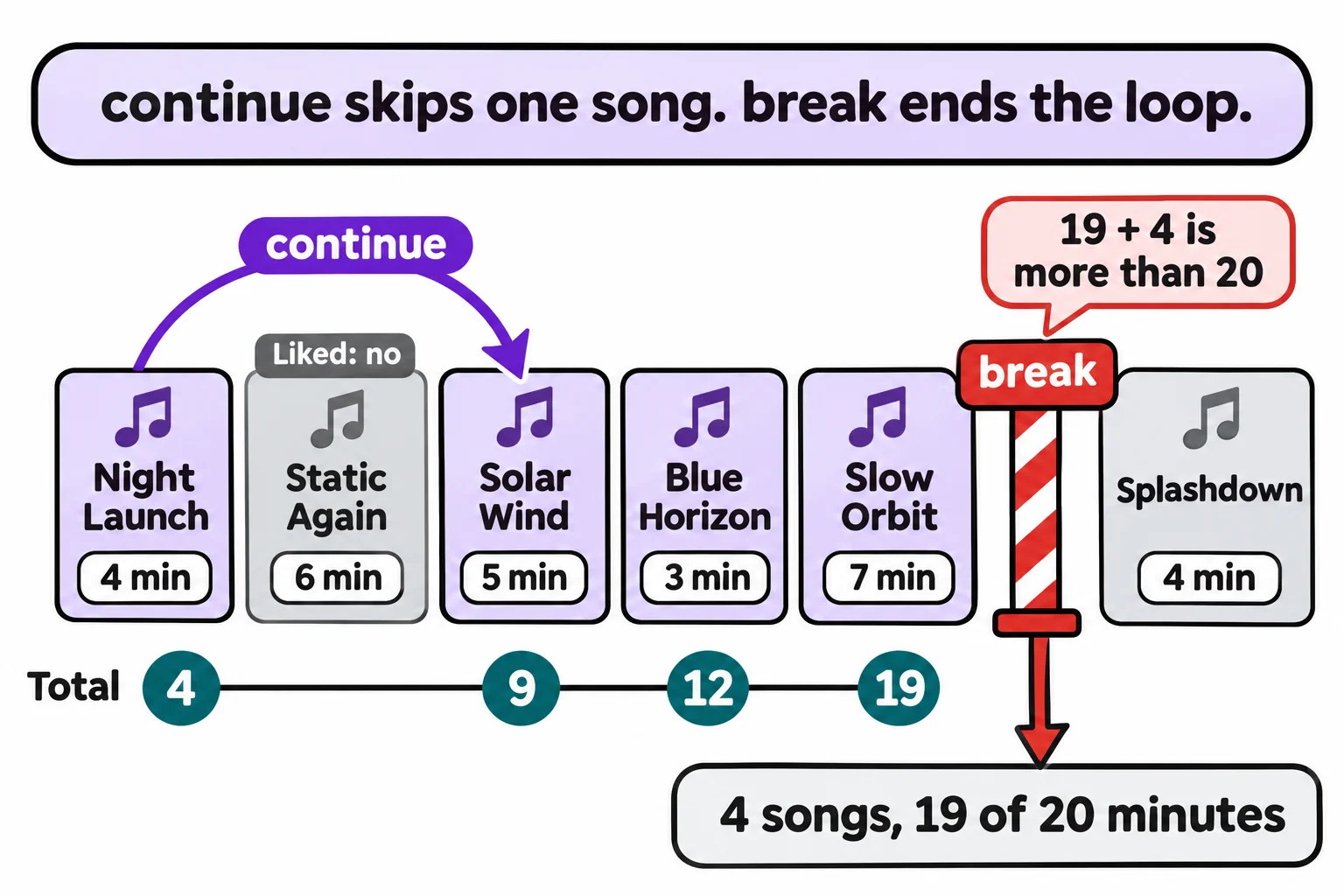
break leaves the loop at once, and the script carries on with the first line after the closing brace. Here is the whole playlist builder: skip, then stop when the next song would take the total past 20 minutes:
$count = 0
$total = 0
foreach ($song in Import-Csv playlist.csv) {
    if ($song.Liked -eq 'no') { continue }
    $minutes = [int]$song.Minutes
    if ($total + $minutes -gt 20) { break }
    $total += $minutes
    $count++
    "Added $($song.Title), $minutes minutes"
}
"$count songs, $total of 20 minutes"
Added Night Launch, 4 minutes
Added Solar Wind, 5 minutes
Added Blue Horizon, 3 minutes
Added Slow Orbit, 7 minutes
4 songs, 19 of 20 minutes
Splashdown would have made 23, so break stopped the loop before it was added, and the last line still ran. break and continue work the same way in for, while and do loops, from Until Something Is True: while, do and for. In a do loop that retries, break is the way out the moment it works.
Not inside ForEach-Object
break and continue belong to loops. ForEach-Object's braces look like a loop but are a script block handed to a command, so there break doesn't stop only ForEach-Object. It stops the whole line you typed, or the whole script it's in:
Import-Csv playlist.csv | ForEach-Object { if ($_.Liked -eq 'no') { break }; $_.Title }; 'Playlist done'
Night Launch
Playlist done never printed. To skip one item inside ForEach-Object, use return, which ends this item's script block and lets ForEach-Object go on with the next:
Import-Csv playlist.csv | ForEach-Object { if ($_.Liked -eq 'no') { return }; $_.Title }; 'Playlist done'
Night Launch
Solar Wind
Blue Horizon
Slow Orbit
Splashdown
Playlist done
To stop a pipeline early, Select-Object -First is the safe way (Picking Columns: Select-Object). Windows PowerShell 5.1, a Mac and Linux all behave the same way here.
Check yourself
2 questions to try on the lesson page.
So what
A counter, continue and break let one loop keep score, skip what doesn't belong and stop at the right moment: the difference between a script that does everything and one that does the right things.