Until Something Is True: `while`, `do` and `for`
while repeats steps as long as a condition is true, do runs them at least once and checks at the end, which suits trying again up to three times, and for counts from a start to a finish one step at a time.
Apprentice · PowerShell · Updated
After this lesson you can
- Repeat steps while a condition is true with while, or at least once with do and until
- Count with a for loop from its start, its test and its step
- Choose foreach, while, do or for for a job
Key takeaways
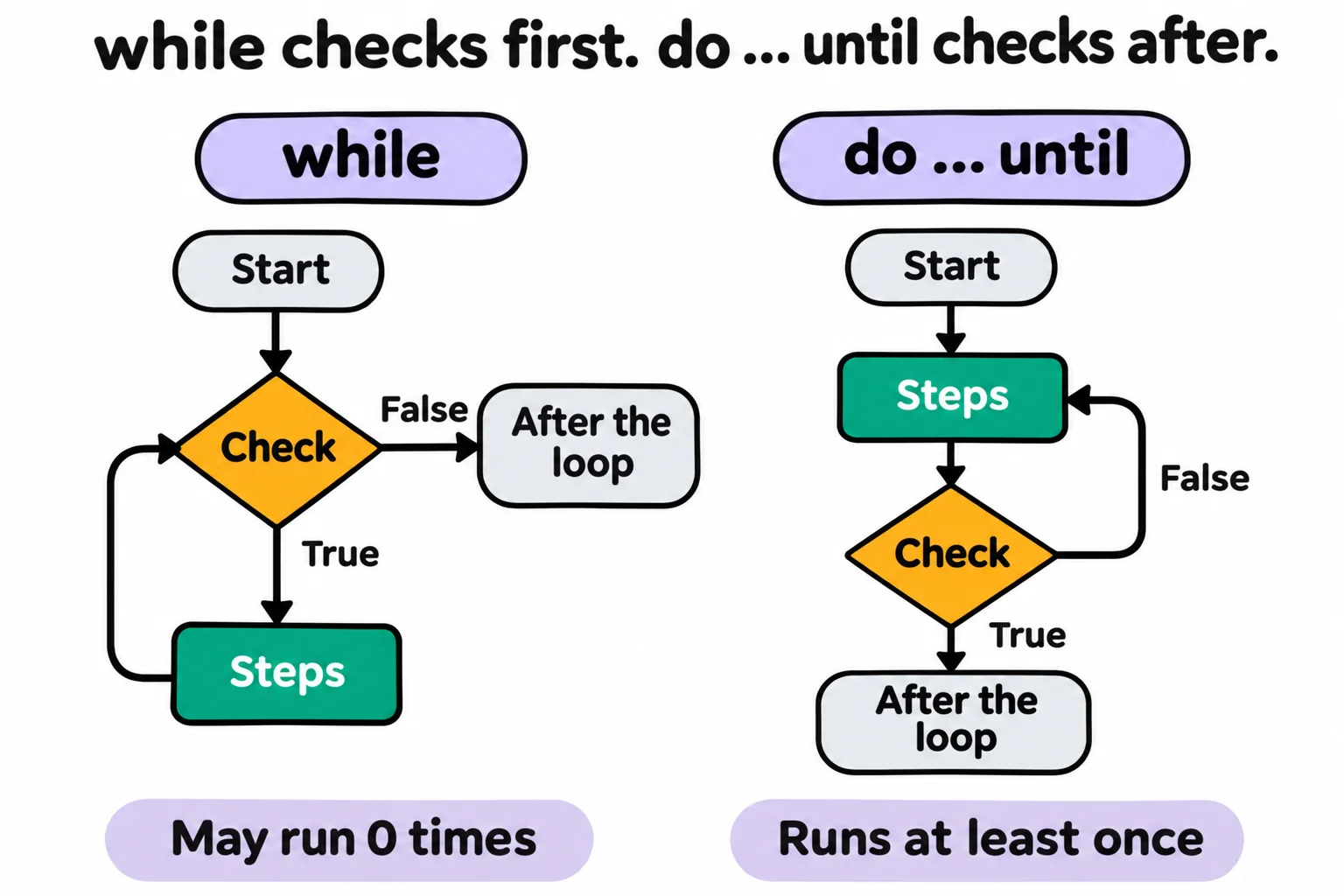
- while (condition) { … } checks first and repeats while the condition is true. If it's false at the start, the steps never run.
- do { … } until (condition) runs at least once and stops when the condition becomes true, which suits retrying. do { … } while (condition) goes on while it's true.
- for ($n = 5; $n -ge 1; $n--) { … } counts: a start, a test before each pass, and a step after it.
- Something inside a while or do loop must change its condition, or the loop never ends. Ctrl+C stops it.
- Choose foreach for a list, while to wait, do to try at least once, and for to count.
Some jobs have no list to work through, only a moment to stop. A download has to finish before you unzip it. A website is down for a minute, so you try again, but not forever. For Each Thing: foreach needs a list to go round; these jobs need a loop that keeps going until something is true. An IT technician's script waits for a computer to restart before it copies the updates, and a backup script tries the network drive three times before it gives up and says so.
The examples are on the launch pad at Mission Control. Make the practice folder and go into it:
New-Item -ItemType Directory -Force -Path "$HOME\terminal-practice\launch-pad" | Out-Null
Set-Location "$HOME\terminal-practice\launch-pad"
while: as long as it's true
Filling a tank, you keep the pump running while the tank isn't full. A while loop checks its condition, a test that answers True or False like an if's, before every pass, and runs the steps in its braces for as long as the answer is True:
$fuel = 40
while ($fuel -lt 100) {
    "Fuel at $fuel%"
    $fuel += 20
}
'Tank full'
Fuel at 40%
Fuel at 60%
Fuel at 80%
Tank full
Read it aloud: "while the fuel is less than 100, do what's in the braces." +=, read "add to", adds 20 to $fuel on each pass. At 100 the test answers False, and PowerShell carries on after the loop. If the test answers False the first time, a while loop never runs at all.
Something inside the loop has to change the answer. Leave out $fuel += 20 and the loop never ends, an infinite loop that fills the screen with Fuel at 40%. Press Ctrl+C to stop it; nothing is harmed.
Waiting: while and Start-Sleep
The launch can't go until the flight director says so by leaving a file called go.txt. Test-Path (Is It There? Test-Path) answers True when the file is there, and -not turns the answer around, so the loop goes round while it isn't. Start-Sleep -Seconds 2 pauses for two seconds on each pass, so the loop doesn't check thousands of times a second:
while (-not (Test-Path go.txt)) {
    'Waiting for go...'
    Start-Sleep -Seconds 2
}
'Go for launch'
Waiting for go...
Waiting for go...
Waiting for go...
Go for launch
While it waits, make the file from a second PowerShell window, New-Item "$HOME\terminal-practice\launch-pad\go.txt", or in File Explorer. You'll see a Waiting for go... every two seconds until the file appears. Run the loop again and it says Go for launch at once, because the file is still there; Remove-Item go.txt makes it wait again.
do: try first, check after
When you call a friend who doesn't pick up, you try again, and after three tries you leave a message. That's a do loop: it runs its steps first and checks at the end, so it always runs at least once. Here a script asks the ground station's computer whether it's there with Test-Connection, which works like the ping program: -Count 1 asks once, and -Quiet answers only True or False. A name ending in .invalid never exists, so this one never answers:
$tries = 0
do {
    $tries++
    $answered = Test-Connection ground-station.invalid -Count 1 -Quiet
    "Try $tries of 3: answered $answered"
} until ($answered -or $tries -eq 3)
Try 1 of 3: answered False
Try 2 of 3: answered False
Try 3 of 3: answered False
Read the last line aloud: "until it answered, or we've tried three times." $tries++, read "tries plus plus", adds one. until stops the loop as soon as its condition is True. do { … } while (…) works the other way around and goes on while its condition is True. Change the name to localhost, your own computer, and the loop stops after Try 1 of 3: answered True.
for: counting
A countdown has a start, a finish and a step: 5, 4, 3, 2, 1. A for loop keeps all three in its parentheses, separated by semicolons:
for ($n = 5; $n -ge 1; $n--) {
    "T-minus $n"
}
'Liftoff!'
T-minus 5
T-minus 4
T-minus 3
T-minus 2
T-minus 1
Liftoff!
Read the parentheses aloud: "start $n at 5; go round while $n is at least 1; after each pass, take one off." $n--, read "n minus minus", takes one away; counting up is for ($i = 1; $i -le 10; $i++). For a plain range, foreach ($n in 5..1) does the same job. for earns its place when the step isn't one, such as $day += 7 for each week of a month.
Which loop?
| Your job | Loop | Why |
|---|---|---|
| Something for every file, song or line | foreach |
there's a list to go round |
| Wait until a file appears | while |
it checks first, and may not need to run at all |
| Try up to three times | do … until |
it tries at least once, then checks |
| Count down from 10, or every seventh day | for |
a start, a test and a step in one place |
These loops, Test-Connection and Start-Sleep work the same in Windows PowerShell 5.1 and on a Mac or Linux.
Check yourself
2 questions to try on the lesson page.
So what
When there's no list, only a moment to stop, while waits, do tries again and for counts: the loops that let a script keep at a job with nobody watching it.