Taking Pipeline Input
A parameter marked [Parameter(ValueFromPipeline)] receives each object that comes down the pipeline, a process block runs once for each of them, and begin and end run once before the first and after the last, for the setup and the totals.
Freelancer · PowerShell · Updated
After this lesson you can
- Take input from the pipeline with [Parameter(ValueFromPipeline)] and a process block that runs once for each item
- Use begin and end for the work done once, before the first item and after the last, such as a running total
Key takeaways
- [Parameter(ValueFromPipeline)] on a parameter lets your function sit after a | and receive each object the command before it outputs.
- Without a process block, the function body runs once, after the pipeline ends, and sees only the last object.
- process { } runs once for each object that arrives. Output from inside it goes on down the pipeline straight away.
- begin { } runs once before the first object and end { } once after the last: the place for a counter and a total.
You have 20 minutes until you reach the store, and you want a playlist that fills them without going over. With your playlist tools, the natural way to ask is a pipeline: Get-Song | Limit-Playlist -Minutes 20, the songs going in one end and a shorter list coming out of the other, ready for Export-Csv. Every cmdlet you've piped into since The Pipeline: | was built to receive objects that way. Your functions aren't yet. This lesson makes Limit-Playlist take its songs from the pipeline, and the same three blocks it uses are inside any real tool that works on many things at once.
Start fresh: run the practice-folder lines from Functions: Naming a Job again (they put back the seven songs and leave PlaylistTools.ps1 alone), then load the tools with . .\PlaylistTools.ps1.
The pipeline has to go somewhere
A first try, typed at the prompt, with a $Song parameter for the songs:
function Limit-Playlist {
    [CmdletBinding()]
    param(
        $Song,
        [int]$Minutes = 20
    )
    $Song.Title
}
Get-Song | Limit-Playlist -Minutes 20
Limit-Playlist: The input object cannot be bound to any parameters for the command either because the command does not take pipeline input or the input and its properties do not match any of the parameters that take pipeline input.
That message comes seven times, once for each song. PowerShell had an object in its hands and no parameter willing to take it. You say which parameter takes pipeline input with [Parameter(ValueFromPipeline)], read "value from pipeline". Change the param block to this and run it again:
    param(
        [Parameter(Mandatory, ValueFromPipeline)]
        $Song,
        [int]$Minutes = 20
    )
Last Exit Home
No error, but only the last song. A function's body runs once, after everything before the | has finished, so $Song holds whatever arrived last.
process: once for each item
Think of an assembly line. One worker sets up before the first box arrives, a second handles each box as it comes past, and a third tidies up when the line stops. A function's three blocks are those workers: begin, process and end. The one that runs for each object is process. Put the body inside it:
function Limit-Playlist {
    [CmdletBinding()]
    param(
        [Parameter(Mandatory, ValueFromPipeline)]
        $Song,
        [int]$Minutes = 20
    )
    process {
        $Song.Title
    }
}
Get-Song | Limit-Playlist -Minutes 20
Mile Marker 9
Gas Station Coffee
Rainy Overpass
Backseat Snacks
Cruise Control
Left at the Lighthouse
Last Exit Home
Each time a song comes down the pipeline, $Song holds it and process runs. A function with no blocks at all has its body treated as end, which is why the last try saw only Last Exit Home.
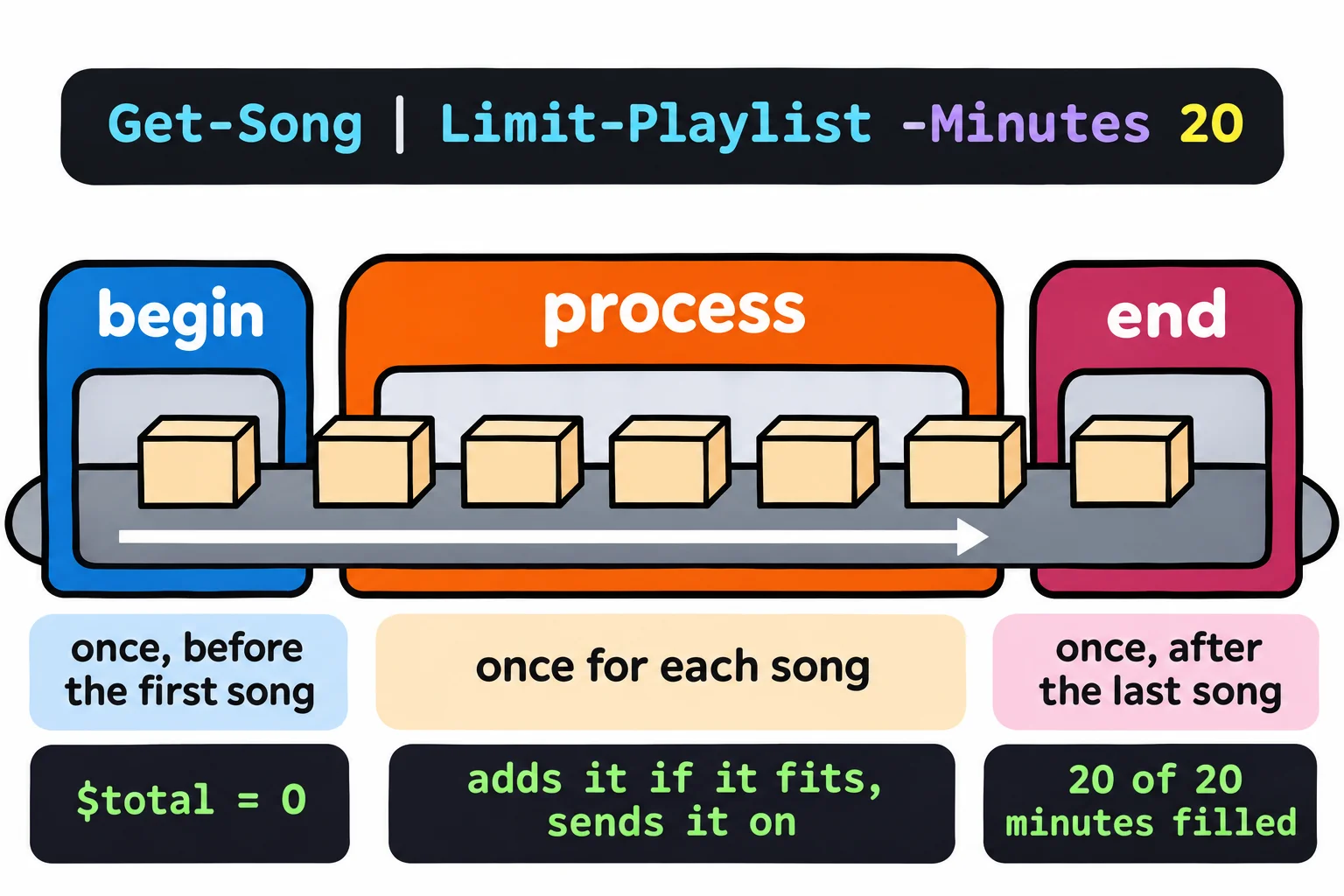
begin and end: once before, once after
To fill 20 minutes, the function keeps a running total, as in Stopping Early: break and continue. The total starts at 0 once, in begin. Each song is checked in process: if it fits, it's added and sent on down the pipeline; if not, it's skipped. end reports once, at the end. Replace Limit-Playlist with this version, in PlaylistTools.ps1 this time, and load the file again:
function Limit-Playlist {
    [CmdletBinding()]
    param(
        [Parameter(Mandatory, ValueFromPipeline)]
        $Song,
        [ValidateRange(1, 600)]
        [int]$Minutes = 20
    )
    begin {
        $total = 0
    }
    process {
        if ($total + [int]$Song.Minutes -le $Minutes) {
            $total += [int]$Song.Minutes
            $Song
        }
    }
    end {
        Write-Verbose "$total of $Minutes minutes filled"
    }
}
[int] turns each song's Minutes into a number, because Import-Csv reads every value as text. Try it:
Get-Song | Limit-Playlist -Minutes 20
Title              Artist         Minutes Mood
-----              ------         ------- ----
Mile Marker 9      Juniper Kite   4       Upbeat
Gas Station Coffee The Night Owls 3       Upbeat
Rainy Overpass     Juniper Kite   6       Chill
Backseat Snacks    Maple Street   3       Upbeat
Last Exit Home     Juniper Kite   4       Chill
Cruise Control (5) and Left at the Lighthouse (7) didn't fit after 16 minutes, but Last Exit Home (4) did. The songs come out as objects, so the rest of the pipeline can use them. Save the list, and check the total that end reports:
Get-Song | Limit-Playlist -Minutes 20 | Export-Csv run-to-the-store.csv
$run = Get-Song | Limit-Playlist -Minutes 20 -Verbose
$run.Count
VERBOSE: 20 of 20 minutes filled
5
Put $total = 0 in process instead, and it goes back to 0 for every song: every song fits, and the limit does nothing. That's the most common mistake with these blocks. Everything here works the same in Windows PowerShell 5.1 and on a Mac or Linux.
Try it. Sort first, so the shortest songs go in first: Get-Song | Sort-Object Minutes | Limit-Playlist -Minutes 15. How many songs fit now? Then try Get-Song -Mood Upbeat | Limit-Playlist -Minutes 8.
Check yourself
2 questions to try on the lesson page.
So what
ValueFromPipeline and the three blocks are how a function joins the pipeline as an equal: it takes what the last command gives it, one object at a time, and hands objects on to the next.