Secrets Out of Scripts
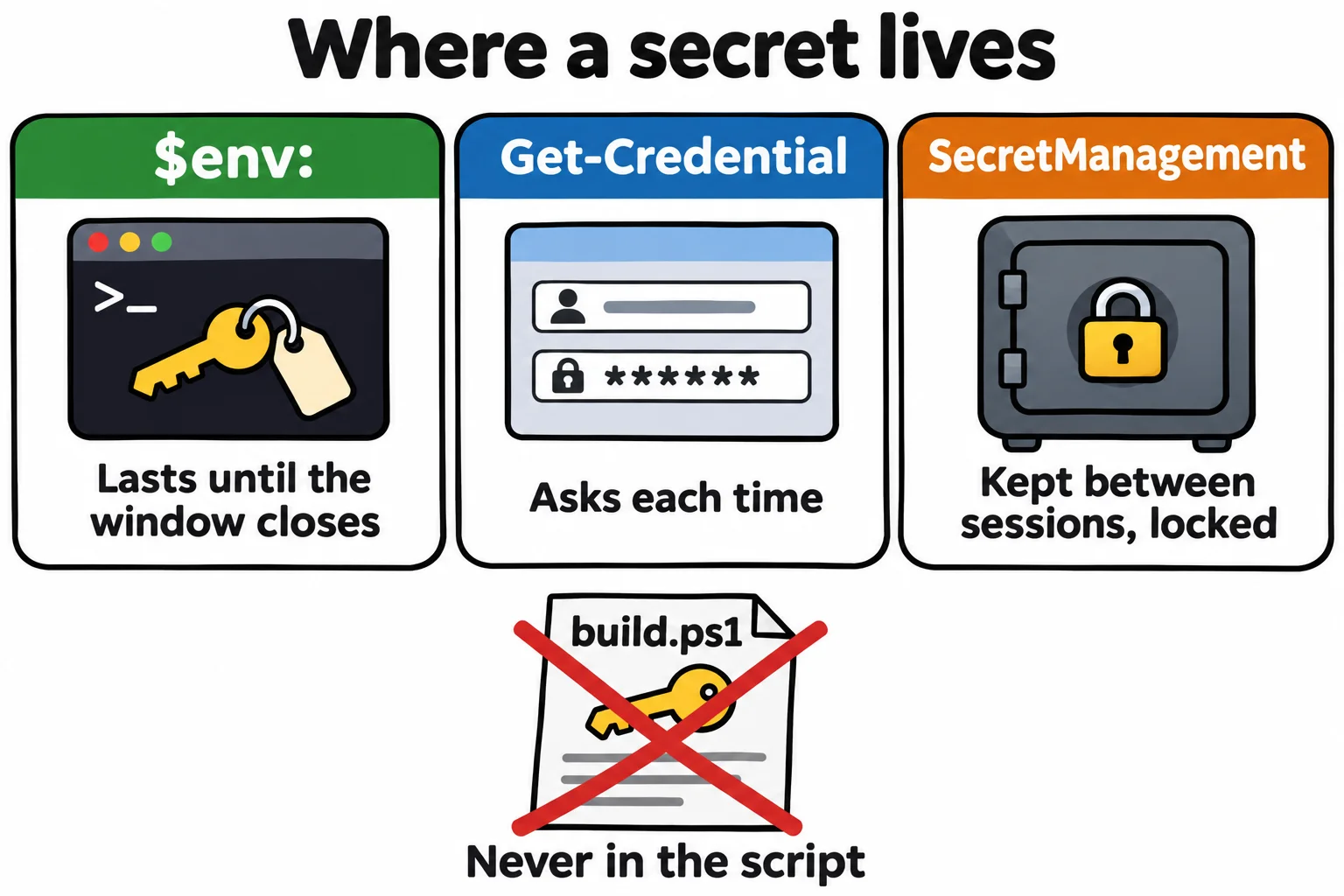
A password or token written into a script travels wherever the script goes, so a script names the secret it needs and reads it from an environment variable, asks for it with Get-Credential, or fetches it from a SecretManagement vault, and stops with a clear message when it isn't there.
Journeyman · PowerShell · Updated
After this lesson you can
- Keep a secret out of a script by reading it from an environment variable, and stop with a clear message when it isn't set
- Ask for a password with Get-Credential, and choose between an environment variable, Get-Credential and a SecretManagement vault
Key takeaways
- A secret written into a script goes wherever the script goes: GitHub, an email, a shared screen. Deleting it later leaves it in Git's history.
- Read a secret from an environment variable such as $env:BIKESHOP_DEPLOY_TOKEN, and throw a message naming the variable when it's empty.
- Get-Credential asks for a user name and password and hands back a PSCredential, whose password is a SecureString that never prints.
- The SecretManagement module keeps secrets in a locked vault on your computer: Set-Secret stores one, and Get-Secret reads it back.
- Never print a secret. Say that it was found, not what it is.
The bike shop's web host lets you upload a new version of the site with a deploy token: a long password made for one program, here build.ps1. The quickest way to use it is to paste it into the script. Then the script goes to GitHub, into an email to the friend who helps with the site, onto your screen during a video call. Programs scan public repositories around the clock for passwords and tokens, and a leaked one can be used within minutes. Deleting the line later doesn't help: Git keeps every earlier version. Developers and administrators follow one rule for secrets, the passwords, tokens and keys that open doors: a script says which secret it needs, never what it is.
What not to write
This is the line that causes the trouble, so don't add it to your build.ps1:
# Don't: everyone who sees this file has the token.
$token = 'maple-7f3a9c-practice'
A secret belongs to a person and a computer, not to the script. Here are three places to keep it, from the simplest.
From the environment: `$env:`
An environment variable (Environment Variables and PATH) is a setting that lasts as long as the window. The script reads the token from one, and says plainly what's missing when it isn't set. Add a publish task to build.ps1: 'publish' to the ValidateSet list, 'publish' { Invoke-PublishTask } to the switch, and this function above the switch. A folder beside the site stands in for the web host:
function Invoke-PublishTask {
    if (-not $env:BIKESHOP_DEPLOY_TOKEN) {
        throw 'Set $env:BIKESHOP_DEPLOY_TOKEN first.'
    }
    Invoke-BuildTask
    $server = Join-Path $HOME 'terminal-practice\web-host'
    New-Item -ItemType Directory -Path $server -Force | Out-Null
    Copy-Item -Path "$dist\*" -Destination $server -Recurse -Force
    Write-Output "Published version $version to $server"
}
A real host would get the token with the upload, in Invoke-RestMethod's -Headers (APIs as Objects: Invoke-RestMethod); here the task only checks it's there. The message is in single quotes, so it shows the variable's name, not its value. Run it before setting anything:
.\build.ps1 -Task publish
Exception: C:\Users\Sam\terminal-practice\bike-shop-site\build.ps1:44
Line |
  44 |          throw 'Set $env:BIKESHOP_DEPLOY_TOKEN first.'
     |          ~~~~~~~~~~~~~~~~~~~~~~~~~~~~~~~~~~~~~~~~~~~~~
     | Set $env:BIKESHOP_DEPLOY_TOKEN first.
Now set it for this window. Typed into a command, the token would show on screen and stay in this window's history (Get-History), so let Read-Host (Asking Questions: Read-Host) ask for it. -MaskInput shows a star for each character, and nothing is printed afterwards. For practice, type any text:
$env:BIKESHOP_DEPLOY_TOKEN = Read-Host -Prompt 'Deploy token' -MaskInput
.\build.ps1 -Task publish
Built 4 files into dist
Published version 1.2.0 to C:\Users\Sam\terminal-practice\web-host
The message says it published, not what the token was: a secret never goes into output, where it would end up in logs and on screens. Build servers such as GitHub Actions hand secrets to scripts the same way, as environment variables, so this script works there unchanged. Windows PowerShell 5.1 has no -MaskInput; there, Read-Host -AsSecureString hides what you type.
Asking each time: `Get-Credential`
Some doors need a user name and a password together: a network share, a server, a site's sign-in. Get-Credential asks for both:
$login = Get-Credential -UserName 'maple-street' -Message 'Sign in to the web host'
$login
UserName                         Password
--------                         --------
maple-street System.Security.SecureString
PowerShell 7 asks in the terminal and shows a star for each character of the password; Windows PowerShell 5.1 opens a small sign-in window. What comes back is a PSCredential: its UserName is plain text, and its Password is a SecureString, kept scrambled in memory, which prints only its type name, never the password. Commands that sign in somewhere take it whole, with -Credential $login: Invoke-RestMethod and Invoke-WebRequest, for example. Nothing is saved: close the window and it's gone, which is right for a password you'd rather type each time.
A safe for secrets: SecretManagement
For a token you use every day, Microsoft's SecretManagement module, with its partner SecretStore, keeps secrets in a vault on your computer, locked with a password of your own. Install them with Install-PSResource (Installing Apps and Modules: winget and the PowerShell Gallery) and register the vault once:
Install-PSResource Microsoft.PowerShell.SecretManagement, Microsoft.PowerShell.SecretStore
Register-SecretVault -Name SecretStore -ModuleName Microsoft.PowerShell.SecretStore -DefaultVault
Store the token. With no value given, Set-Secret asks for it and hides what you type, and the first time the vault is used it asks you to choose the vault's password:
Set-Secret -Name BikeShopDeployToken
From then on, any window fills the environment variable from the vault in one line, and the build script never changes:
$env:BIKESHOP_DEPLOY_TOKEN = Get-Secret -Name BikeShopDeployToken -AsPlainText
.\build.ps1 -Task publish
Get-SecretInfo lists the names of your secrets, never their values. Microsoft calls these modules finished (SecretManagement 1.1.2 and SecretStore 1.0.6): no new features, still fixed for security. Other vaults plug into the same commands, such as Windows' Credential Manager or a password manager's module from the PowerShell Gallery. They work on a Mac and Linux too.
Check yourself
2 questions to try on the lesson page.
So what
A script that names its secrets instead of holding them can be shared, published and run on a build server, and the doors it opens stay locked to everyone else.