CSV Files in Bash, and Their Limits
A CSV file is a table saved as text: while IFS=, read -r reads it a row at a time into named variables, awk -F, picks and totals its columns, and a comma inside a quoted value breaks both.
Journeyman · Unix · Linux · Updated
After this lesson you can
- Read a CSV file row by row with while IFS=, read -r, and pick or total its columns with awk -F,
- Spot a quoted comma that breaks IFS=, read and awk -F, and read such a file with awk --csv
Key takeaways
- A CSV file is a table as plain text: one row per line, commas between the values, and usually a header line first.
- while IFS=, read -r id station bikes docks splits each row at its commas, one value to each name. The last name gets the rest of the line.
- awk -F, is shorter for picking and adding up columns. A read loop suits running commands for each row.
- A value with a comma in it is written in double quotes. IFS=, read and awk -F, split it anyway, often with no error.
- grep for a double quote before you trust a file. GNU awk 5.3 and newer reads quoted values correctly with --csv.
Your city's bike share publishes a list of its stations as a CSV file: each station, how many bikes it has, and how many empty docks. To look at it once, a spreadsheet is the better tool. But the driver who moves bikes around in a van wants a list of the nearly empty stations every morning, and you'd like a script that checks the station by your door. A script has to read the file itself. Data analysts get CSV exports from every kind of system, and IT techs get lists of new staff as CSV files to make accounts from. This lesson reads CSV two ways, and then shows the one kind of line that breaks both.
A station list
These lines make the practice folder and the list. They're safe to run again.
mkdir -p ~/terminal-practice/bike-share && cd ~/terminal-practice/bike-share
printf '%s\n' 'id,station,bikes,docks' '101,Library Plaza,7,15' '102,Riverside Park,0,12' \
  '103,Union Station,12,20' '104,Market Street,2,10' '105,City Hall,5,10' > stations.csv
cat stations.csv
id,station,bikes,docks
101,Library Plaza,7,15
102,Riverside Park,0,12
103,Union Station,12,20
104,Market Street,2,10
105,City Hall,5,10
CSV stands for comma-separated values: a table written as plain text. Each line is a row, commas separate its boxes, and the first line, the header, names the columns. Every spreadsheet can save one, and most apps and websites can export one.
Row by row: IFS=, read
Line by Line: while read set IFS= to nothing, to keep each line whole. Set it to a comma instead, and read splits each line at its commas and hands one value to each name you give it, in order. Here is the van driver's list:
while IFS=, read -r id station bikes docks; do
  [[ $id == id ]] && continue
  if [[ $bikes -lt 3 ]]; then
    echo "Refill $station: $bikes bikes left"
  fi
done < stations.csv
Refill Riverside Park: 0 bikes left
Refill Market Street: 2 bikes left
Read the first line aloud: "while reading a line works, with IFS set to a comma, put its parts into id, station, bikes and docks". IFS=, (read "IFS is comma") changes the separator for this one read only, so the space in Library Plaza stays inside its value. The header line comes through the loop too, with the word id in id, so [[ $id == id ]] && continue skips it (Stopping Early: break, continue and Counters). If a row has more values than names, the last name gets the rest of the line, commas and all.
Columns and totals: awk -F,
For picking columns and adding them up, awk -F, from Columns and Totals: awk does the job in one line. NR > 1 skips the header:
awk -F, 'NR > 1 && $3 < 3 { print $2 }' stations.csv
awk -F, 'NR > 1 { bikes += $3 } END { print bikes " bikes in all" }' stations.csv
Riverside Park
Market Street
26 bikes in all
Which one to choose? When the answer is a column, a count or a total, awk is shorter. When each row needs commands of its own (a folder for each station, a message to each person on a list, a web address to ask for each one, as Talking to the Web: curl does), use the while read loop, where each value sits in a variable with a name.
The quoted comma that breaks both
The bike share opens a station at the harbor and calls it Harbor, Pier 3. A comma in a value would look like the start of a new column, so CSV has a rule: a value with a comma in it goes in double quotes, and the commas inside the quotes belong to the value. These lines copy the list and add the new station at the end:
cp stations.csv stations-new.csv && echo '106,"Harbor, Pier 3",4,8' >> stations-new.csv
tail -n 2 stations-new.csv
105,City Hall,5,10
106,"Harbor, Pier 3",4,8
Neither read nor awk -F, knows the rule. Both split at every comma, quotes or not, so every value after the name moves one place to the right:
tail -n 1 stations-new.csv | while IFS=, read -r id station bikes docks; do
  echo "station=$station bikes=$bikes docks=$docks"
done
awk -F, 'NR > 1 { bikes += $3 } END { print bikes " bikes in all" }' stations-new.csv
station="Harbor bikes= Pier 3" docks=4,8
26 bikes in all
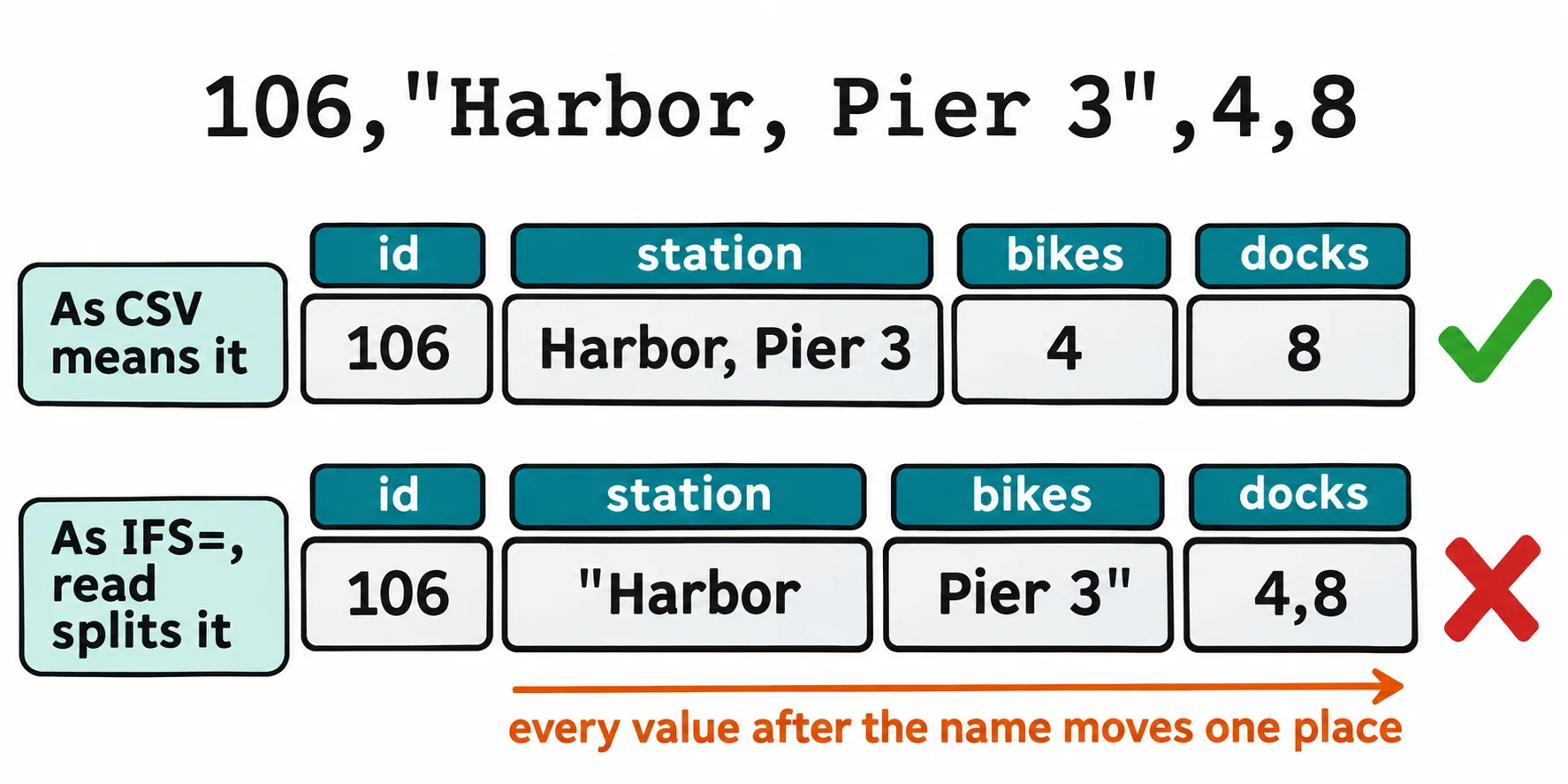
The station became "Harbor and the bikes Pier 3". The total is the worse problem: the harbor's 4 bikes should make it 30, but awk counted Pier 3" as 0 and said nothing. The refill loop from the first section does notice, because -lt needs a number: on that row bash prints an arithmetic syntax error, skips it, and carries on. A wrong answer with no error is the one that slips into a report.
Living with the limit
Look before you trust a file. A double quote anywhere means some value has a comma or a quote in it. grep -c '"' counts the lines with one:
grep -c '"' stations.csv stations-new.csv
stations.csv:0
stations-new.csv:1
No quotes, and read and awk -F, are safe on that file.
GNU awk 5.3 and newer knows the rule. Its --csv option reads a quoted value as one, and takes the quotes off:
awk --csv 'NR > 1 { bikes += $3 } END { print bikes " bikes in all" }' stations-new.csv
awk --csv '$1 == 106 { print $2, "has", $3, "bikes" }' stations-new.csv
30 bikes in all
Harbor, Pier 3 has 4 bikes
Ubuntu's awk is GNU awk 5.3. Not every awk has --csv: mawk, which some Linux systems use, doesn't, so check yours with awk --version first. On a Mac, brew install gawk gives you GNU awk as gawk.
Ask for a better format. Many systems can export tab-separated values instead, where commas are harmless, or JSON, which the next lesson, JSON with jq, reads properly. For big or messy files, a spreadsheet or a language with a real CSV reader (Python has one built in) is the right tool, and choosing it is good judgment, not giving up.
Check yourself
2 questions to try on the lesson page.
So what
Bash reads a simple CSV file in one loop or one awk line, and a quick grep for quotes tells you when a file needs a tool that knows CSV's rules.