Your Own Module
A module is a folder of functions that PowerShell loads by name: the functions go in a .psm1 file, Export-ModuleMember chooses which ones others can call, New-ModuleManifest writes a .psd1 that gives the module a version and a description, and a folder on $env:PSModulePath lets PowerShell find it from anywhere.
Journeyman · PowerShell · Updated
After this lesson you can
- Turn a file of functions into a module with a .psm1 file, Import-Module and Export-ModuleMember
- Give a module a manifest with New-ModuleManifest, and put it where PowerShell finds it by name through $env:PSModulePath
Key takeaways
- A module is a folder with a .psm1 file of functions in it, both named after the module. Import-Module loads it.
- Export-ModuleMember -Function lists the commands others can call. Helpers that aren't listed stay inside the module.
- New-ModuleManifest writes a .psd1 file, the module's label: its version, author, description and the commands it shares.
- $env:PSModulePath lists the folders where PowerShell looks for modules. A module there loads by itself the first time you use one of its commands.
- After you change a module, Import-Module -Force loads the new version.
Your playlist functions work, and now they live in a script you dot-source, or pasted at the bottom of your profile, which grows longer every week. A friend asks for "your playlist commands", and you send a file with a note: "dot-source this, and ignore the helper functions, they're not for you." PowerShell's own commands don't arrive like that. You type Compress-Archive and it's there, with a version number, and nobody tells you about its helpers. They come in modules, and yours can too. IT teams hand out their tools as modules, and so does everyone who publishes to the PowerShell Gallery.
Make a practice folder with a playlist to work on:
New-Item -ItemType Directory -Force -Path "$HOME\terminal-practice\modules\PlaylistTools", "$HOME\terminal-practice\playlists" | Out-Null
Set-Content -Path "$HOME\terminal-practice\playlists\road-trip.csv" -Value 'Title,Artist,Length', 'Golden Hour Drive,The Night Owls,3:45', 'Rain on the Roof,Clara Moss,4:15', 'Long Way Home,Harbor Lights,5:30'
Set-Location "$HOME\terminal-practice\modules"
From a script to a module: a .psm1 file
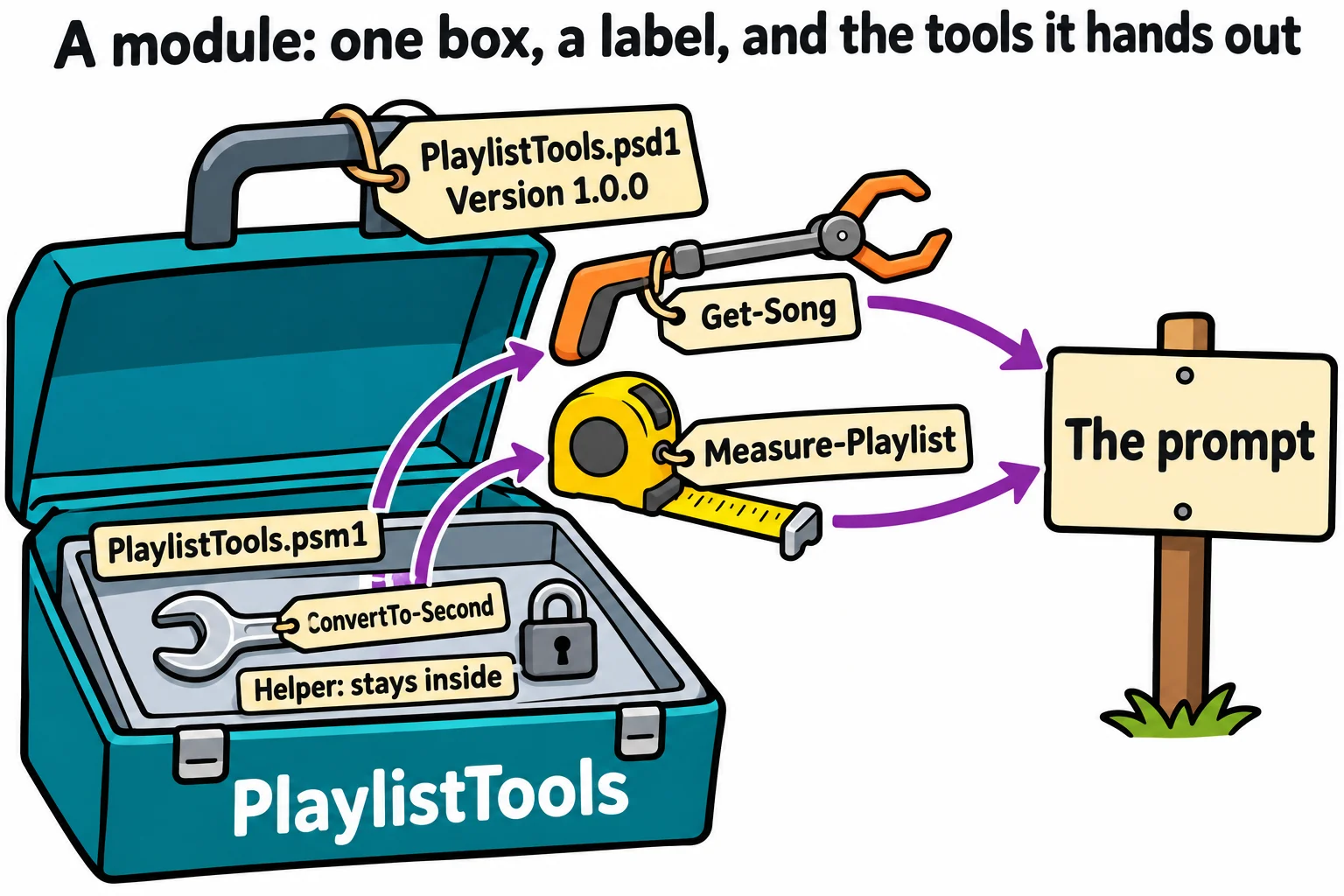
A module is a toolbox with a label on it. In its simplest form it's a folder, and inside it a file of functions with the extension .psm1 (PowerShell script module), both with the module's name. Open the folder in VS Code (code PlaylistTools) and save this as PlaylistTools.psm1. It's a short set of playlist functions, cousins of the ones you wrote in Functions: Naming a Job: this Get-Song has the same name, but it lives in a new file, for a playlist that keeps each song's length as minutes and seconds. Get-Song reads the file into objects, Measure-Playlist adds up the minutes, and ConvertTo-Second is a helper that turns 3:45 into 225 seconds. Your own PlaylistTools.ps1 becomes a module the same way.
# PlaylistTools.psm1: tools for playlists saved as CSV files.

function ConvertTo-Second {
    param([string] $Length)
    $parts = $Length -split ':'
    [int] $parts[0] * 60 + [int] $parts[1]
}

function Get-Song {
    [CmdletBinding()]
    param(
        [Parameter(Mandatory)]
        [string] $Path
    )
    foreach ($row in Import-Csv -Path $Path) {
        [PSCustomObject]@{
            Title   = $row.Title
            Artist  = $row.Artist
            Seconds = ConvertTo-Second -Length $row.Length
        }
    }
}

function Measure-Playlist {
    [CmdletBinding()]
    param(
        [Parameter(Mandatory, ValueFromPipeline)]
        [PSCustomObject] $Song
    )
    begin   { $total = 0; $count = 0 }
    process { $total += $Song.Seconds; $count++ }
    end {
        [PSCustomObject]@{
            Songs   = $count
            Minutes = [math]::Round($total / 60, 1)
        }
    }
}
Import-Module loads it, from the folder's path, and Get-Command -Module lists what it brought:
Import-Module .\PlaylistTools
Get-Command -Module PlaylistTools
Get-Song -Path ..\playlists\road-trip.csv | Measure-Playlist
CommandType     Name                                               Version    Source
-----------     ----                                               -------    ------
Function        ConvertTo-Second                                   0.0        PlaylistTools
Function        Get-Song                                           0.0        PlaylistTools
Function        Measure-Playlist                                   0.0        PlaylistTools

Songs Minutes
----- -------
    3   13.50
Share only what others need: `Export-ModuleMember`
ConvertTo-Second is in the list, so anyone who loads the module can call it, and may start to depend on it. A helper is a tool you keep inside the box. Add this line at the end of PlaylistTools.psm1, and save:
Export-ModuleMember -Function Get-Song, Measure-Playlist
To export a command is to hand it out. A module that never says which commands to export hands out all its functions; once it does, only those listed leave the box. PowerShell keeps the old version loaded until you ask for the new one, so load it again with -Force:
Import-Module .\PlaylistTools -Force
Get-Command -Module PlaylistTools
ConvertTo-Second -Length 3:45
CommandType     Name                                               Version    Source
-----------     ----                                               -------    ------
Function        Get-Song                                           0.0        PlaylistTools
Function        Measure-Playlist                                   0.0        PlaylistTools

ConvertTo-Second: The term 'ConvertTo-Second' is not recognized as a name of a cmdlet, function, script file, or executable program.
Check the spelling of the name, or if a path was included, verify that the path is correct and try again.
Get-Song still calls ConvertTo-Second from inside the module. Only the prompt can't see it.
A label for the box: the manifest
The Version column says 0.0: the module has no label yet. A module manifest is a .psd1 file beside the .psm1 that says what the module is: its version, who wrote it, what it does, and which file holds its commands. New-ModuleManifest writes one, and Test-ModuleManifest checks it:
New-ModuleManifest -Path .\PlaylistTools\PlaylistTools.psd1 -RootModule PlaylistTools.psm1 -ModuleVersion 1.0.0 -Author 'Sam' -Description 'Tools for playlists saved as CSV files' -FunctionsToExport Get-Song, Measure-Playlist
Test-ModuleManifest -Path .\PlaylistTools\PlaylistTools.psd1
ModuleType Version    PreRelease Name                                ExportedCommands
---------- -------    ---------- ----                                ----------------
Script     1.0.0                 PlaylistTools                       {Get-Song, Measure-Playlist}
Open the .psd1: it's a long list, mostly comments for settings you don't need yet. The lines that matter now:
RootModule = 'PlaylistTools.psm1'
ModuleVersion = '1.0.0'
Author = 'Sam'
Description = 'Tools for playlists saved as CSV files'
FunctionsToExport = 'Get-Song', 'Measure-Playlist'
RootModule names the file with the commands; without it, the module loads nothing. FunctionsToExport is the manifest's list of what to hand out. A command leaves the box only when it's on both lists, this one and Export-ModuleMember's, so a new function has to be added to both. When you change the module, raise ModuleVersion (1.0.1 for a fix, 1.1.0 for a new command), so people can tell which copy they have.
Your recipe box from Exercise: A Recipe Box Module becomes a module the same way: a RecipeBox folder, RecipeBox.psm1 and a manifest.
Where PowerShell looks: `$env:PSModulePath`
You never typed Import-Module for Compress-Archive. $env:PSModulePath is the list of folders where PowerShell looks for modules, the way PATH lists the folders for programs:
$env:PSModulePath -split ';'
C:\Users\Sam\Documents\PowerShell\Modules
C:\Program Files\PowerShell\Modules
c:\program files\powershell\7\Modules
C:\Program Files\WindowsPowerShell\Modules
C:\WINDOWS\system32\WindowsPowerShell\v1.0\Modules
The first folder is yours, for modules you install for your account only. (If your Documents folder is kept in OneDrive, that path is inside OneDrive.) A module in one of these folders loads by itself the first time you use one of its commands. Try it with the practice folder, added to the front of the list for this window only:
$env:PSModulePath = "$HOME\terminal-practice\modules;" + $env:PSModulePath
Remove-Module PlaylistTools
Set-Location $HOME
Get-Song -Path .\terminal-practice\playlists\road-trip.csv | Measure-Playlist
Songs Minutes
----- -------
    3   13.50
No Import-Module, from your home folder: PowerShell found Get-Song in PlaylistTools on its own. To keep the module for good, copy its folder into your own modules folder, the first one in the list; a new window then finds it too. These lines make that folder if it isn't there yet, find your Documents folder wherever Windows keeps it, and are safe to run again after each change:
$myModules = Join-Path ([Environment]::GetFolderPath('MyDocuments')) 'PowerShell\Modules'
New-Item -ItemType Directory -Force -Path $myModules | Out-Null
Copy-Item -Path "$HOME\terminal-practice\modules\PlaylistTools" -Destination $myModules -Recurse -Force
On a Mac or Linux, your modules folder is ~/.local/share/powershell/Modules, and $env:PSModulePath separates its folders with : instead of ;. Windows PowerShell 5.1 looks in Documents\WindowsPowerShell\Modules instead.
Check yourself
2 questions to try on the lesson page.
So what
A module turns a pile of functions into a tool with a name, a version and a clear front door, one that loads itself wherever you are and that you can hand to anyone.