Where Output Goes: `Write-Output`, `Write-Host` and Friends
Write-Output sends a script's results down the pipeline, where the next command, a variable or a > file receives them, while Write-Host, Write-Warning, Write-Verbose and Write-Error send words for people to the screen, each on a channel of its own that > and the pipeline leave alone.
Journeyman · PowerShell · Updated
After this lesson you can
- Choose between Write-Output for results the next command receives and Write-Host for words only for the screen
- Report warnings, details and failures from a script with Write-Warning, Write-Verbose and Write-Error
Key takeaways
- Write-Output sends results down the pipeline: the next command, a variable or a > file gets them.
- Write-Host writes words for the person watching, in color if you like. The pipeline and > never get them.
- Write-Warning prints WARNING: for something worth a look. Write-Verbose prints details only when you run the script with -Verbose.
- Write-Error reports a failure in red, on the error channel, so it never ends up in your results.
- [CmdletBinding()] above param() gives your script -Verbose and the other common parameters every cmdlet has.
You'd like a list of every receipt your mover moved, so you run .\move-receipts.ps1 > moved.txt. But the file also gets the chatty lines meant for you, Moved in front of every name, and, on a bad day, the error message too, filed as if it were a receipt. A script talks to two audiences: the person watching the screen, and whatever comes next, a file, a variable or another command. Tools that IT teams and developers share keep the two apart, and PowerShell gives each kind of message a channel of its own.
Results, and words for the screen
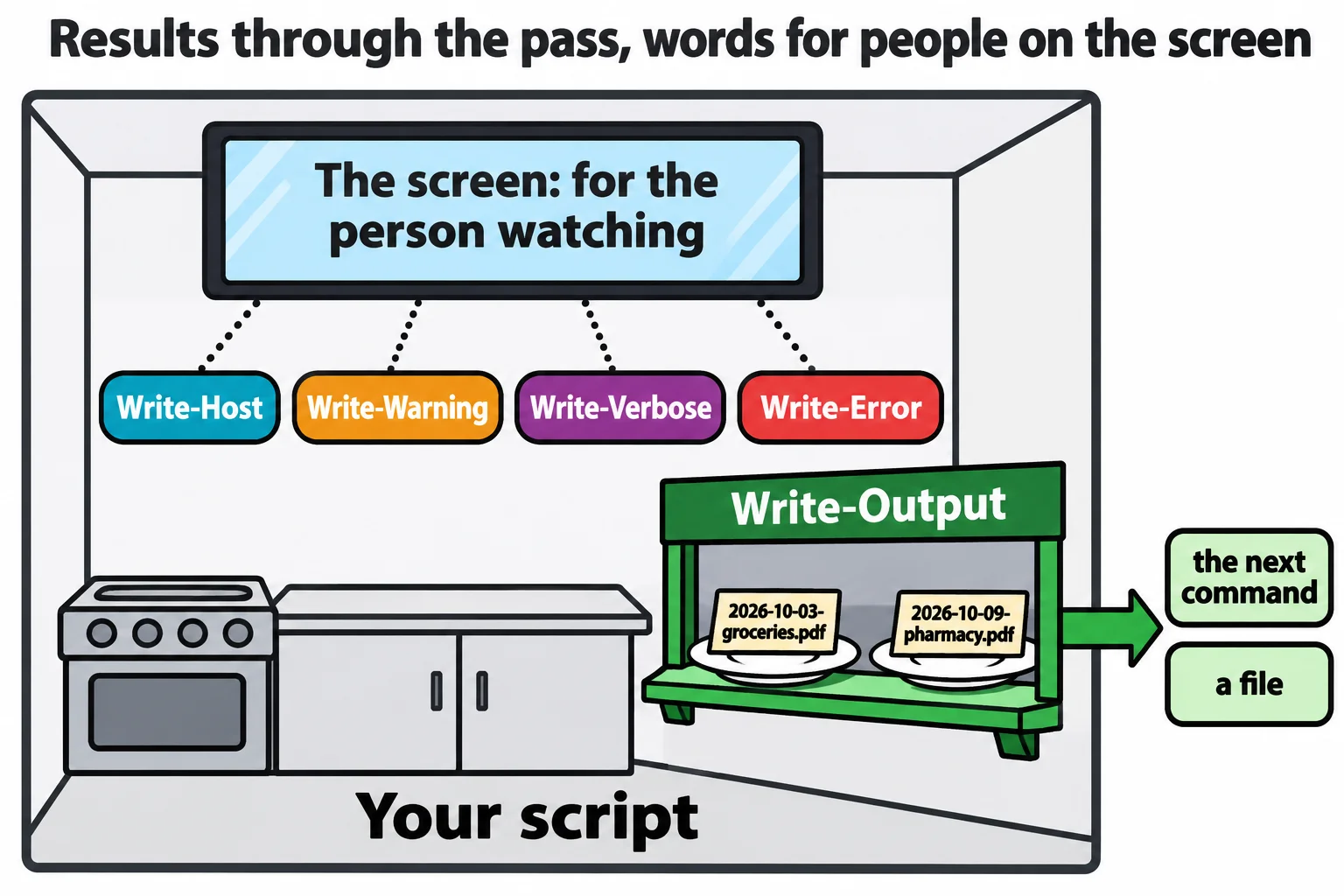
Think of a restaurant kitchen. Plates go through the pass to the dining room; "two minutes on table four!" is for the kitchen only. In a script, Write-Output sends plates: results that go down the pipeline, to the next command, a variable or a > file. Write-Host is for the kitchen: words that only ever reach the screen, in color if you like.
Here is the mover with its messages sorted out. Each receipt it moves is a result, so it outputs only the name. Everything else is for people:
# move-receipts.ps1: moves every receipt in the inbox to the backup drive
[CmdletBinding()]
param($Destination = "$HOME\terminal-practice\mover\backup-drive")
$inbox = "$HOME\terminal-practice\mover\inbox"
Write-Host "Moving receipts to $Destination" -ForegroundColor Cyan
try {
    foreach ($file in Get-ChildItem $inbox -File) {
        $to = "$Destination\$($file.Name)"
        if (Test-Path $to) {
            Write-Warning "$($file.Name) is already there. Left it in the inbox."
            continue
        }
        Write-Verbose "Copying $($file.Name) to $Destination"
        Copy-Item -Path $file.FullName -Destination $to -ErrorAction Stop
        Remove-Item -Path $file.FullName
        Write-Output $file.Name
    }
}
catch {
    Write-Error "Couldn't copy $($file.Name): $($_.Exception.Message) It is still in the inbox."
    exit 1
}
The Test-Path check is new, and it's about never losing a file: Copy-Item replaces a file of the same name without asking, which would wipe out the copy already on the backup drive.
To try it, run the practice-folder lines from Reading Errors, and -ErrorAction, then empty the pretend backup drive and put last week's gas receipt on it:
Remove-Item backup-drive\*
Copy-Item inbox\2026-10-05-gas.pdf -Destination backup-drive
Now send the results into a file, and read it:
.\move-receipts.ps1 > moved.txt
Get-Content moved.txt
Moving receipts to C:\Users\Sam\terminal-practice\mover\backup-drive
WARNING: 2026-10-05-gas.pdf is already there. Left it in the inbox.
2026-10-03-groceries.pdf
2026-10-09-pharmacy.pdf
The first two lines appeared on the screen while the script ran: > didn't take them. The file holds only the results, the two receipts that moved. A pipeline works the same way: .\move-receipts.ps1 | Measure-Object counts 2.
Warnings and details
Write-Warning is for "done, but have a look": it prints in yellow, starting WARNING:. Write-Verbose is for details you want only sometimes: it prints nothing until you run the script with -Verbose. That parameter comes from the line [CmdletBinding()] above param(), which gives your script the common parameters every cmdlet has, -Verbose and -ErrorAction among them. Put the receipts back as before, then:
.\move-receipts.ps1 -Verbose
Moving receipts to C:\Users\Sam\terminal-practice\mover\backup-drive
VERBOSE: Copying 2026-10-03-groceries.pdf to C:\Users\Sam\terminal-practice\mover\backup-drive
2026-10-03-groceries.pdf
WARNING: 2026-10-05-gas.pdf is already there. Left it in the inbox.
VERBOSE: Copying 2026-10-09-pharmacy.pdf to C:\Users\Sam\terminal-practice\mover\backup-drive
2026-10-09-pharmacy.pdf
Your own errors: `Write-Error`
In try, catch and finally, the message about a failed copy went out with Write-Output, so > moved.txt would have filed it as a receipt. A failure belongs on the error channel: Write-Error prints it in red, adds it to $Error, and keeps it out of your results, like any cmdlet's error. Run it with the misspelled folder:
.\move-receipts.ps1 -Destination "$HOME\terminal-practice\mover\backup-drvie"
$LASTEXITCODE
Moving receipts to C:\Users\Sam\terminal-practice\mover\backup-drvie
Write-Error: Couldn't copy 2026-10-05-gas.pdf: Could not find a part of the path 'C:\Users\Sam\terminal-practice\mover\backup-drvie\2026-10-05-gas.pdf'. It is still in the inbox.
1
The gas receipt was the only one left in the inbox, so it's the one the message names. Before the colon, PowerShell names the command that reported the error: here, Write-Error itself.
Which one?
PowerShell calls these channels streams. You'll use these five:
| Command | Use it for | Where it goes |
|---|---|---|
Write-Output |
Results: things the next command, a variable or a file should get | The pipeline |
Write-Host |
Words for the person watching, such as a heading, in color if you like | The screen only |
Write-Warning |
It worked, but something is worth a look | The screen, as WARNING: |
Write-Verbose |
Details, shown only with -Verbose |
The screen, as VERBOSE: |
Write-Error |
It failed | The screen in red, and $Error |
A quick test: if a file or the next command should get it, Write-Output. If only a person should read it, one of the others. All five work the same in Windows PowerShell 5.1 and on a Mac or Linux.
Check yourself
2 questions to try on the lesson page.
So what
Results down the pipeline, words for people on the screen: keep them apart, and anyone can save, count or pipe your script's output and still read every warning.